CH
SCAN
PGM
1 2 3
□
DODD
MANUAL
CLEAR
4 5 6
DODOO
UOUT
DELA
Y 7 8 9
DODD
□
KEYLOCK
LIGHT
o
~
ENTER
l
□
)D
DD
D
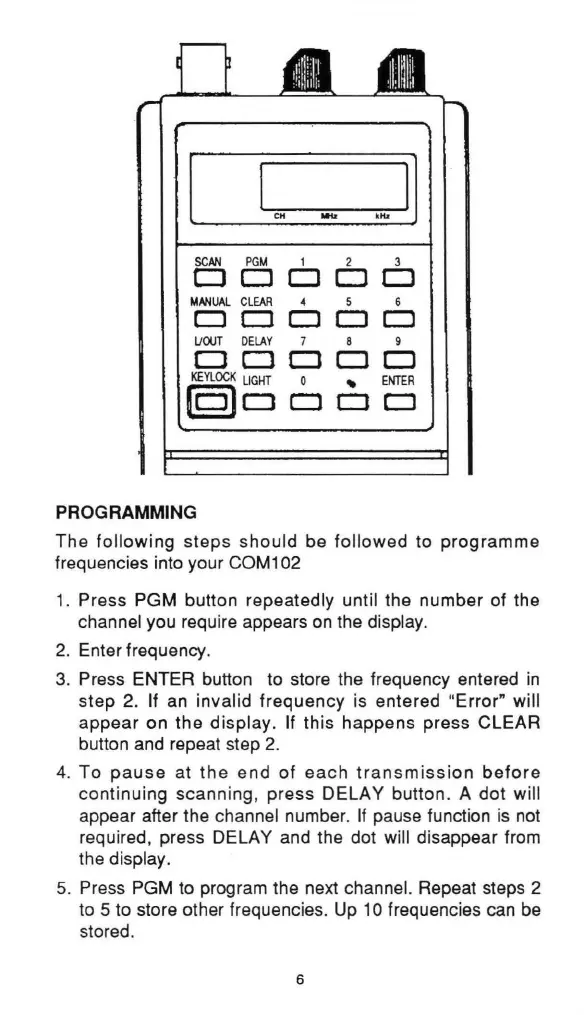
PROGRAMMING
The
following
steps should be followed to programme
frequencies into your COM102
1.
Press PGM button repeatedly until the number of the
channel you require appears
on
the display.
2. Enter frequency.
3.
Press ENTER button to store the frequency entered
in
step 2. If
an
invalid frequency is entered "Error" will
appear on
the
display. If this happens press CLEAR
button and repeat step
2.
4.
To
pause
at
the
end
of
each
transmission
before
continuing scanning, press DELAY button. A dot will
appear after the channel number.
If
pause function
is
not
required, press DELAY and the dot will disappear from
the display.
5. Press PGM to program the next channel. Repeat steps 2
to 5 to store other frequencies. Up
10
frequencies can be
stored.
6


 To Next Page