INS_CNFE3TX2CXMS(U,E)_REV– Rev. 7.11.18 PAGE 11
QUICK START GUIDE CNFE3TX2CXMS(U,E)
TECH SUPPORT: 1.888.678.9427
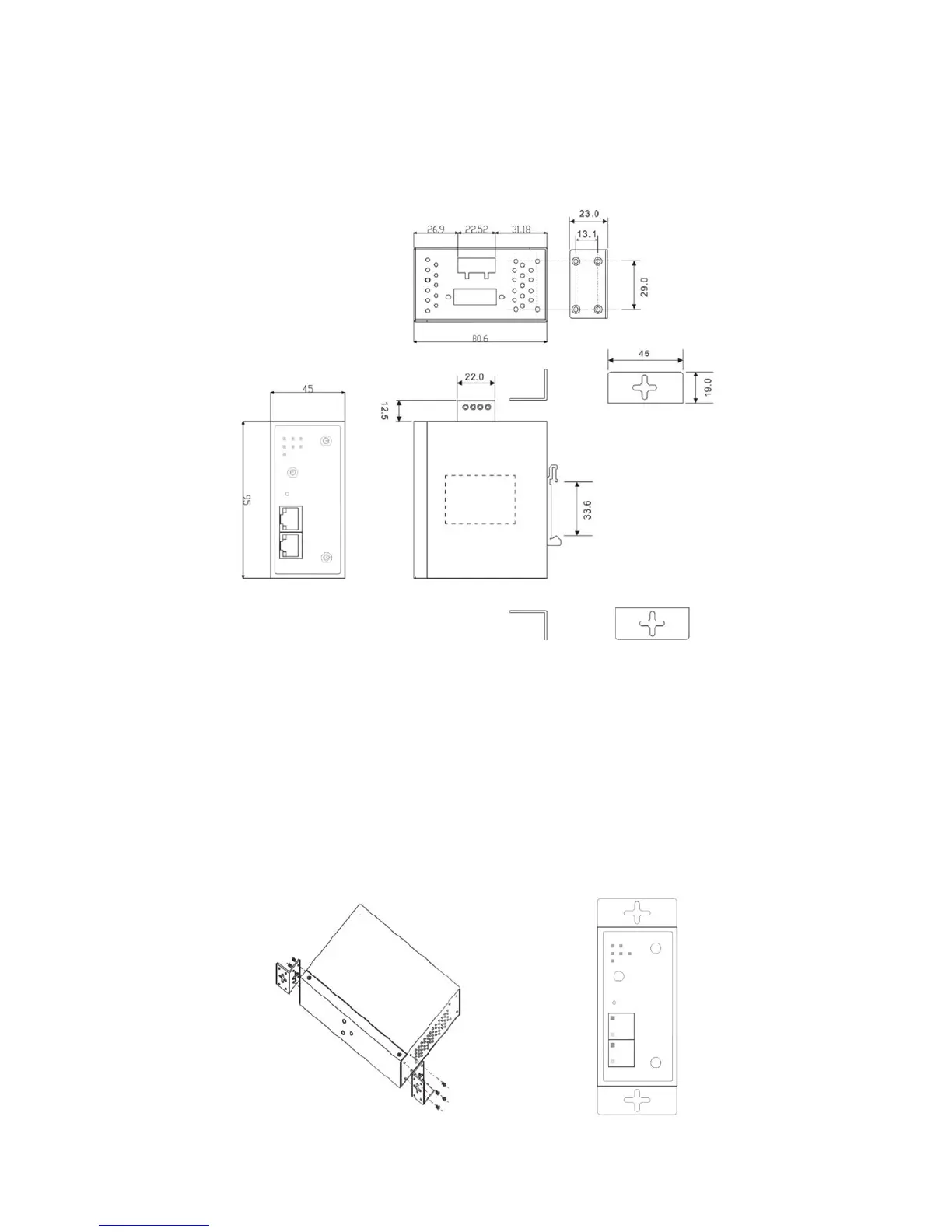
3.2 Wall Mounting
Besides Din-rail, the router can be fixed to the wall via a wall mount panel, which can be found in
the package.
Wall-Mount Kit Drawing (Measurements in mm)
To mount the router onto the wall, follow the steps:
Step 1: Screw the two pieces of wall-mount kits onto both ends of the rear panel of the router. A
total of eight screws are required, as shown below.
Step 2: Use the router, with wall mount plates attached, as a guide to mark the correct locations of
the four screws.
Step 3: Insert a screw head through the large part of the keyhole-shaped aperture on the plate,
and then slide the router downwards. Tighten the screw for added stability.


 To Next Page