INS_CNFE3TX2CXMS(U,E)_REV– Rev. 7.11.18 PAGE 6
QUICK START GUIDE CNFE3TX2CXMS(U,E)
TECH SUPPORT: 1.888.678.9427
Hardware Overview
2.1 Front Panel
2.1.1 Ports and Connectors
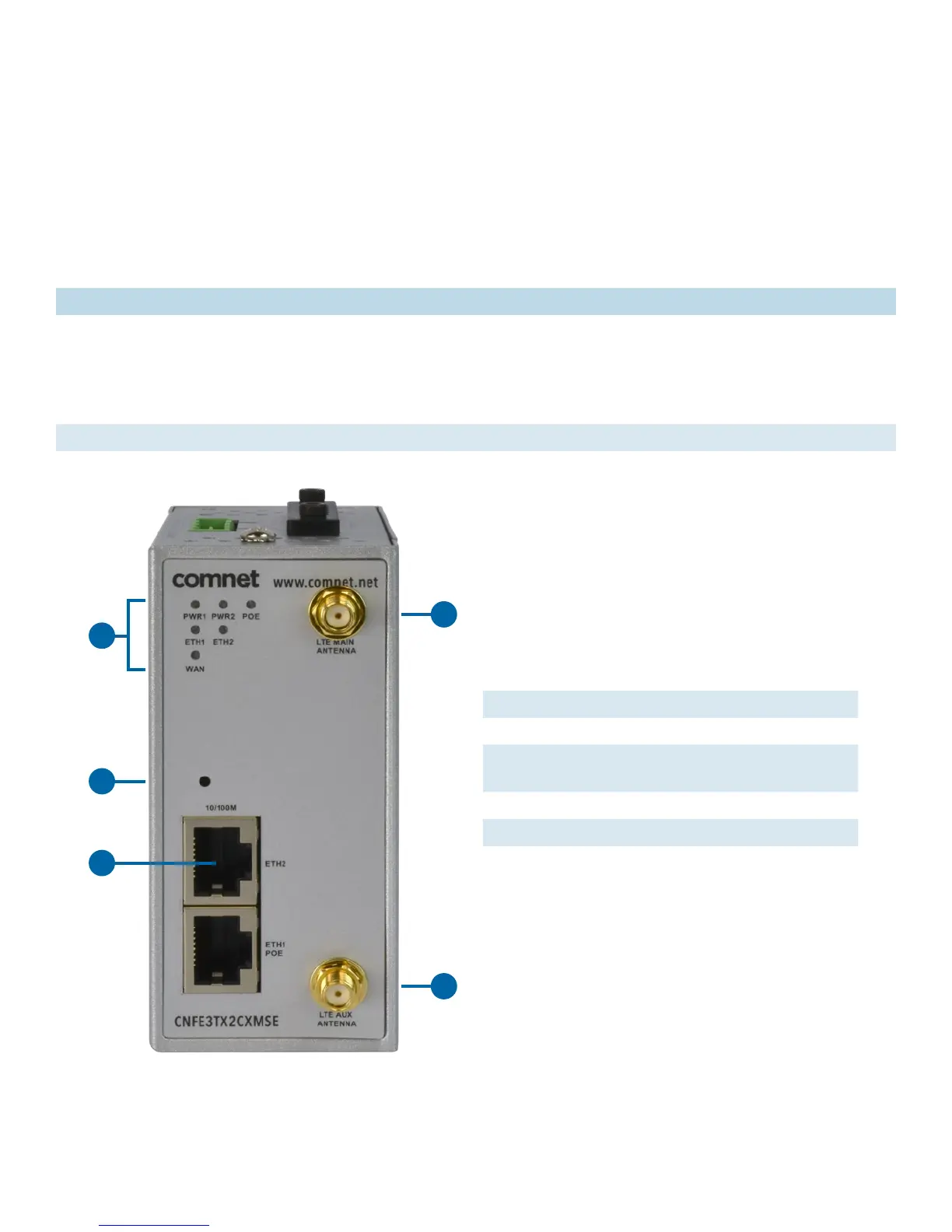
The Router is equipped with the following ports and features on the front panel.
Port Description
10/100Base-T(X)
Fast Ethernet Ports
10/100Base-T(X) RJ-45 fast Ethernet ports supporting auto-negotiation.
Default settings includes
Speed: auto
Duplex: auto
ETH1 (LAN port) is IEEE802.3af PoE compliant PD
ANT. 2 × SMA connector for cellular antenna.
1 Indicating LEDs (see 2.2 Front Panel LEDs)
2 Reset
3 Ethernet Ports (ETH1 as LAN port; ETH2 as
WAN port)
4 LTE main antenna connector
5 LTE auxilliary antenna connector
1
2
4
5
3


 To Next Page