INS_CNFE3TX2CXMS(U,E)_REV– Rev. 7.11.18 PAGE 21
QUICK START GUIDE CNFE3TX2CXMS(U,E)
TECH SUPPORT: 1.888.678.9427
Label Description
Auto Connect Check to start connections when the router boots up
Reconnect on Failure Check to allow for reconnection when links fail
Two LAN Ports When connecting to a WAN network through wireless
Connections such as a 3G SIM card, you can turn the idling WAN port to act as a
LAN port by checking the box.
Device Status Shows the status of the device
Operations Click Connect to start modem/3G connections or Disconnect to shut down
connections
Link Status Shows the status of connections
Modem Status Shows information about the modem
LAN
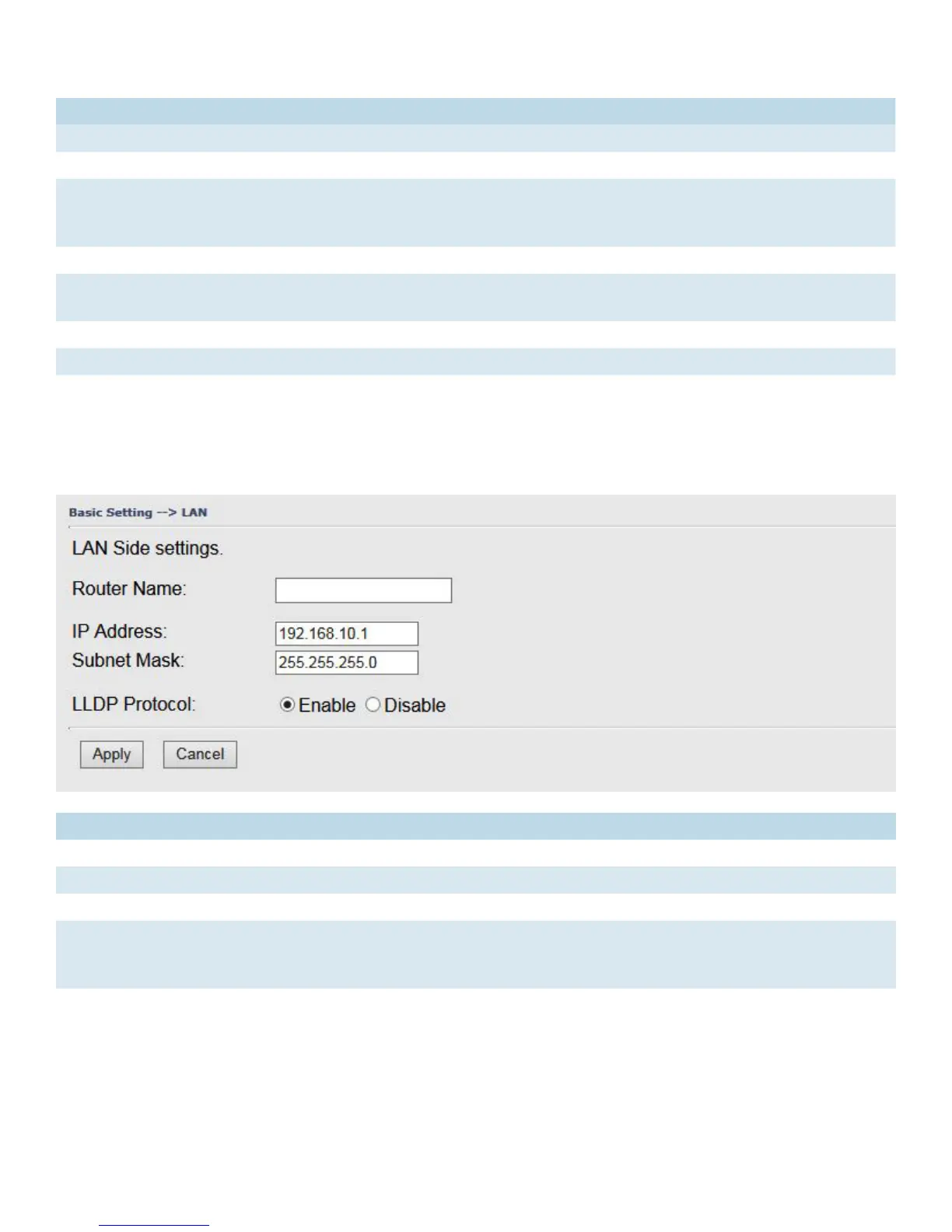
This page allows you to configure the IP settings of the LAN for the router. The LAN IP address is
private to your internal network and is not visible to Internet.
Label Description
Router Name Enter the name of your router
IP Address The IP address of the LAN. The default value is 192.168.10.1
Subnet Mask The subnet mask of the LAN. The default value is 255.255.255.0
LLDP Protocol LLDP is a vendor-neutral protocol used by network devices for advertising their identity,
capabilities, and neighbors on a LAN.
You can enable or disable LLDP protocol.


 To Next Page