EasyManua.ls Logo

Comnet Copper Line CLFE1EOC - User Manual

Comnet Copper Line CLFE1EOC
12 pages
Print Icon
To Next Page IconTo Next Page
Loading...
INS_CLFE(X)EO(C,U)_REV– 10/27/11 PAGE 1TECH SUPPORT: 1.888.678.9427
INSTALLATION AND OPERATION MANUAL
CLFE(X)EO(C,U) Series
ETHERNET OVER COPPER EXTENDER
WITH PASS-THROUGH POE TO 15 WATTS
The ComNet
CopperLine® Ethernet over copper line supports up to sixteen
channels of 10/100Mbps Ethernet with Pass-through PoE over twisted pair cable
(CAT-5, UTP), or over coaxial cable. The single channel units may be powered by a
PoE switch or the included power supply. Four, eight, and sixteen channel units
operate from local power. These units provide the ultimate flexibility for extending
a powered device (PD) over long distance copper. DIP switches are provided for user-
selection of local or remote, 10 or 100Mbps, and 1 pair or 4 pair (UTP) settings.
Bi-color (Red/Green) LED indicators are provided for rapidly ascertaining equipment
operating status. Table 2 on Page 9 describes the LED indicators for each light on
the unit.
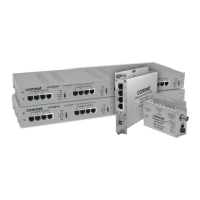
The CLFE8EO(C,U) and CLFE16EO(C,U) are 1RU rack mountable units. The
CLFE4EO(C,U) units are interchangeable between stand-alone or card mount
configurations, or may be DIN-rail mounted by the addition of ComNet model
DINBKT1 or DINBKT4 adaptor plate. The CLFE1EO(C,U) units are stand-alone, or
may be DIN-rail mounted by the addition of ComNet model DINBKT4 adaptor. See
Figures A through C on Page 11 for mounting instructions.
This manual serves the following
ComNet Model Numbers:
CLFE1EOC
CLFE4EOC
CLFE8EOC
CLFE16EOC
CLFE1EOU
CLFE4EOU
CLFE8EOU
CLFE16EOU
Question and Answer IconNeed help?

Do you have a question about the Comnet Copper Line CLFE1EOC and is the answer not in the manual?

Summary

ComNet CopperLine Extender Overview

Key Features and Technology

Details Ethernet over copper capabilities, PoE, and user settings.

Application Diagrams and Modes

Installation Instructions and Power

Setting DIP Switches and Controls

Guides on setting 10/100, Wire Pair, and Local/Remote switches.

Power Connection Requirements

Details power requirements for different unit types and scenarios.

Verifying Functionality with LEDs

Explains how to use indicator LEDs to confirm operation.

Application Notes and Troubleshooting Guide

Application Notes

Provides important considerations for implementing ComNet extenders.

Approximate Maximum Extended Distances

Table showing maximum transmission distances based on media and data rate.

Troubleshooting Common Issues

Lists common problems and steps to resolve them.

Installation Considerations and Safeguards

Important Safety Safeguards

Covers elevated ambient temperature and reduced air flow concerns.

Summary

ComNet CopperLine Extender Overview

Key Features and Technology

Details Ethernet over copper capabilities, PoE, and user settings.

Application Diagrams and Modes

Installation Instructions and Power

Setting DIP Switches and Controls

Guides on setting 10/100, Wire Pair, and Local/Remote switches.

Power Connection Requirements

Details power requirements for different unit types and scenarios.

Verifying Functionality with LEDs

Explains how to use indicator LEDs to confirm operation.

Application Notes and Troubleshooting Guide

Application Notes

Provides important considerations for implementing ComNet extenders.

Approximate Maximum Extended Distances

Table showing maximum transmission distances based on media and data rate.

Troubleshooting Common Issues

Lists common problems and steps to resolve them.

Installation Considerations and Safeguards

Important Safety Safeguards

Covers elevated ambient temperature and reduced air flow concerns.

Comnet Copper Line CLFE1EOC Specifications

General IconGeneral
TypeEthernet over Coax Extender
Operating Temperature-40°C to +75°C
Standards ComplianceIEEE 802.3, IEEE 802.3u
Data RateUp to 100 Mbps
ConnectorsRJ45
Interface10/100Base-TX
Power Supply12 VDC @ 0.5 A
HumidityUp to 95% (Non-Condensing)

Related product manuals