EasyManua.ls Logo

Comnet FDX60M1A-M - User Manual

Comnet FDX60M1A-M
9 pages
Print Icon
To Next Page IconTo Next Page
Loading...
INS_FDX60_REV–
04/23/10
PAGE 1
INSTALLATION AND OPERATION MANUAL
FDX60(M)(S)(-M)
SINGLE OR DUAL
RS232/RS422/RS485(2/4W)
DATA TRANSCEIVER
The ComNet™ FDX60(M)(S)(-M) data transceivers provide point-to-point
transmission of simplex or duplex EIA RS232/RS422/RS485 (2W/4W) data
signals over one or two optical fibers. The transceivers are transparent to data
encoding allowing for broad-range compatibility. Models within this series are
available for use with multimode or single mode optical fiber.
Each transceiver incorporates a bi-color (Red/Green) indicating LED for
monitoring proper system operation. See Figure 8 on Page 6 for LED Indicator
explanations.
The FDX60(M)(S)(-M) has a built-in fiber link test feature that allows for the
testing of the fiber. See Figure 13 on Page 8 for an explanation of the Loop
Back Test Mode.
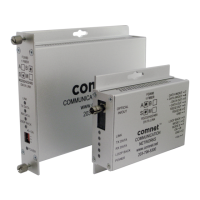
The FDX60(M)(S) may be directly plugged into the ComNet Rack (Part C1) or
they can operate as standalone modules. The FDX60(M)(S)-M has a small
footprint and is designed for surface mounting. See Figures A and B on
Page 9 for mounting instructions.
See Figures 1 – 13 for complete installation details.
Question and Answer IconNeed help?

Do you have a question about the Comnet FDX60M1A-M and is the answer not in the manual?

Summary

FDX60 Transceiver Overview and Features

FDX60 1 Fiber Transceiver Illustrations

Diagrams showing the front and rear panels of the FDX60 1 Fiber Transceiver.

FDX60 2 Fiber Transceiver Illustrations

Diagrams showing the front and rear panels of the FDX60 2 Fiber Transceiver.

FDX60-M 1 Fiber Transceiver Illustrations

Diagrams showing the front and rear panels of the FDX60-M 1 Fiber Transceiver.

FDX60-M 2 Fiber Transceiver Illustrations

Diagrams showing the front and rear panels of the FDX60-M 2 Fiber Transceiver.

FDX60 Transceiver Operation and Configuration

LED Indicators

Explanation of the meaning of different LED states for Link, Data, and Power.

Switch Positions

Details on how to set the data type and Loop Back Test Mode using switches.

Data Connections

Diagrams illustrating data connections for various protocols like RS232, RS422, and RS485.

Data Settings

Configuration mapping for different data types and protocols between customer equipment and transceiver.

Loop Back Test Mode

Instructions and expected LED behavior for performing a fiber link loop back test.

Mechanical Installation Instructions

Summary

FDX60 Transceiver Overview and Features

FDX60 1 Fiber Transceiver Illustrations

Diagrams showing the front and rear panels of the FDX60 1 Fiber Transceiver.

FDX60 2 Fiber Transceiver Illustrations

Diagrams showing the front and rear panels of the FDX60 2 Fiber Transceiver.

FDX60-M 1 Fiber Transceiver Illustrations

Diagrams showing the front and rear panels of the FDX60-M 1 Fiber Transceiver.

FDX60-M 2 Fiber Transceiver Illustrations

Diagrams showing the front and rear panels of the FDX60-M 2 Fiber Transceiver.

FDX60 Transceiver Operation and Configuration

LED Indicators

Explanation of the meaning of different LED states for Link, Data, and Power.

Switch Positions

Details on how to set the data type and Loop Back Test Mode using switches.

Data Connections

Diagrams illustrating data connections for various protocols like RS232, RS422, and RS485.

Data Settings

Configuration mapping for different data types and protocols between customer equipment and transceiver.

Loop Back Test Mode

Instructions and expected LED behavior for performing a fiber link loop back test.

Mechanical Installation Instructions

Overview

The ComNet™ FDX60(M)(S)(-M) is a versatile data transceiver designed for reliable point-to-point transmission of simplex or duplex EIA RS232/RS422/RS485 (2W/4W) data signals over optical fiber. This device is available in both single and dual fiber configurations, accommodating either multimode or single mode optical fiber, depending on the specific model. Its transparency to data encoding ensures broad compatibility with various data systems.

Function Description:

The primary function of the FDX60(M)(S)(-M) is to convert electrical data signals (RS232, RS422, or RS485) into optical signals for transmission over fiber optic cables, and vice-versa. This conversion allows for extended data transmission distances, immunity to electromagnetic interference, and enhanced security compared to traditional copper cabling. The device supports both simplex (one-way) and duplex (two-way) data communication, making it suitable for a wide range of applications.

Important Technical Specifications:

  • Data Interface: RS232, RS422, RS485 (2-Wire, 4-Wire)
  • Fiber Type: Multimode or Single Mode optical fiber
  • Fiber Configuration: Single or Dual fiber options
  • Power Supply: 9-12 VDC @ 1A (Listed Class 2 or LPS power supply)
  • Mounting Options:
    • Standard size modules: Designed for direct plug-in into ComNet Rack (Part C1) or standalone operation.
    • Small size modules (FDX60(M)(S)-M): Designed for surface mounting.
  • Dimensions (Standard Module - Figure A):
    • Length: 5.906 inches (150.00 mm)
    • Width: 2.953 inches (75.00 mm)
    • Height: 1.083 inches (27.51 mm)
    • Front Panel Width: 0.156 inches (3.96 mm)
    • Rear Connector Panel Depth: 0.313 inches (7.95 mm)
  • Dimensions (Small Size Surface Mount Module - Figure B):
    • Length: 3.937 inches (100.00 mm)
    • Width: 1.969 inches (50.00 mm)
    • Height: 1.062 inches (26.97 mm)
    • Front Panel Width: 0.156 inches (3.96 mm)
    • Rear Connector Panel Depth: 0.313 inches (7.95 mm)

Usage Features:

The FDX60(M)(S)(-M) offers several features that enhance its usability and adaptability:

  • Data Type Selection: The front panel (or rear panel for small modules) features switches that allow users to select the appropriate data type (RS232, RS422, Bi-Phase, Manchester, RS485 2-Wire, or RS485 4-Wire). This flexibility ensures compatibility with various data communication protocols.
  • Rack Mount Compatibility: Standard size modules are designed to plug directly into ComNet Rack (Part C1) card cages. This allows for centralized power and management in larger installations. When rack-mounting, the electrical connector on the rear panel should be removed.
  • Standalone Operation: Both standard and small size modules can operate as standalone units, providing flexibility for smaller deployments or remote locations.
  • Surface Mounting (FDX60(M)(S)-M): The small footprint of the FDX60(M)(S)-M models makes them ideal for surface mounting, offering discreet installation options.
  • Hot-Swappable (Rack Mount): While the units are hot-swappable in a rack, ComNet recommends turning off the power supply and disconnecting it from any source before installation to ensure safety.
  • Installation in Card Cages: When installing in a ComNet Rack, ensure the card is oriented correctly and slide it into the card guides until the edge connector seats in the corresponding slot. Thumb screws are provided to secure the card to the front of the rack. Care should be taken not to press on the LEDs during installation.

Maintenance Features:

The FDX60(M)(S)(-M) incorporates diagnostic features to aid in monitoring and troubleshooting:

  • LED Indicators (Figure 9):
    • LINK (Green/Red/Off):
      • Green: Unit In Sync, indicating correct fiber link connections.
      • Red: Unit Not In Sync, indicating a fiber link issue (Head End or Far End).
      • Off: No Optical Link or Test Mode is Off.
    • DATA (TX/RX) (Activity): Indicates data transmission or reception activity.
    • LOOP BACK (Test Mode) (Green/Red/Off):
      • Green: Fiber Link Connections are Correct.
      • Red: Fiber Link Issue Exists (Head End) or Fiber Link Issue Exists (Far End).
      • Off: Test Mode is Off.
    • POWER (Unit Powered Up/Down): Indicates the power status of the unit.
  • Loop Back Test Mode (Figure 13): This built-in feature allows for easy testing of the fiber link.
    1. Initiating Test: On one end (Head End), set Switch 3 to "OFF" (Switches 1 and 2 can be in any position). Data will not pass during this test.
    2. Far End Unit Check: If the Far End unit is powered on and fiber link connections are correct, its Loop Back LED will light GREEN.
    3. Fiber Link Issue (Head End): If the Head End unit has Switch 3 in the "ON" position and there is a fiber link issue, the Far End unit's Loop Back LED will remain OFF (error condition).
    4. Correct Link (Head End): If the Far End unit's Loop Back LED is GREEN and the fiber link and optical connections back to the Head End unit are correct, then the Head End unit's Loop Back LED will light GREEN.
    5. Fiber Link Issue (Far End to Head End): If there is a fiber link issue from the Far End back to the Head End, or if the Far End unit is not working, the Head End unit's Loop Back LED will light RED when the Loop Back switch is set to OFF (error condition).
    6. Exiting Test Mode: When not in Loop Back Test Mode, the Loop Back LED on both ends will be OFF.

Installation Considerations:

  • Environmental: Units should be installed in dry locations protected from extremes of temperature and humidity.
  • Rack Assembly: When installed in a closed or multi-unit rack assembly, the operating ambient temperature may be higher than room ambient. Ensure the equipment is installed in an environment compatible with the maximum ambient temperature specified by the manufacturer.
  • Air Flow: Installation in a rack should not compromise the amount of air flow required for safe operation of the equipment.

The ComNet FDX60(M)(S)(-M) series provides a robust and flexible solution for extending data communication over fiber optic networks, offering ease of use, comprehensive diagnostic capabilities, and adaptable mounting options for various installation scenarios.

Comnet FDX60M1A-M Specifications

General IconGeneral
BrandComnet
ModelFDX60M1A-M
CategoryTransceiver
LanguageEnglish