— 9 —
P900
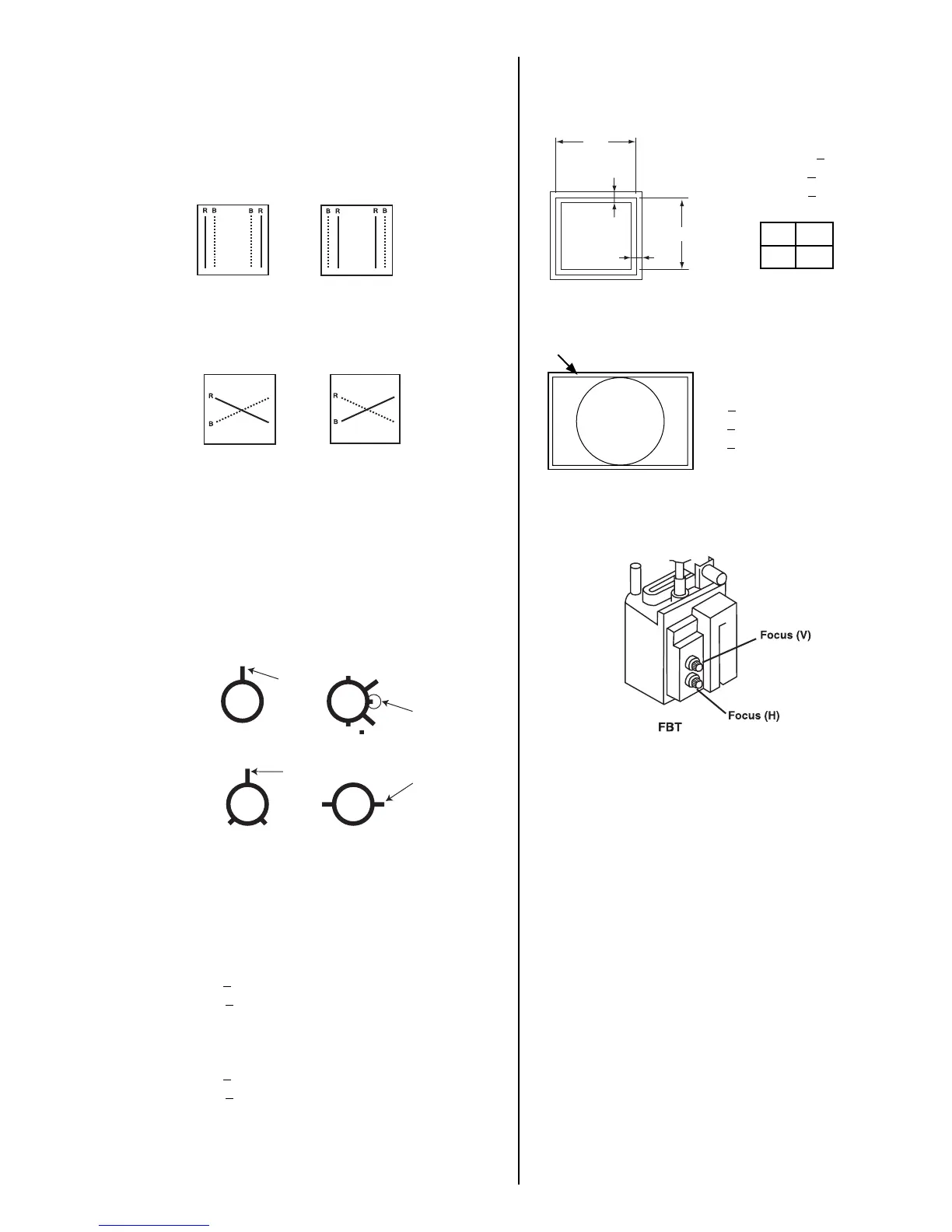
3-7. Vertical and Horizontal Position and
Size Specification
3-8. Convergence Specification
3-9. Focus Adjustment
Adjust focus (V) and focus (H) for optimum focus.
3. Display white crosshatch pattern.
4. Adjust HMC and VMC with 6-pole magnet.
5. Display crosshatch pattern with R and B.
6. Adjust H.STAT and V.STAT with 4-pole magnet.
7. Fine adjust H. STAT and V. STAT with use register
'HSTAT" and "VSTAT" in the range of 0 ± 10.
8. Adjust H.TILT with TLH plate.
Move of THL Plate
9. Adjust XCV with XCV core.
Move of XCV Volume
10. Repeat steps 2-8 to optimize condition of whole screen.
11. Affix 4-pole magnet, 6-pole magnet and TLH plate and
XCV core with white paint.
3-5. Zero Positions of Ring Magnets
are Indicated by Arrows
[2pole magnet on DY] [4pole magnet]
[2pole magnet on Neck Assy][6pole magnet]
3-6. White Balance Adjustment
Specification
1. 9300K
x=0.283
+0.015
y=0.298
+0.015
(All White)
2. 5000K
x=0.346
+0.015
y=0.359
+0.015
(All White)
or
or
fH > 60 KHz
a
< 2.0 mm
b
< 2.4 mm
fH < 60 KHz
2.4 mm
2.4 mm
A B
264 352
Horizontal and Vertical
B
A
C
Prime Mode
A
< 0.25 mm
B
< 0.30 mm
C
< 0.35 mm
Other Mode
0.30 mm
0.35 mm
0.40 mm


 To Next Page