PROCHRONO DLX
USER MANUAL / OPERATING INSTRUCTIONS
8
Installing the Guide Wires & Diuser
Hoods
(Note: Diuser Hoods are intended for sunny conditions only)
Insert the 3/16” rods into the holes on each side of the plastic diuser. Insert one
of the rods into the chronograph. Insert the other rod into the opposite side of the
chronograph.
Operating the Chronograph
To turn the chronograph on, move the small black slide switch on the side of the
chronograph to the “ON” position. The display will briey show all segments.
Meters per Second/Feet per Second
Selection
If you want to use the chronograph in ft/sec mode, just turn it on. To register
velocities in meters/sec mode, hold down the “review” button while you turn on
the chronograph until you see the “rdY” message.
You must do this each time you turn on the chrono when meters/sec readout
is desired.
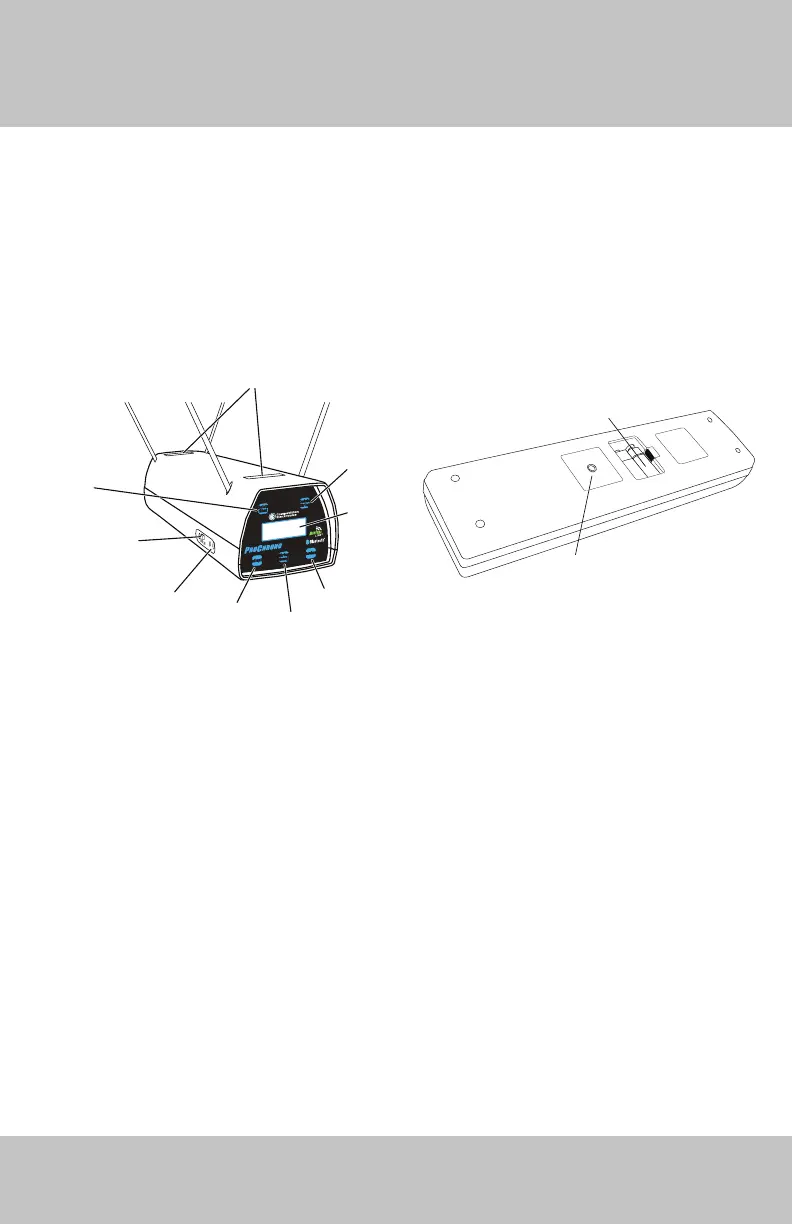
Projectile
Sensors
Delete String
Button
Display Readout
Review Button
String Change
Redisplay
Button
On/Off Switch
Bluetooth
Connect LED
Delete Shot
Button
Battery Compartment
Tripod Mount
Insert 1/4-20 Thread
Delete
Shot
Delete
String
Review
Redisplay
String
Change
DLX


 To Next Page