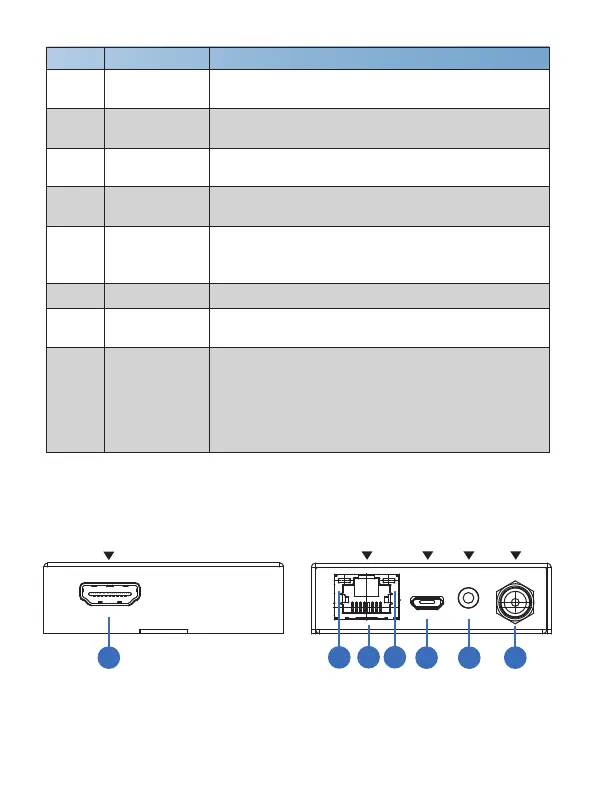
5.2 Receiver Panel
HDMI OUT
DC 12VIR INSERVICECAT IN
1
2
3
4
5 6
7
HDMI IN
HDMI input port, connect to HDMI source device such
as DVD or PS4 player with an HDMI cable.
HDMI loop output port, connect to HDMI display device
such as TV or Projector with an HDMI cable.
Power Indicator
Lamp (Green)
The lamp will illuminate when the transmitter is powered
on.
Connect to CAT IN port on the receiving end with a
CAT6 cable.
Number Name Function description
1 HDMI OUT
2
3 CAT OUT
4
SERVICE port For firmware updated use.
Data signal
Indicator Lamp
(Orange)
The lamp will illuminate when the transmitter and the
receiver have signal transmission.
IR OUT
Connect to wideband IR Blaster cable. The IR signal is
from the IR IN port of the receiver.
5
6
7
8 DC 12V
Plug DC 12V/1A power supply into the unit and connect
the adapter to an AC outlet.
(Note: The extender supports PoC function, it means
that either transmitter or receiver is powered supply by
12V/1A power adapter, the other doesn’t need
power supply.)
4/7



 To Next Page