EasyManua.ls Logo

COMPRO TN3230 - Page 11

COMPRO TN3230
24 pages
Print Icon
To Next Page IconTo Next Page
To Previous Page IconTo Previous Page
Loading...
Compro TN3230 - Installation Guide
9
Installation
PoE Switch
(802.3af class3 Type B)
Wireless
Router/Hub
Internet
Midspan
(PoE Injector)
Wireless
Router/Hub
Internet
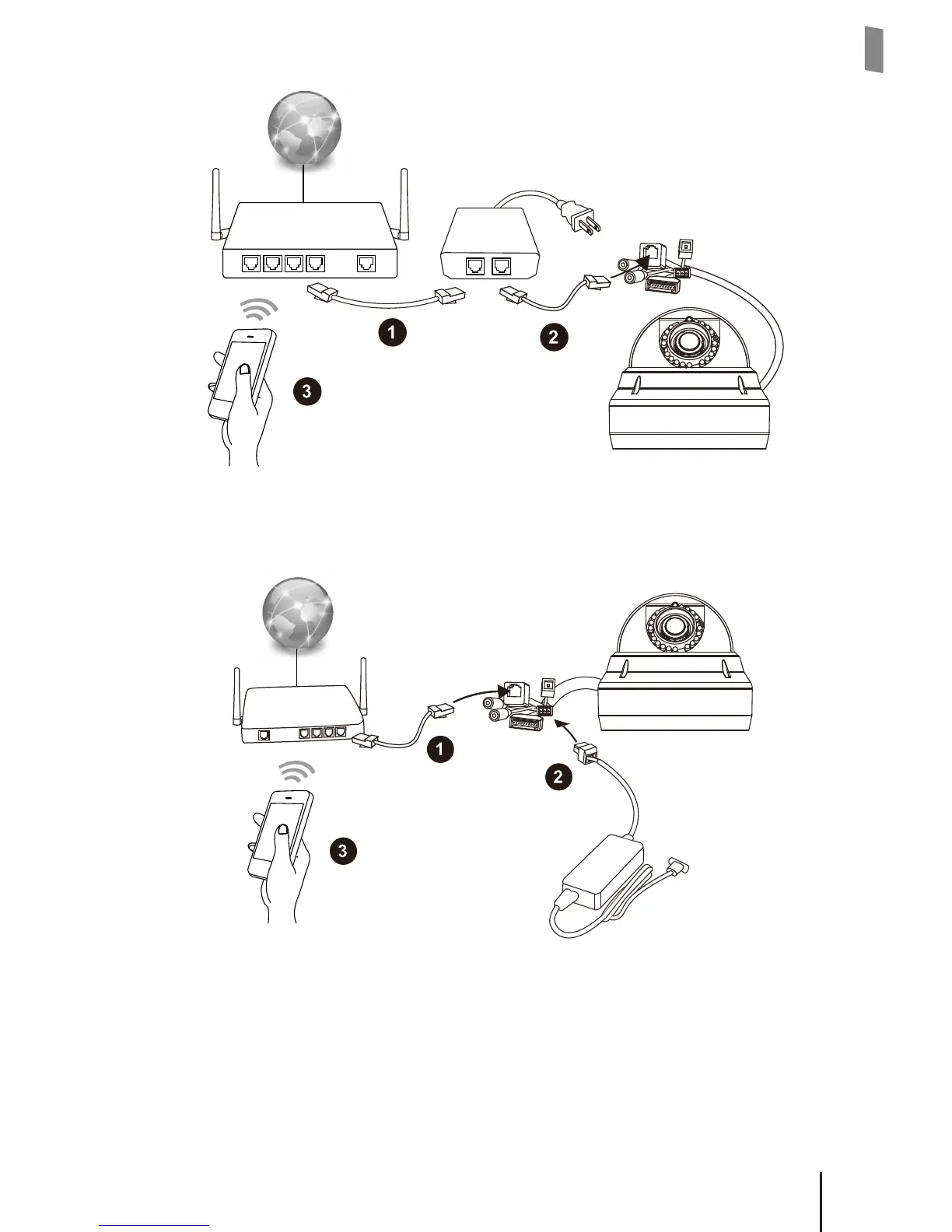
Using Ethernet Cable and Power Adapter
The gure below shows the basic cabling of your IP camera.
2
Wireless
Router/Hub
Internet
1. Connect an Ethernet cable (not supplied in the package) between IP camera with
your wireless switch/router.
2. Connect the power adapter/power cable (optional accessary, not supplied in the
package) to the IP camera and plug to the power outlet
3. Make sure your smartphone is able to access the internet via your wireless
switch/router.


Related product manuals