Compro TN3230 - Installation Guide
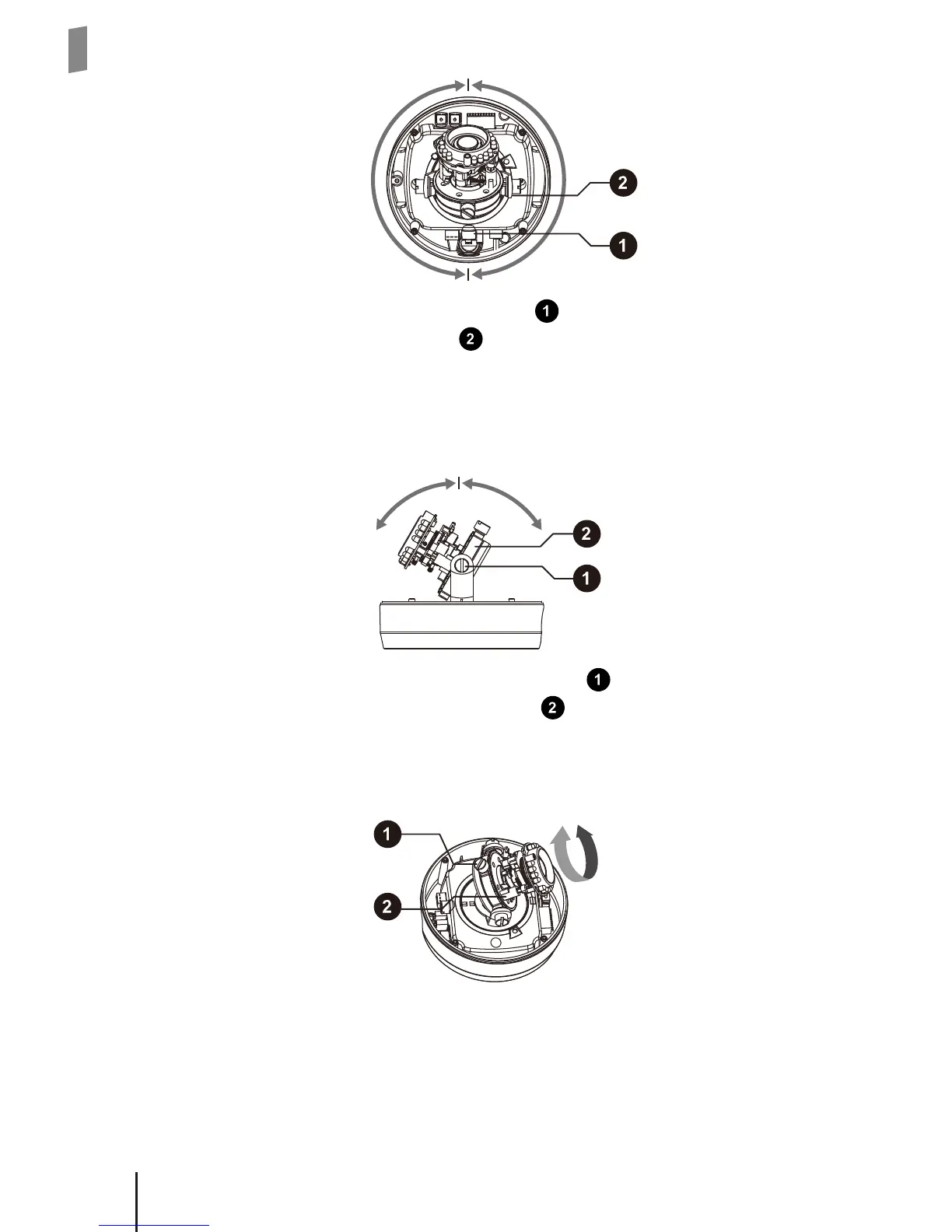
3. Loosen the tilt adjustment screw (labeled in below gure) on both sides and
then tilt the lens holder (labeled in below gure) to adjust the camera's tilting
position. The tilt adjustment range is between +60 degrees to -60 degrees.
4. Tighten the tilt adjustment screws and then, if desired, go on to adjust the rota-
tion of the camera image.
60° 60°
\
5. Loosen the rotation adjustment screw (labeled
in below figure). Then grab
the lens holder by the holder boss (labeled in below gure) on both sides and
rotate the lens holder clockwise or counterclockwise to adjust the horizon in the
live image. The rotation adjustment range is between +180 degrees to -180 de-
grees. Tighten the rotation adjustment screw when completed.
6. Rotate the lens hood inside the top cover so the opening in the lens hood is
aligned with the camera's new position.



 To Next Page