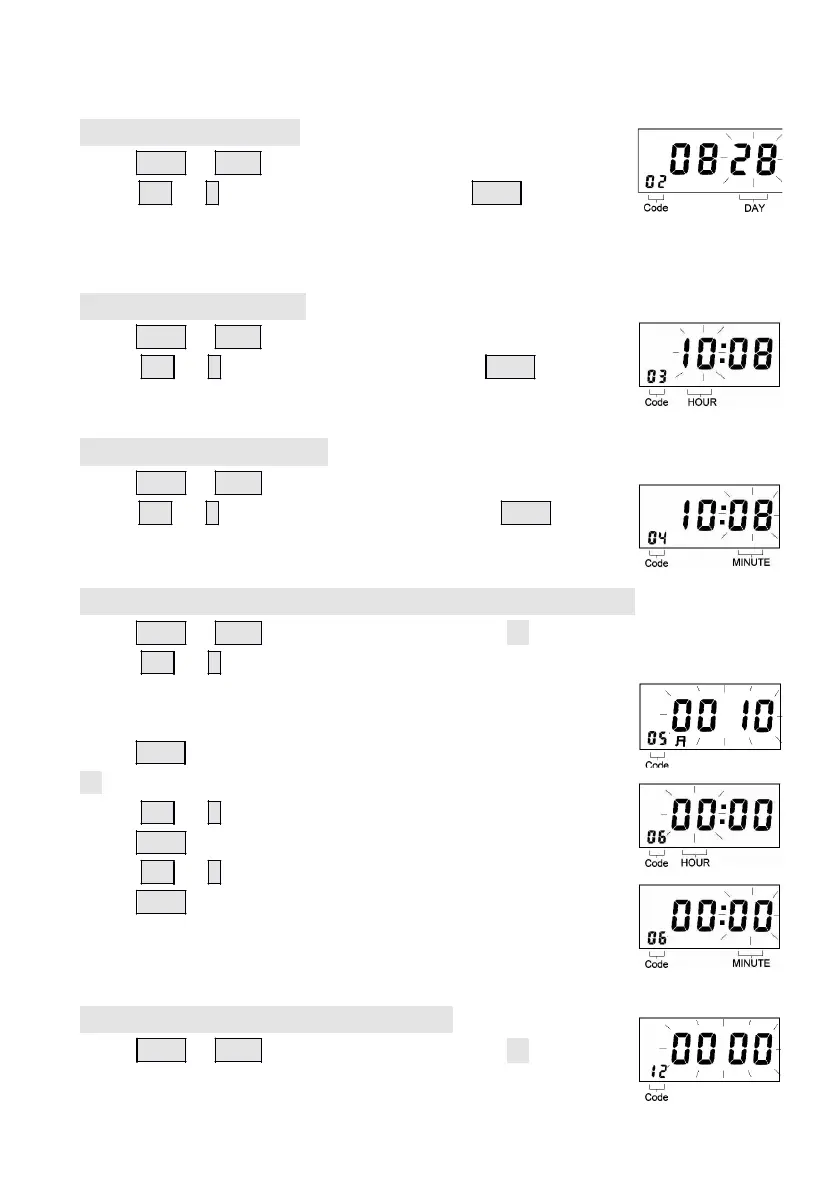
4.3 Setting the date
Press Enter or Back to enter the program Code 02,
press + or – button to set the day. Press Enter again to
register the setting value.
4.4 Setting the Hour
Press Enter or Back to enter the program Code 03,
Press + or – button to set the Hour. Press Enter again to
register the setting value.
4.5 Setting the Minute
Press Enter or Back to enter the program Code 04,
press + or – button to set the Minute. Press Enter again
to register the setting value.
4.6 Setting the regular time signal (0-99Seconds)
Press Enter or Back to enter the program Code 05,
Press + or – button to set time signal duration and the initial value (10
seconds) will appear.
The duration can be set from 0~99 seconds,
Press Enter again to register the setting value and enter code
06 so as to setting the time of 1
st
ringing
Press + or – button to set the Hour.
Press Enter again to register the setting value.
Press +
or – button to set the Minute.
Press Enter again to register the setting value.
Doing the same as above to enter code 07, 08, 09, 10, 11
and complete the setting of 2
nd
, 3
rd
, 4
th
,5
th
, 6
th
ring times.
4.7 Setting the Date Change time
Press Enter or Back to enter the program Code 12,
- 9
-


 To Next Page