19
Firmware updates for the BRIC-Link should be handled using Comrex , a Windows- and MAC
OS-executable program that can be downloaded from the Comrex website. can also be used for
license installaon and IP conguraon.
Please note: In order to congure a BRIC-Link unit for the rst me (without knowing the unit’s IP address),
must be run on a computer located on the same network (e.g. physical LAN connecon) as the unit itself.
If this is not possible, an Ethernet crossover connecon between the BRIC-Link and a computer should be used for
conguraon.
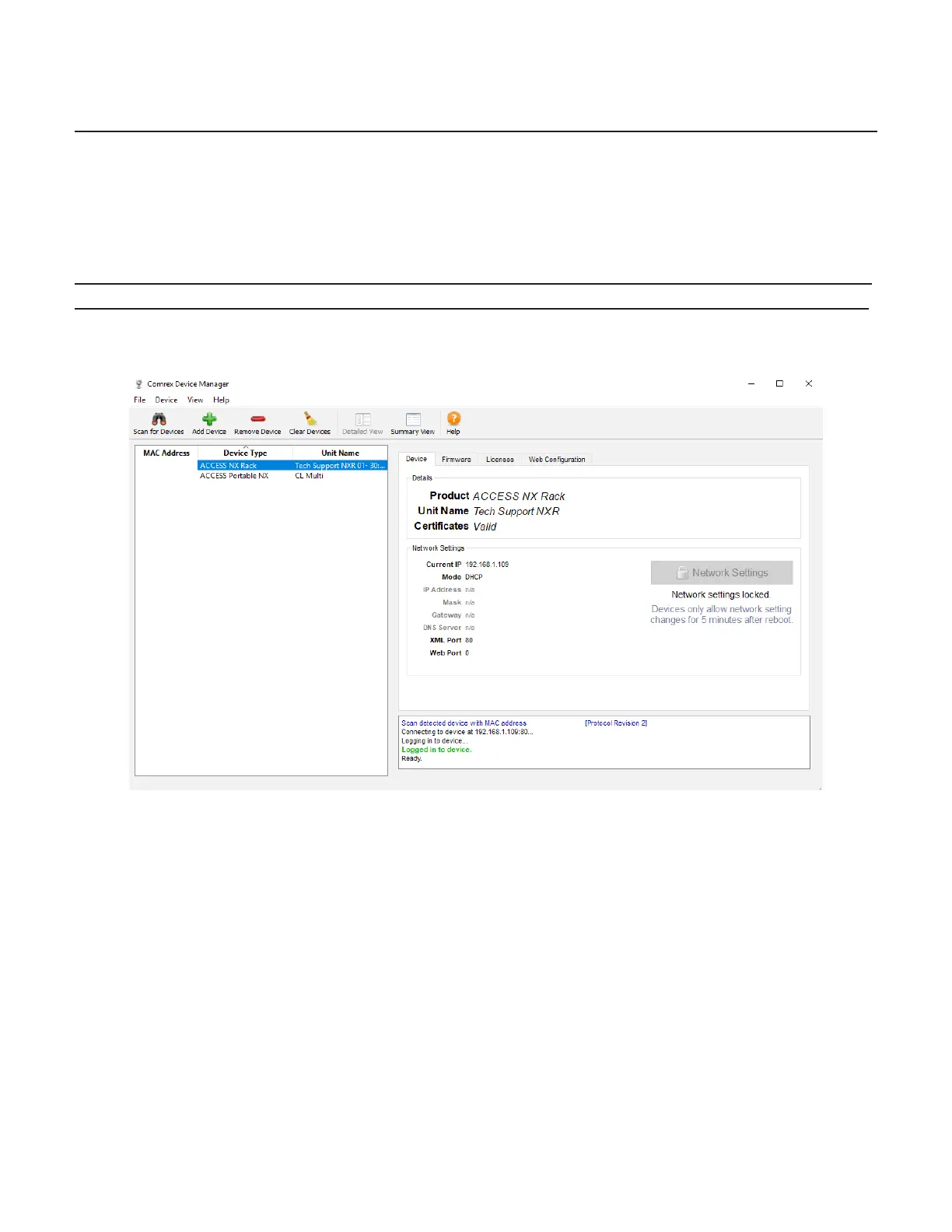
As shown in 6, running the and clicking the “” buon will produce a list of all Comrex
devices found on the LAN. If the default password has changed, will prompt for the password to
BRIC-Link aer the scan.
shows the four tabs that appear on the right-hand pane aer has logged in. The fourth
tab is labelled . This will open a simplied setup interface on the BRIC-Link called . The
interface allows for conguraon of several opons including the Ethernet port. Log in to with a
username (any) and password (default = ) to enter the .
Once logged into , choose the opon and then choose . Choose
the Ethernet port that appears in the list, which will look like .


 To Next Page
 Loading...