43
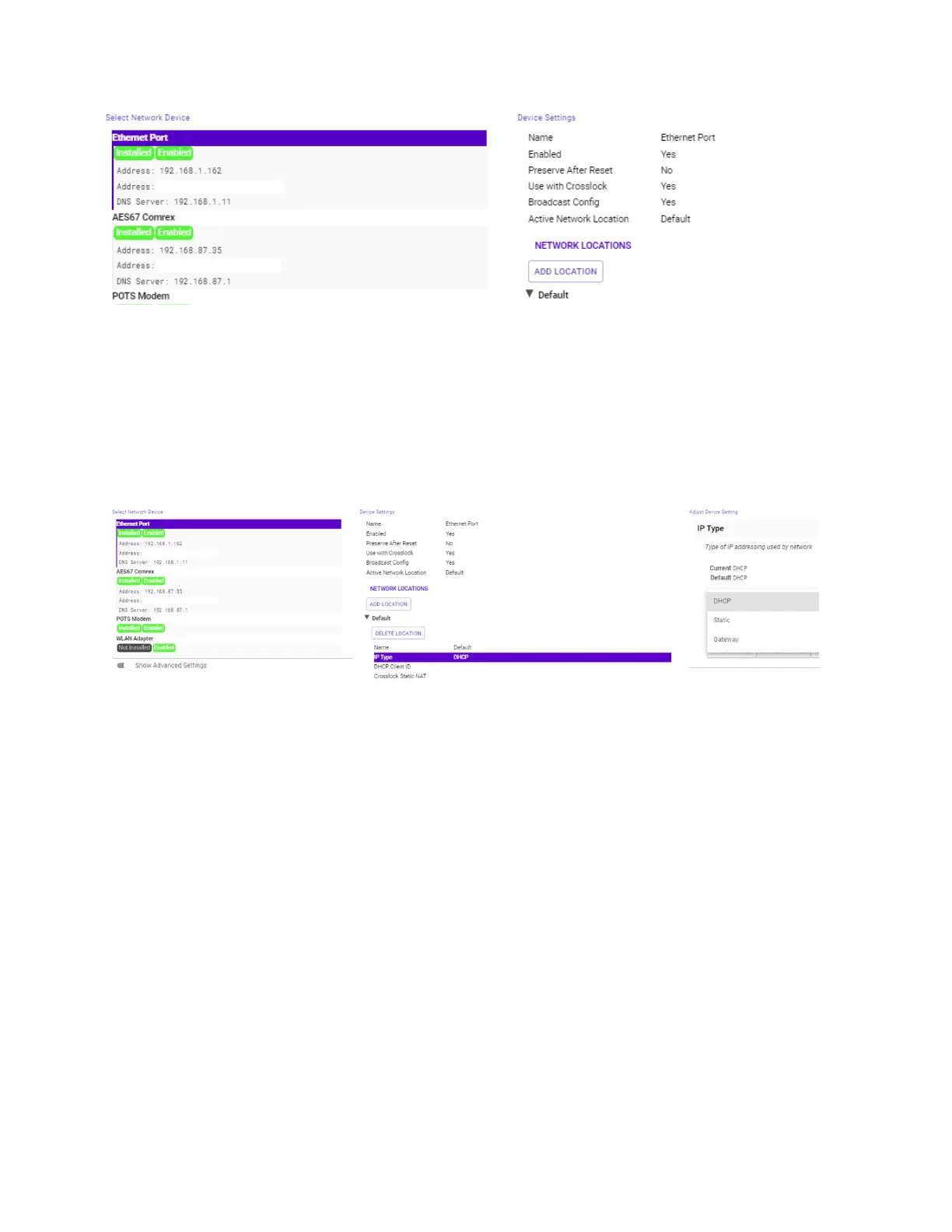
For users who wish to have a Stac IP address for their units, this can be congured by eding the sengs for the
“Default” Acve Network Locaon. First, select to expand the Default sengs under Network Locaons. Select
IP Type to open a drop-down selecon screen. This will give users the opon to change the “Default” Network
Locaon to Stac IP, DHCP, or Gateway IP types as shown in Figure 26.
NETWORK LOCATIONS
While the “Default” seng may work for many users in a staonary environment, BRIC-Link includes Network
sengs for conguring dierent connecons to dierent Networks known as “Locaons”. This allows for
on-the-y connecon to dierent Networks by storing connecon and conguraon data as a Name-able Locaon.
To do this, select the under the Network Locaon header. Change the name of the Locaon to
something memorable and then select IP Type (Figure 27). This controls the IP address type amongst DHCP, Stac,
and Gateway sengs. If selecng a Stac IP address, make certain to enter the unit’s new IP address, its Netmask,
and its Gateway Address, as well as at least one DNS Server Address.
present advanced network conguraon for users with complex and mullayered networks.
As this is an uncommon need for most users, Comrex recommends users interested in learning more refer to the
Stac Roung Technical Note at www.comrex.com.


 To Next Page
 Loading...