21
COMUNELLO ®Copyright 2014 - All right reserved
ENGLISH
in emergency mode. If tted, a Flashing Light will operate only for the rst 4
seconds of the movement when mains power is absent.
PROGRAMMING:
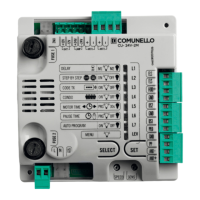
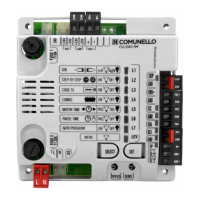
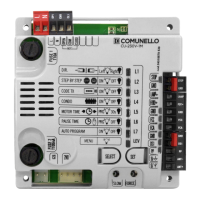
SELECT key: selects the type of function to store; the selection is indicated
by blinking of the LED.
Press the key twice to go to the desired function. The selection remains active
for 10 seconds shown by blinking of the LED; when this interval elapses, the
control unit returns to the original state.
SET key: programs the information in accordance with the function type
preselected with the SEL key.
IMPORTANT: The SET key function can be replaced by the remote if
programmed beforehand (CODE LED on).
MAIN MENU
The control unit is factory set to allow the selection of several important
functions.
L1 DELAY Operator 1 delay Operator 2 delay
L2 STEP-BY-STEP Step-by-Step Automatic
L3 TX CODE Code entered No code
L4 COND ON OFF
L5 MOTOR TIME Programmed time 30 sec.
L6 PAUSE TIME With automatic closure Without automatic closure
L7 AUTO PROGRAM ON OFF
LEV MENU ON
1. DELAY:
In the default conguration the control unit is set up with “OPERATOR 2
DELAY” logic.
To avoid having to disconnect the wiring in order to set a delay for operator
1 rather than operator 2, proceed as follows: use the SELECT key to select
blinking LED L1 and then press the SET key: LED L1 becomes steady on
and programming will be completed. Repeat the procedure if you wish to
restore the previous conguration.
2. STEP-BY-STEP:
In the default conguration the control unit is set with “Automatic” operating
logic enabled (LED n2 off); if the “Step-by-Step” operating logic is required
(LED n2 on), proceed as follows; use the SELECT key to select blinking
LED n2 and then press the SET key: LED n2 becomes steady on and
programming will be completed.
If the “Step-by-Step 1” operating logic is required, repeat the operation above
described, by pressing the SEL key twice instead only one (to obtain the
quick blinking of LED
Repeat the procedure if you wish to restore the previous conguration.
3. CODE TX: (Remote control code)
Up to 120 remotes with different codes of either the xed or the rolling code
type can be saved on the control unit.
Programming:
Programming of the transmission code is performed as follows: use the
SELECT key to select blinking LED L3. Press SET once; the LED will change
its blinking mode (longer 1 0 1 0) to show that the rst level is being saved.
On sending the selected code with the desired remote, the CODE LED will
remain steady on to indicate that programming has been completed.
To save the code for pedestrian opening / single leaf proceed as follows: use
the SELECT key to select blinking LED L3. Press SET twice consecutively;
the LED will change its blinking mode (1 1 0 1 1 0) to show that the
pedestrian code is being saved. On sending the selected code with the
desired remote LED L3 will remain steady on to indicate that programming
has been completed.
If all 120 codes have been saved, repeating the programming operation will
cause all the programming LEDs to start blinking to signal that no further
codes can be saved.
Deletion:
Use SELECT to go to LED L3; activate blinking of the code to be deleted
(CODE or PEDESTRIAN identied by the respective blinking); press and hold
down SET for > 5 s. After this interval the LED will switch off for 2 seconds
and the procedure is completed. If all CODE and PEDESTRIAN codes are
deleted, the LED will remain off.
If only PEDESTRIAN codes remain stored, the LED blinking mode will change
(1 1 1 1 0 1 1 1 1 0)
Rule of the rst saved Remote control:
When programming remotes the following rule is applied: if the rst remote to
be saved is of the rolling code type, the receiver will subsequently accept only
rolling code remotes, thus providing enhanced anti-intrusion security; if the
rst remote to be saved is a xed code type, the receiver will subsequently
accept both xed code remotes and rolling code remotes, although only
the xed part of the latter will be controlled (thus effectively relinquishing the
security of the rolling code system).
4. COND:
The Condominium function means that during the opening movement or
during the pause time the control unit will not respond to commands sent
by Pushbuttons or remotes. In contrast, during the closing movement a
command sent by the Pushbuttons or the remotes will reverse the direction of
movement. This operating mode is invaluable when the automation includes
a loop detector.
In the default conguration the control unit is set with the Condominium
function disabled; if the Condominium function is required, proceed as
follows: use the SELECT key to select blinking LED L4 and then press the
SET key: LED L4 becomes steady on and programming will be completed.
Repeat the procedure if you wish to restore the previous conguration.
5. MOTOR TIME: (Programming of the run time of the operators with
max 4 minutes)
The control unit is factory set with a preset motor time of 30 seconds without
deceleration. If the run time of the operators must be changed, programming
must be carried out with the gate closed as follows: use the SELECT key to
select blinking LED L5 and then press the SET key momentarily; the operator
will start the opening movement; when the desired deceleration starting
point is reached, press the SET key again; at the same time the operator
will decelerate and reach the desired position; press SET to terminate the
opening cycle. Thereafter LED L5 will start blinking rapidly; now repeat the
motor time and deceleration programming procedure for the closing cycle.
If you do not require the control unit to perform the deceleration, during
programming, when the open-close cycle has been completed press the
SET key twice consecutively rather than just once.
During programming, instead of the SET key on the control unit you can use
the button on the remote, providing the remote has been saved beforehand.
6. PAUSE TIME: (Automatic closing time programming 4 min. max.)
The control unit is factory set with automatic closing disabled. If you wish
to enable automatic closing proceed as follows: use the SELECT key to
select blinking LED L6 and press the SET key momentarily; now wait for
a time equivalent to the desired time interval; press the SET key again
momentarily and at the same time the automatic closing time will be saved
and LED L6 will remain steady on. If you wish to restore the initial condition (no
automatic closing) select blinking LED L6 and then press the SET key twice
consecutively in a time period of 2 seconds. The LED will switch off and the
operation will be completed.
During programming, instead of the SET key on the control unit you can use
the button on the remote, providing the remote has been saved beforehand.
7. AUTOMATIC PROGRAMMING:
The control unit offers the facility of Automatic Programming (SIMPLIFIED).
First bring the gate leaves to an intermediate position, use the SELECT
key to select blinking LED L7 and then hold down the SET key; the control
unit executes the Auto programming procedure by performing a complete
opening and closing cycle (keep the SET key pressed until Auto Programming
is completed). During the Auto Programming procedure the Deceleration
cycle is set automatically at approximately 15% of the complete cycle.
During Automatic Programming, instead of the SET key on the control unit
you can use the button on the remote, providing the remote has been saved
beforehand.
EXTENDED MENU 1
The control unit is factory set to allow direct selection exclusively of the main
menu functions. If you wish to enable the functions described in Extended
Menu 1, proceed as follows: select blinking LEV LED and press SET once.
The LED will start blinking. This means there will be 30 seconds to select
the functions of Extended Menu 1 using the SELECT and SET keys; once
an additional 30 seconds have elapsed the control unit reverts to the main
menu.
L1 FOTOTEST ON OFF
L2 PEDESTRIAN TIME ON OFF


 To Next Page
 Loading...