6
Basic Operation
Power-Up: The Force Monitor has been designed to start automatically when you begin lifting.
No button pushing is required.
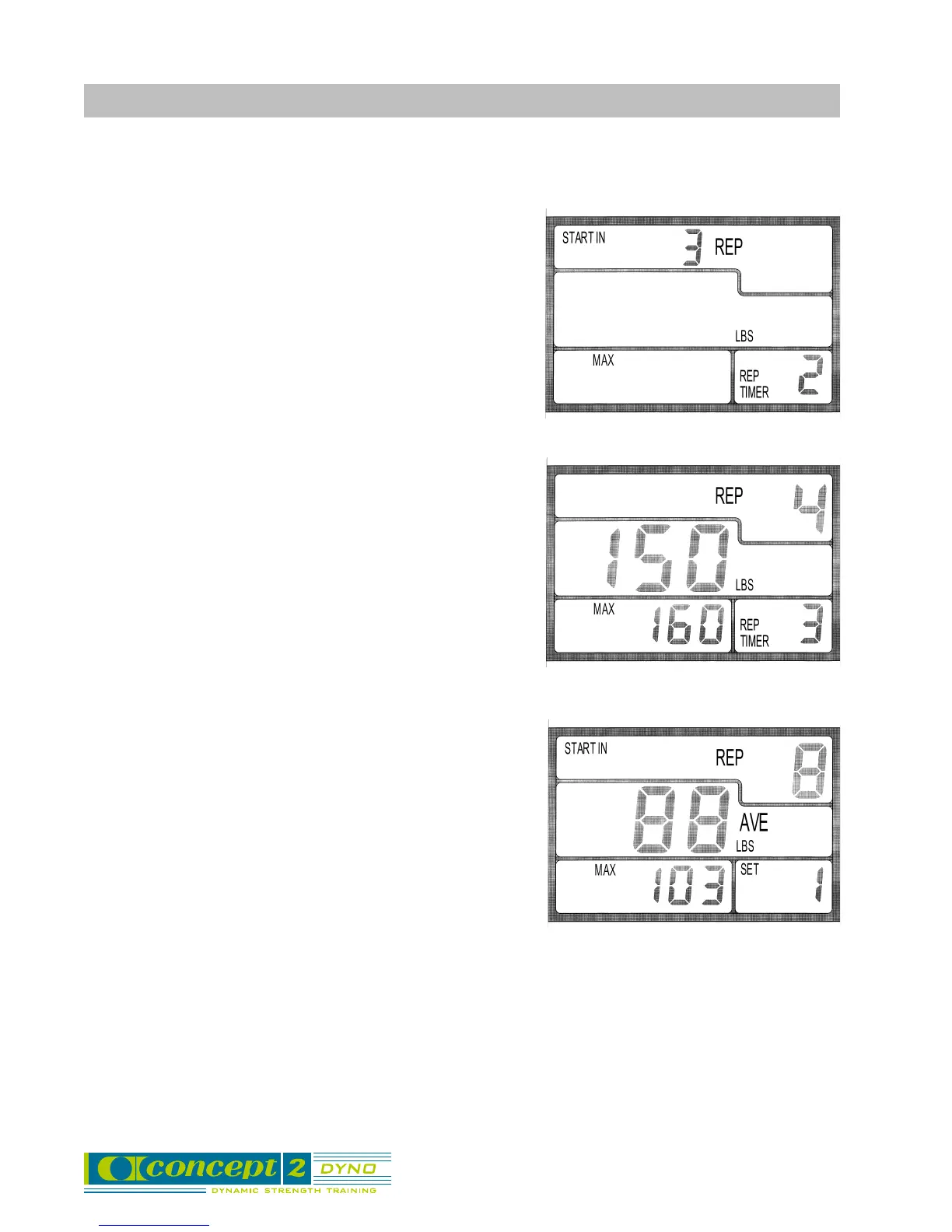
Start in 3 Reps: The Force Monitor will count down the
first three reps as warm-up reps, during which no force
data will be displayed. This allows you to start every set
with three easy warm-up reps.
Workout Data: After the warm-up, the Force Monitor
will automatically display your workout data as follows:
• Center display - your force reading for each rep, and the
average of all your reps at the end of the set
• Bottom left - your maximum force reading for the set.
• Top right - the number of reps completed.
• Bottom right - the elapsed time since your last rep, and
the number of sets completed at the end of the set.
End of Set: The monitor determines that your set is
finished if ten seconds elapses since the beginning of the
last rep without another rep occurring. You can watch the
rep timer in the lower right display to be sure you start your
next rep within ten seconds, unless you are done with your
set. Your set summary data will automatically be displayed
ten seconds after completion of your last rep.
Pounds or Kilograms: To cycle the units between pounds and kilograms in the central display,
press OK and the UP arrow. After powering down, the monitor will come back up in the units you
last used.
Automatic Power Down: The monitor will power down automatically after ten minutes of no
activity. It can also be turned off using the I/O button.



 To Next Page