ENGLISH
8
Conceptronic CSATAi23U Version 2.0
User Manual
Congratulations on the purchase of your
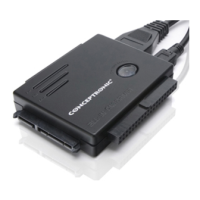
Conceptronic SATA & IDE to USB & eSATA adapter
This user manual gives you a step-by-step explanation how to install and use the Conceptronic CSATAi23U
on your computer.
If you need more information or support for your product, we advise you to visit our Service & Support
website at www.conceptronic.net/support
and select one of the following options:
• FAQ : Frequently Asked Questions database
• Downloads : Manuals, Drivers, Firmware and more downloads
• Contact : Contact Conceptronic Support
For general information about Conceptronic products visit the Conceptronic website at
www.conceptronic.net
.
When problems occur, we advise you to go to our support-site (go to www.conceptronic.net
and click
‘Support’). Here you will find the Frequently Asked Questions Database.
Note:
The information in this manual is based on Windows Vista and Windows 7, but can differ from
your computer when you are using a different operating system.
1. Package contents
The following items are present in the package of the Conceptronic CSATAi23U:
• Conceptronic CSATAi23U SATA & IDE to USB & eSATA adapter
• Mini USB to USB cable
• Power supply
• Power cable for power supply
• Power splitter cable (For hard disk and CSATAi23U)
• IDE extension cable
• Product CD-ROM
• This multi language user manual
• Warranty card & CE declaration booklet


 To Next Page