User Instruction Manual | Version 1.7
13
8.1
TURNING ON (INITIALISING REMOTE & WHEELS)
1 2
3
4
5 6
7 8 9
8.2
TURNING OFF THE WHEELS
10
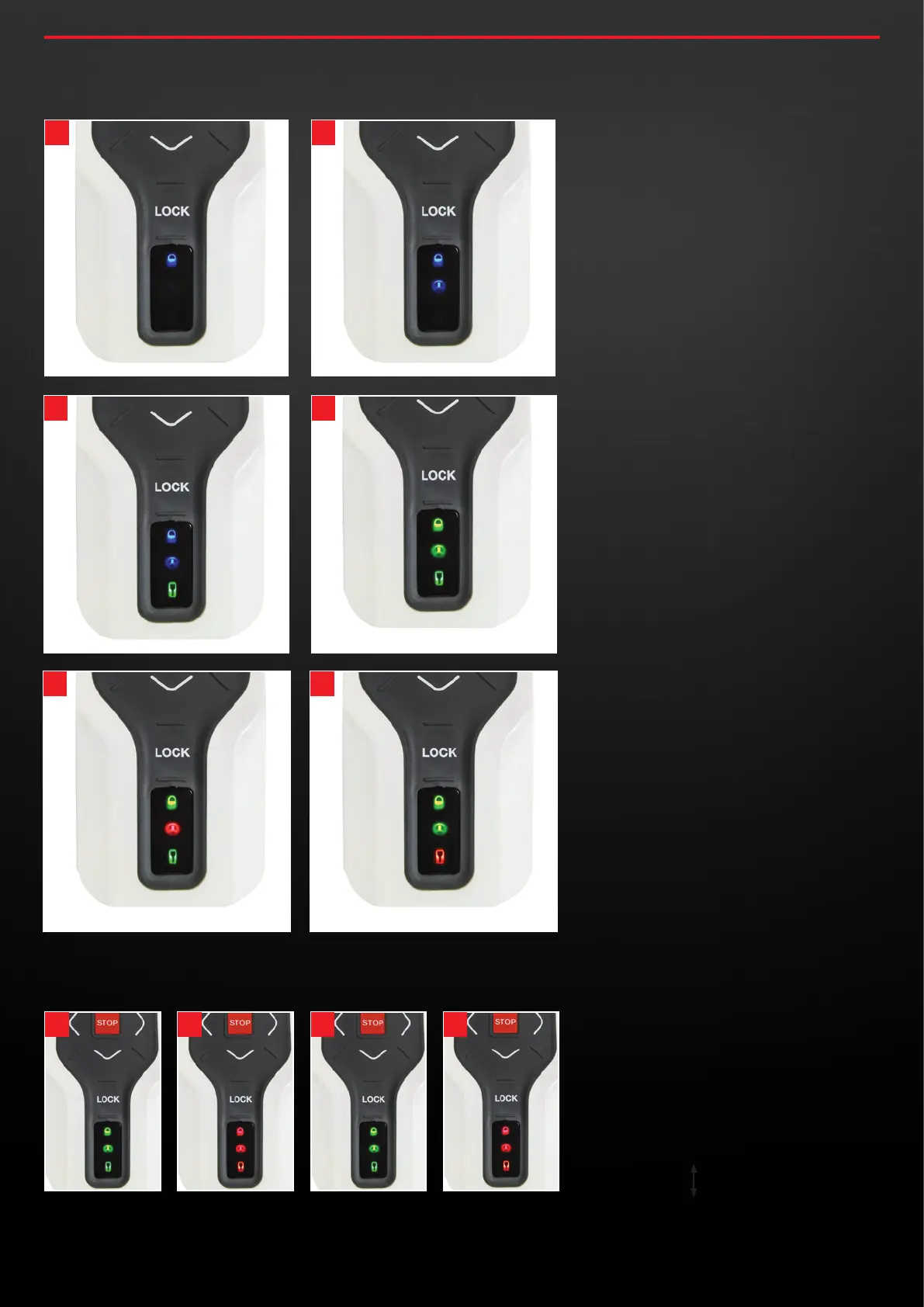
8 .1 To initialise the system, press and hold
the lock button until the Blue Lock LED
illuminates (1). This should be followed
by a Blue Wheel LED (2) and then a
Green Remote LED (3).
If both the wheels and remote are
sufficiently charged you should then
have all Green LEDs illuminate (4).
If the wheels are low on charge you will
get a Red Wheel LED (5) instead and if
the remote is low on charge you will
get a Red Remote LED (6).
8 .2 To turn off the wheels, press and hold
the lock button until you see all Green
LEDs (7). This should then be followed
by a sequence of all Red LEDs (8), all
Green LEDs (9), all Red LEDs (10) then all
off. They will also turn off if there is no
input for 30 mins.
WHEELS LOW ON CHARGE REMOTE LOW ON CHARGE
INITIALISED / READY
INITIALISING INITIALISING
INITIALISING
concoursegolf.com
13
User Instruction Manual | Version 7.0


 To Next Page