4
Contrast
According to the location where the device is installed, it might be required to adjust the display contrast.
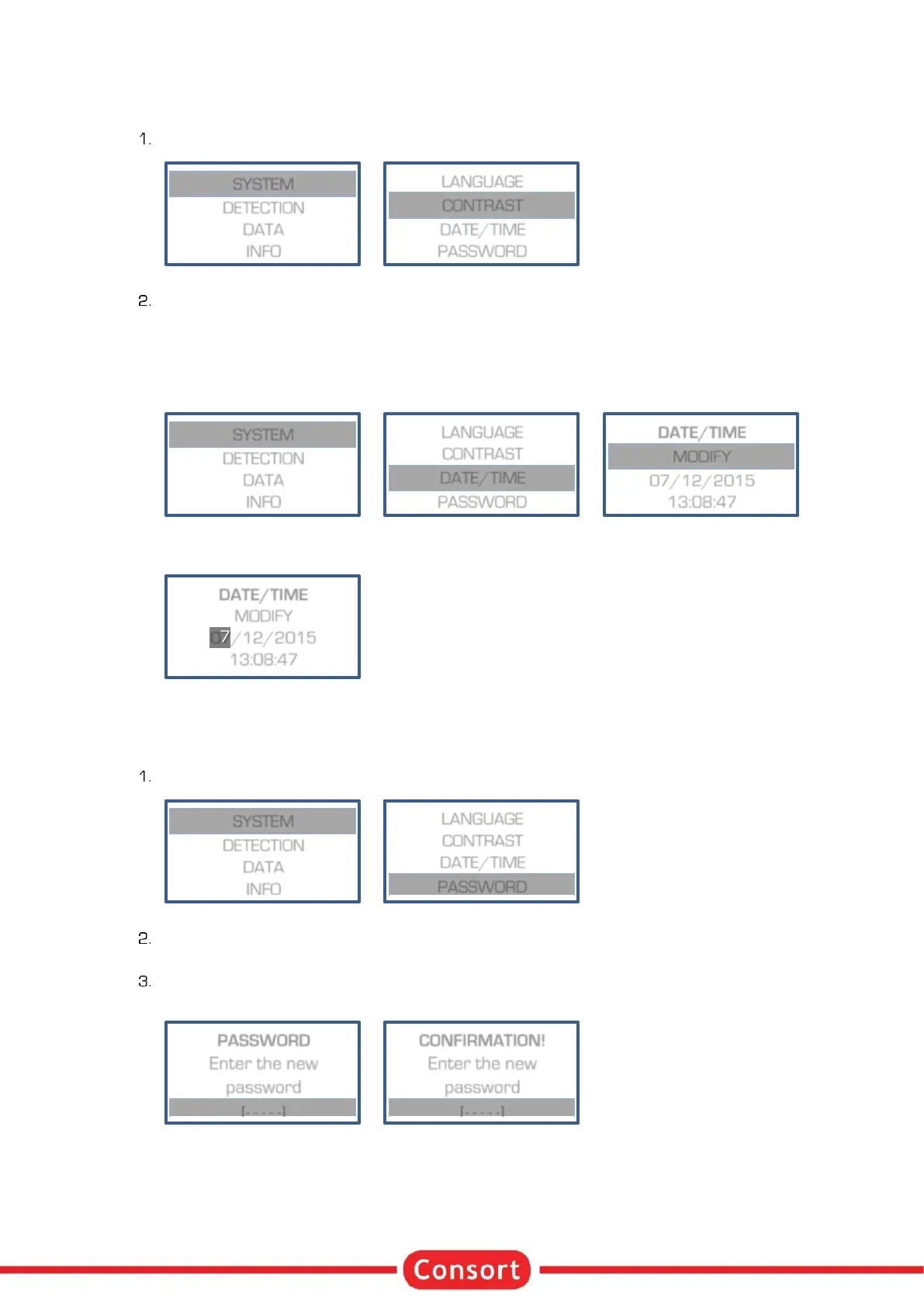
When in SETUP, follow these steps to select CONTRAST and press SET:
Adjust the contrast setting and press SET to confirm.
Date/Time
This device has a precise real time clock built in. The real time clock is used for reports and data recording.
The date and the time can be adjusted.
1. When in SETUP, follow these steps to select DATE/TIME and press SET:
2. Set consecutively the date, month, year, hour, minute and seconds. Confirm each with SET or stop
entering the other values by pressing RUN/STOP.
Password
When desired, a password can be set which will be requested when trying to modify the setup or the
parameters of a procedure. Without a password will the user only be able to choose, run or stop an
experiment.
When in SETUP, follow these steps to select PASSWORD and press SET:
A question to activate the password will appear. Choose YES and confirm to enable a password, set
to NO to disable the password.
When enabled, the device will request twice the same combination of five keystrokes. This
combination will be required to modify any setting.
An error will be given if the second password doesn’t correspond. The password setting will be
disabled, retry to enable.


 To Next Page