7
Method programming
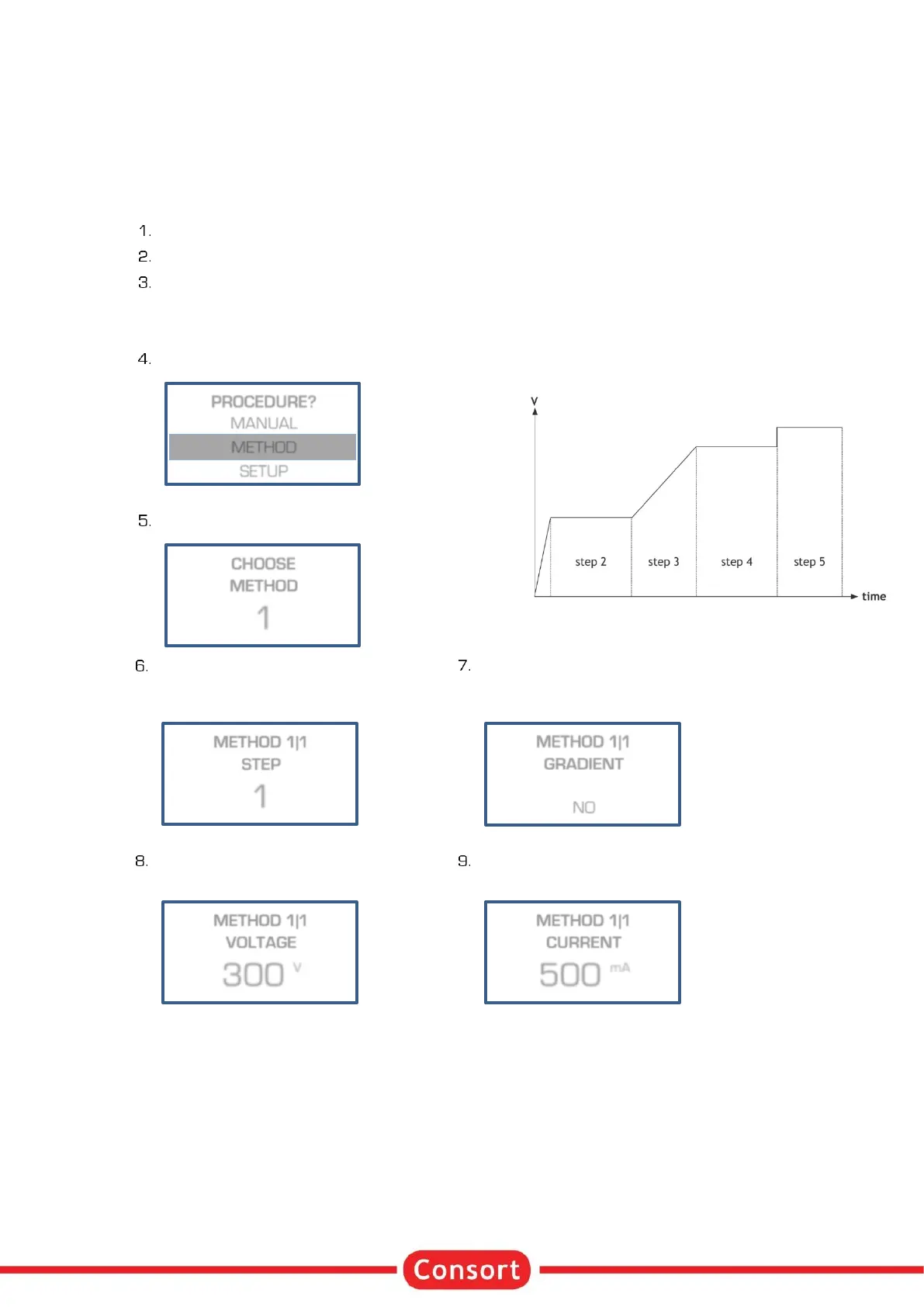
Method programming permits to store up to 9 different methods, each with 9 steps, of frequently used
parameters in the non-volatile memory for future recall. Each step is able to recall a next one, providing a
flexible multiple step function for special techniques. The method mode also permits to program a linear
voltage gradient for any step provided the limiting current or power is not attained. Parameters can be
changed temporarily without interrupting the run.
Verify if the instrument is switched off.
Connect the electrophoresis tank to the instrument.
Switch the instrument on. If the timer is still running after switching on, the power supply will
automatically proceed with a procedure for the remaining time. A temporary menu is shown: Choose
YES within 15 sec. to stop the procedure. Choose NO or wait 15 sec. to continue the procedure for
the remaining timer value.
Select METHOD and press SET:
Select the desired method and press SET:
When previously multiple steps have
been programmed, select the desired
step and press SET:
Enter the desired Voltage limit
and press SET :
When performing a Voltage gradient,
enter the desired end Voltage. The
start Voltage is the end point of the
previous step. This is 0 V when
programming the first step as
gradient step.
Enter the desired current limit
and press SET :
This limit is automatically set to its
maximum and cannot be changed in
case of a Voltage gradient step.


 To Next Page