5
Setting Up
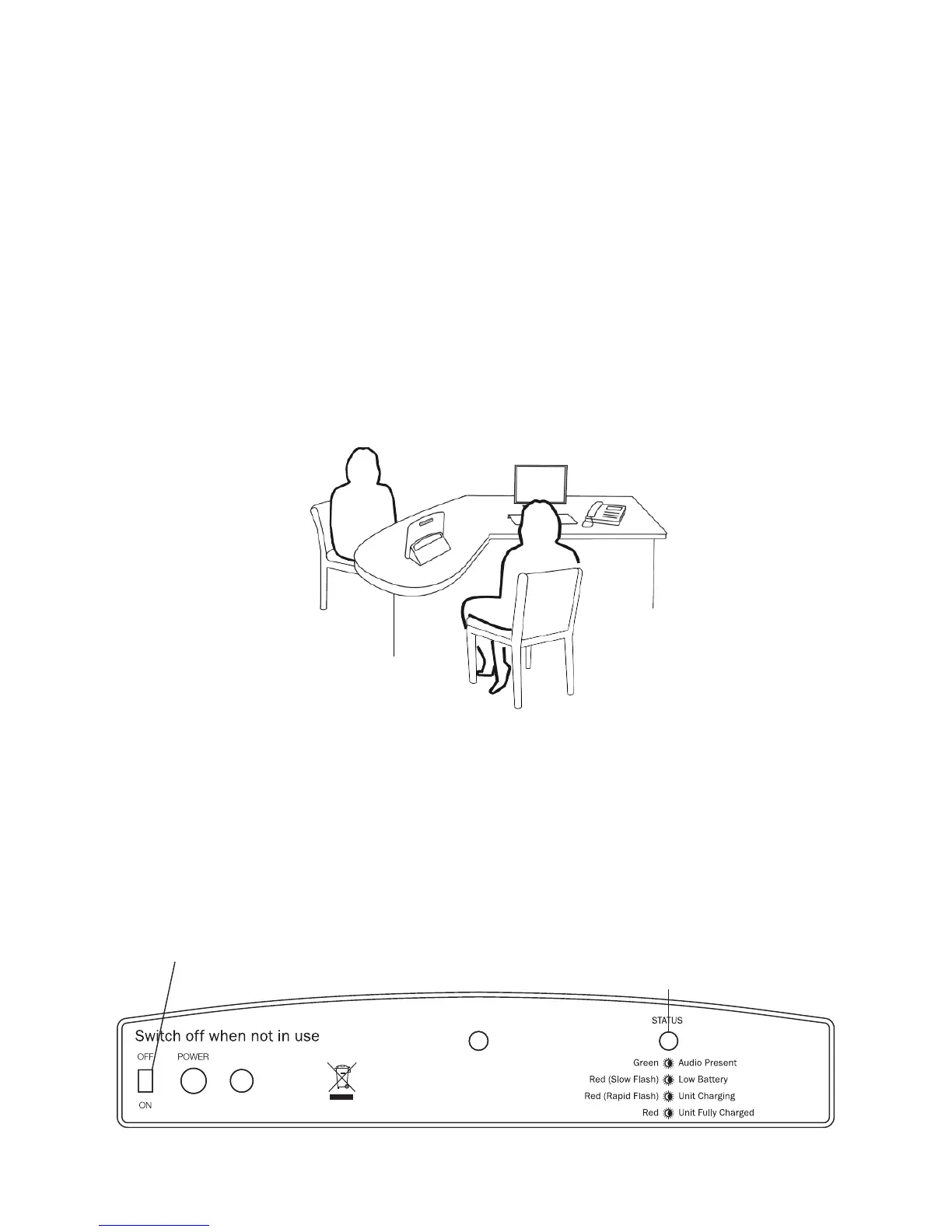
1. Place the Portable Loop on the desk or counter top between the
hearing device wearer and the member of sta.
2. Ensure the rear of the unit, with the in-built microphone, is facing
the sta member, as shown below.
3. The front of the unit, with the “T” position label, needs to face the
person wearing the hearing device.
4. Slide the switch on the left hand side of the rear of the unit to the
“ON” position. The system is now ready to use.
EXT
MIC
Status light
Hearing device
wearer
It is important to fully charge your unit once you have received it.
1. Plug the power supply in to the mains socket.
2. Connect the power supply lead to the the rear of the Portable Loop
using the socket marked “Power”. The status light will then rapidly
ash red.
3. The status will turn a steady red when the unit is fully charged.
Setting up the Portable Loop
Charging the Portable Loop
Sta member


 To Next Page