EasyManua.ls Logo

Contax Aria - Page 105

Contax Aria
114 pages
Print Icon
To Next Page IconTo Next Page
To Previous Page IconTo Previous Page
Loading...
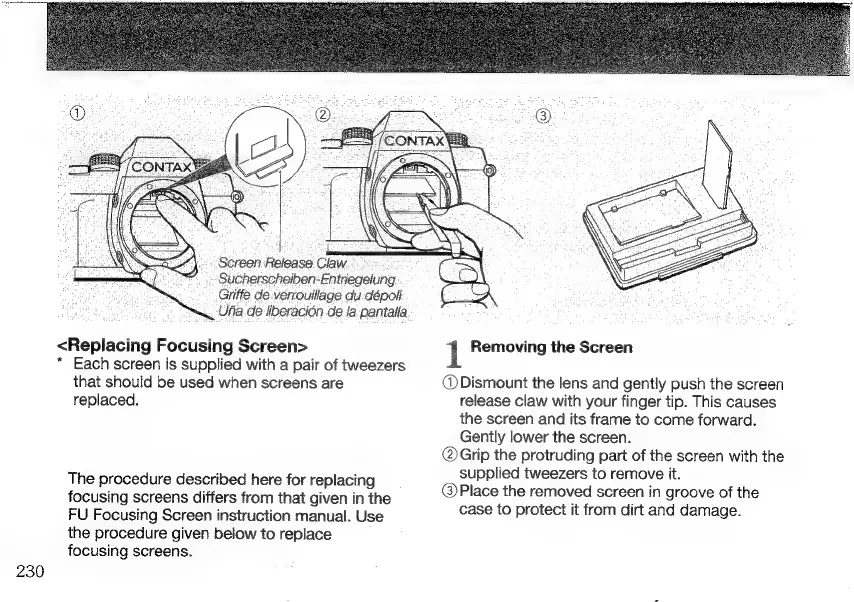
‚Screen
Release
Claw
Sucherscheiben-Entriegelung
Griffe
de
verrouillage
du
dépoli
Uña.
de
liberación
de
la
pantalla
<Replacing
Focusing
Screen>
*
Each
screen
is
supplied
with
a
pair
of
tweezers
that
should
be
used
when
screens
are
replaced.
The
procedure
described
here
for
replacing
focusing
screens
differs
from
that
given
in
the
FU
Focusing
Screen
instruction
manual.
Use
the
procedure
given
below
to
replace
focusing
screens.
230
1
Removing
the
Screen
(DDismount
the
lens
and
gently
push
the
screen
release
claw
with
your
finger
tip.
This
causes
the
screen
and
its
frame
to
come
forward.
Gently
lower
the
screen.
(Grip
the
protruding
part
of
the
screen
with
the
supplied
tweezers
to
remove
it.
@Place
the
removed
screen
in
groove
of
the
case
to
protect
it
from
dirt
and
damage.

Other manuals for Contax Aria

Related product manuals