EasyManua.ls Logo

Contax Aria - Page 106

Contax Aria
114 pages
Print Icon
To Next Page IconTo Next Page
To Previous Page IconTo Previous Page
Loading...
232
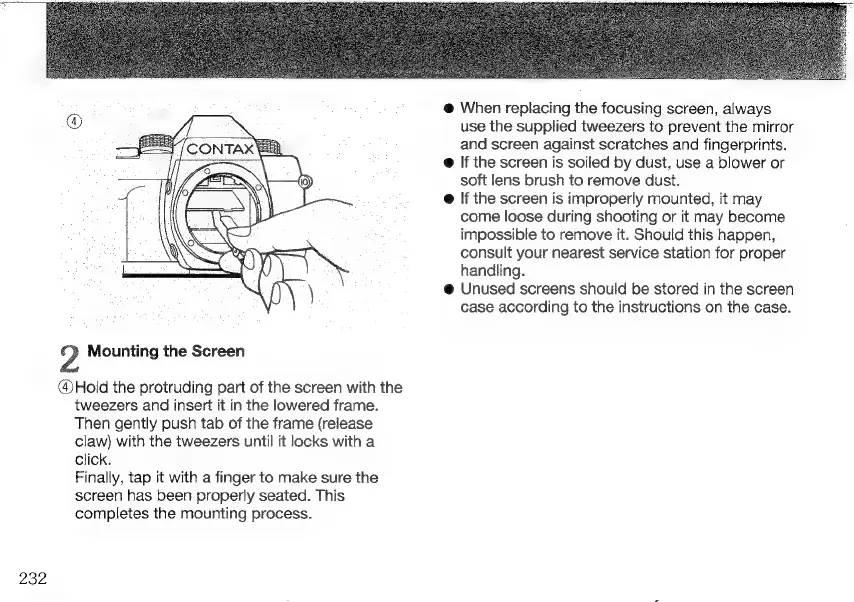
2
Mounting
the
Screen
@Hold
the
protruding
part
of
the
screen
with
the
tweezers
and
insert
it
in
the
lowered
frame.
Then
gently
push
tab
of
the
frame
(release
claw)
with
the
tweezers
until
it
locks
with
a
click.
Finally,
tap
it
with
a
finger
to
make
sure
the
screen
has
been
properly
seated.
This
completes
the
mounting
process.
@
When
replacing
the
focusing
screen,
always
use
the
supplied
tweezers
to
prevent
the
mirror
and
screen
against
scratches
and
fingerprints.
e
If
the
screen
is
soiled
by
dust,
use
a
blower
or
soft
lens
brush
to
remove
dust.
e
If
the
screen
is
improperly
mounted,
it
may
come
loose
during
shooting
or
it
may
become
impossible
to
remove
it.
Should
this
happen,
consult
your
nearest
service
station
for
proper
handling.
@
Unused
screens
should
be
stored
in
the
screen
case
according
to
the
instructions
on
the
case.

Other manuals for Contax Aria

Related product manuals