EasyManua.ls Logo

Contax Aria - Page 33

Contax Aria
114 pages
Print Icon
To Next Page IconTo Next Page
To Previous Page IconTo Previous Page
Loading...
70
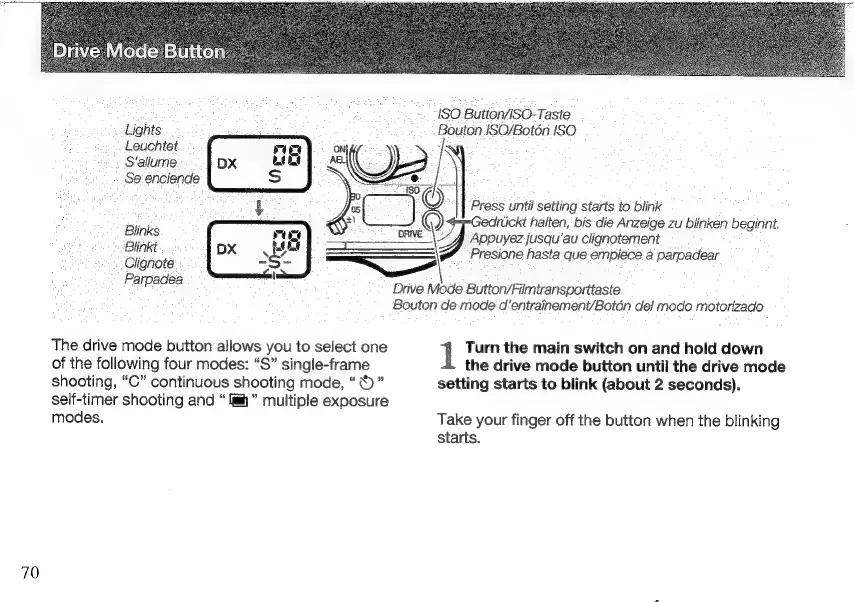
ISO
Button/ISO-Taste
Lights
:
Bouton
ISO/Botón.
ISO
Leuchtet
rum
ON
;
S'allume
DX
LD
Nr
est
~
Se
enciende
S
E E
d
)
Se
+
Press
until
setting
starts
to
blink
:
me
Gedrückt
halten,
bis
die
Anzeige
zu
blinken
beginnt.
B
links
=
Y
gerei
jusqu’au
clignotement
Blink
——
SE
hasta
que
empiece
a
parpadear
¿Clignote
TELA
Parpadea
The
drive
mode
button
allows
you
to
select
one
of
the
following
four
modes:
“S”
single-frame
shooting,
“C”
continuous
shooting
mode,
*
i
"
self-timer
shooting
and
h
multiple
exposure
modes.
Drive
Mode
Button/Filmtransporttaste
Bouton
de
mode
d’entrainement/Botön
del
modo
motorizado
Turn
the
main
switch
on
and
hold
down
the
drive
mode
button
until
the
drive
mode
setting
starts
to
blink
(about
2
seconds).
Take
your
finger
off
the
button
when
the
blinking
starts.

Other manuals for Contax Aria

Related product manuals