EasyManua.ls Logo

Contax Aria - Mounting and Dismounting the Lens

Contax Aria
114 pages
Print Icon
To Next Page IconTo Next Page
To Previous Page IconTo Previous Page
Loading...
72
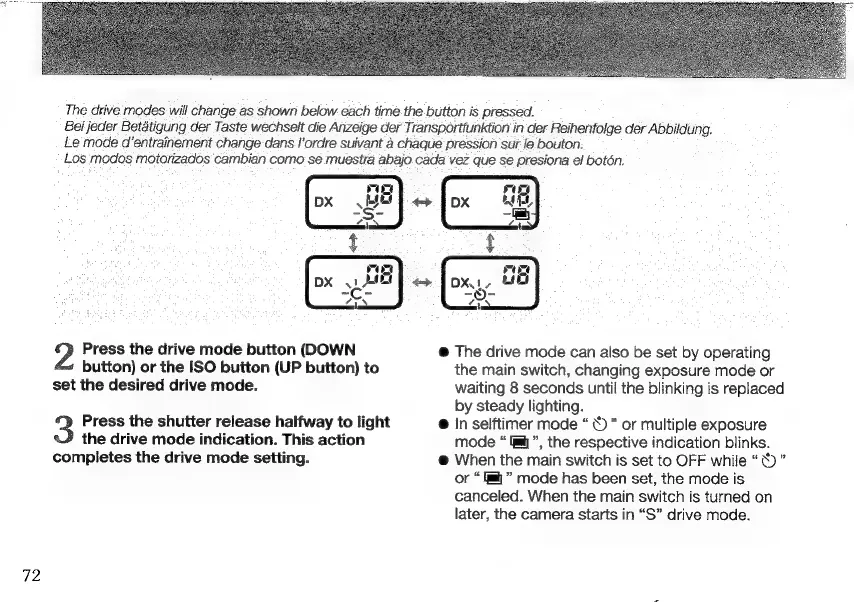
The
drive
modes
will
change
as
shown
below
each
time
the
button
is
pressed.
Bei
jeder
Betätigung
der
Taste
wechselt
die
Anzeige
der
Transportfunktion
in
der
Reihenfolge
der
Abbildung.
Le
mode
d’entrainement
change
dans
l'ordre
suivant
à
chaque
pression
sur
le
bouton.
Los
modos
motorizados
cambian
como
se
muestra
abajo
cada
vez
que
se
presiona
el
botón.
Press
the
drive
mode
button
(DOWN
button)
or
the
ISO
button
(UP
button)
to
set
the
desired
drive
mode.
Press
the
shutter
release
halfway
to
light
the
drive
mode
indication.
This
action
completes
the
drive
mode
setting.
The
drive
mode
can
also
be
set
by
operating
the
main
switch,
changing
exposure
mode
or
waiting
8
seconds
until
the
blinking
is
replaced
by
steady
lighting.
e
In
selftimer
mode
Ù
or
multiple
exposure
mode
Imij
",
the
respective
indication
blinks.
When
the
main
switch
is
set
to
OFF
while
"ën"
or
“a”
mode
has
been
set,
the
mode
is
canceled.
When
the
main
switch
is
turned
on
later,
the
camera
starts
in
“S”
drive
mode.

Other manuals for Contax Aria

Related product manuals