EasyManua.ls Logo

Contax Aria - Page 45

Contax Aria
114 pages
Print Icon
To Next Page IconTo Next Page
To Previous Page IconTo Previous Page
Loading...
96
Set
the
exposure
mode
selector
lever
to
“Ay.
2
Set
the
aperture
and
shoot.
When
setting
the
aperture
with
the
lens
aperture
ring,
the
camera
will
automatically
set
a
suitable
shutter
speed.
The
set
aperture
and
the
automatically
set
shutter
speed
light
in
the
viewfinder.
It
does
not
matter
where
the
shutter
speed
dial
is
set.
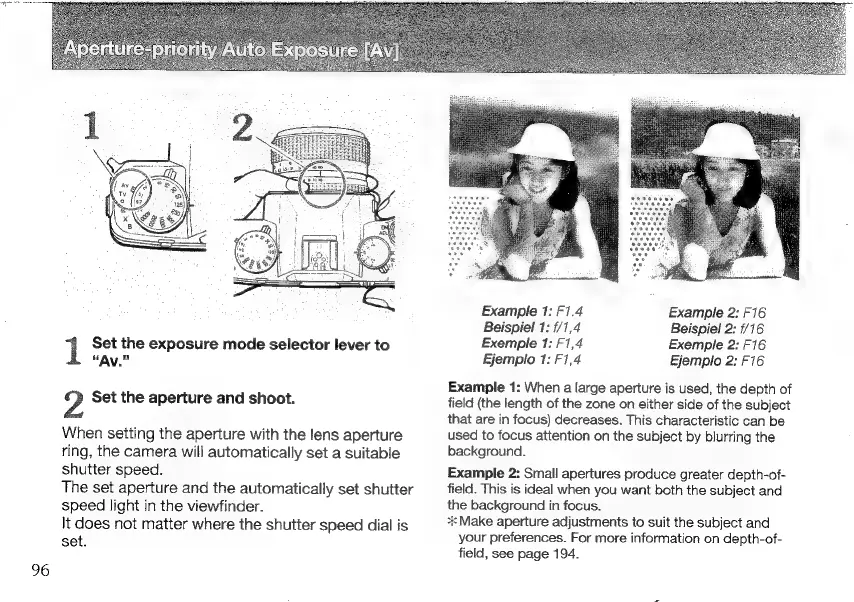
Example
1:
F1.4
Example
2:
F16
Beispiel
1:
1/1,4
Beispiel
2:
1/16
Exemple
1:
F1,4
Exemple
2:
F16
Ejemplo
1:
F1,4
Ejemplo
2:
F16
Example
1:
When
a
large
aperture
is
used,
the
depth
of
field
(the
length
of
the
zone
on
either
side
of
the
subject
that
are
in
focus)
decreases.
This
characteristic
can
be
used
to
focus
attention
on
the
subject
by
blurring
the
background.
Example
2:
Small
apertures
produce
greater
depth-of-
field.
This
is
ideal
when
you
want
both
the
subject
and
the
background
in
focus.
Make
aperture
adjustments
to
suit
the
subject
and
your
preferences.
For
more
information
on
depth-of-
field,
see
page
194.

Other manuals for Contax Aria

Related product manuals