11
Sleep Timer
Set a timer for the TV to turn off automatically.
Press ◄/► button to select (Off / 5min / 10min / 15min / 30min / 60min / 90min
/120min / 180min / 240min).
Time Zone
Select your time zone.
Press ◄/► button to select
(Central / Mountain / Pacific / Alaska / Hawail / Atlantic /
Eastern).
Daylight Saving Time
Set the daylight saving time for your area.
Press ◄/► button to select (On / Off).
Time Format
Select your time format.
Press ◄/► button to select (12-hour or 24-hour).
Auto Clock
Use to synchronize the display automatically.
Press ◄/► button to select (On / Off).
TV Operation and System Setup
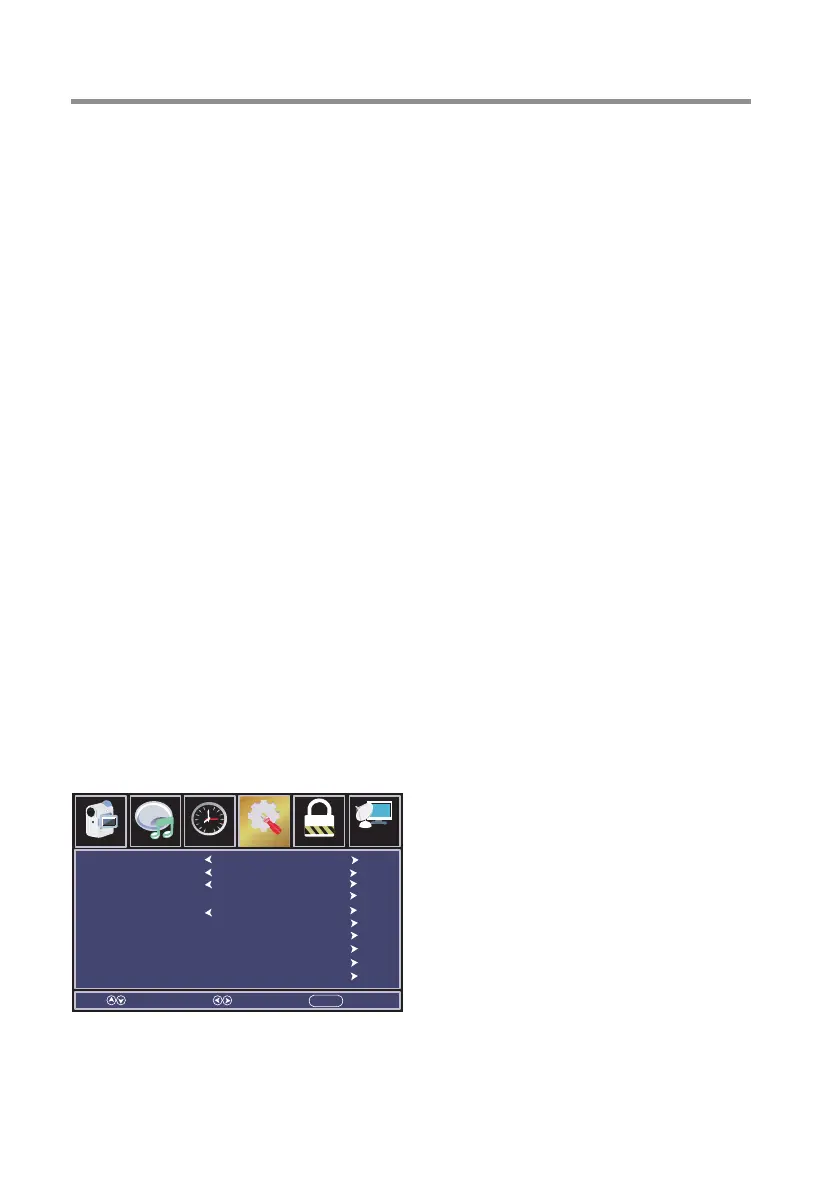
Setup Menu
Press MENU button to display the main menu, press◄/►button to select Setup.
Press ▼/▲ button to select submenu.
Press ◄ / ► button to adjust options.
Press MENU button to back the previous menu.
Menu Language
Transparent
OSD Timeout
Closed Caption
Over Scan
Input Label
PC Settings
Other Settings
Restore Default
Setup Wizard
Select Move EXITMENU
English
25%
45 S
On
Parental ChannelAudio
Picture
Time
12
6
Setup


 To Next Page