12
TV Operation and System Setup
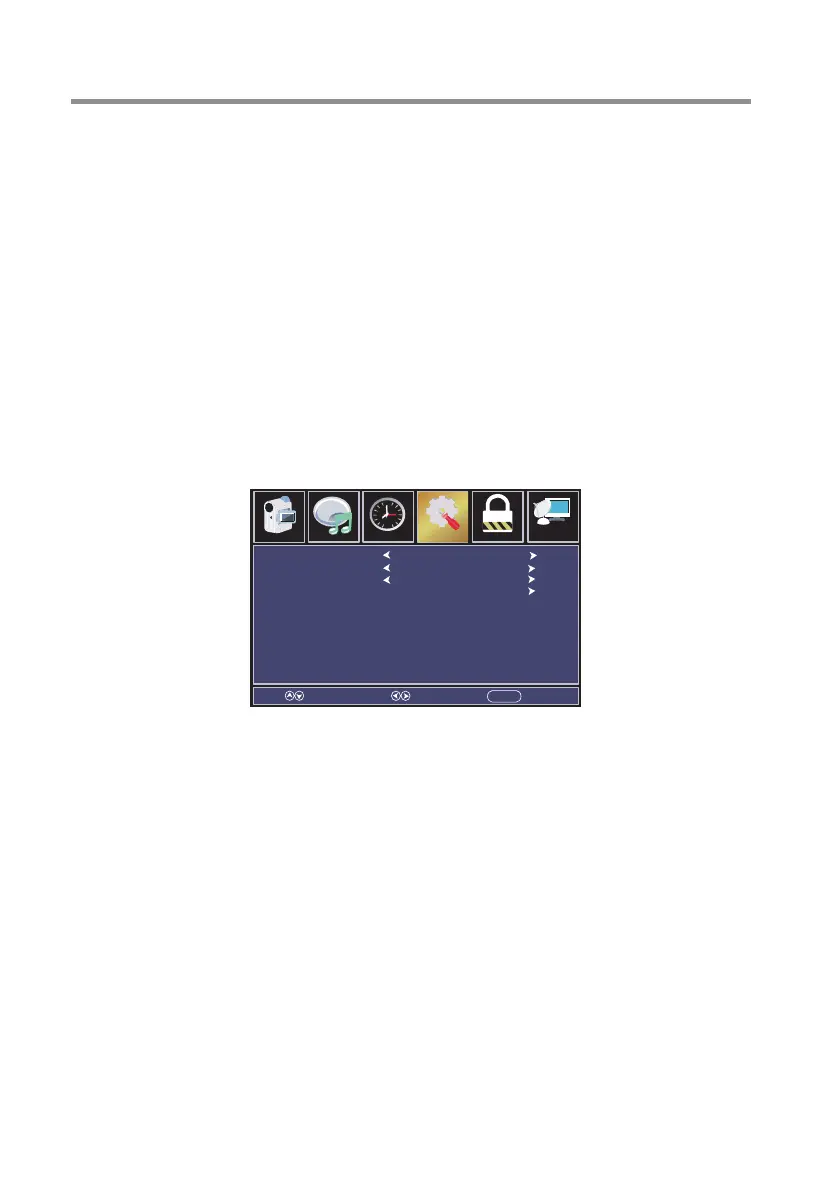
Menu language
Select the language for the on screen display and menu. Default setting is English.
Press ◄ / ► button to select language.
Transparent
Adjust the transparency of the OSD (on screen display) menu.
Press ◄ / ► button to select.(On / Off)
OSD Timeout
Adjust the duration of the OSD (on screen display) menu.
Press ◄ / ► button to select.
Closed Caption
Adjust Closed Caption settings. Only available under TV and AV source.
Press ◄ / ► button to select.
[CC Mode]
Turn Closed Captioning on/off.
Press ◄/► button to select(CC Off / CC On / CC On Mute).
[Analog CC]
Set Closed Captioning for standard(analog) program.
Press ◄/► button to select(Off / CC1 / CC2 / CC3 / CC4 / TEXT1 / TEXT2 /
TEXT3 / TEXT4).
[Digital CC]
Set Closed Captioning for digital program.
Press ◄/► button to select(Off / Servicel / Service2 / Service3 / Service4 /
Service5 / Service6).
[Option]
Adjust the digital Closed Captioning setting.
Press ► button to enter.
CC Mode
Analog CC
Digial CC
Option
Select Move EXITMENU
CC Off
CC1
Service1
Parental ChannelAudio
Picture
Time
12
6
Setup


 To Next Page