13
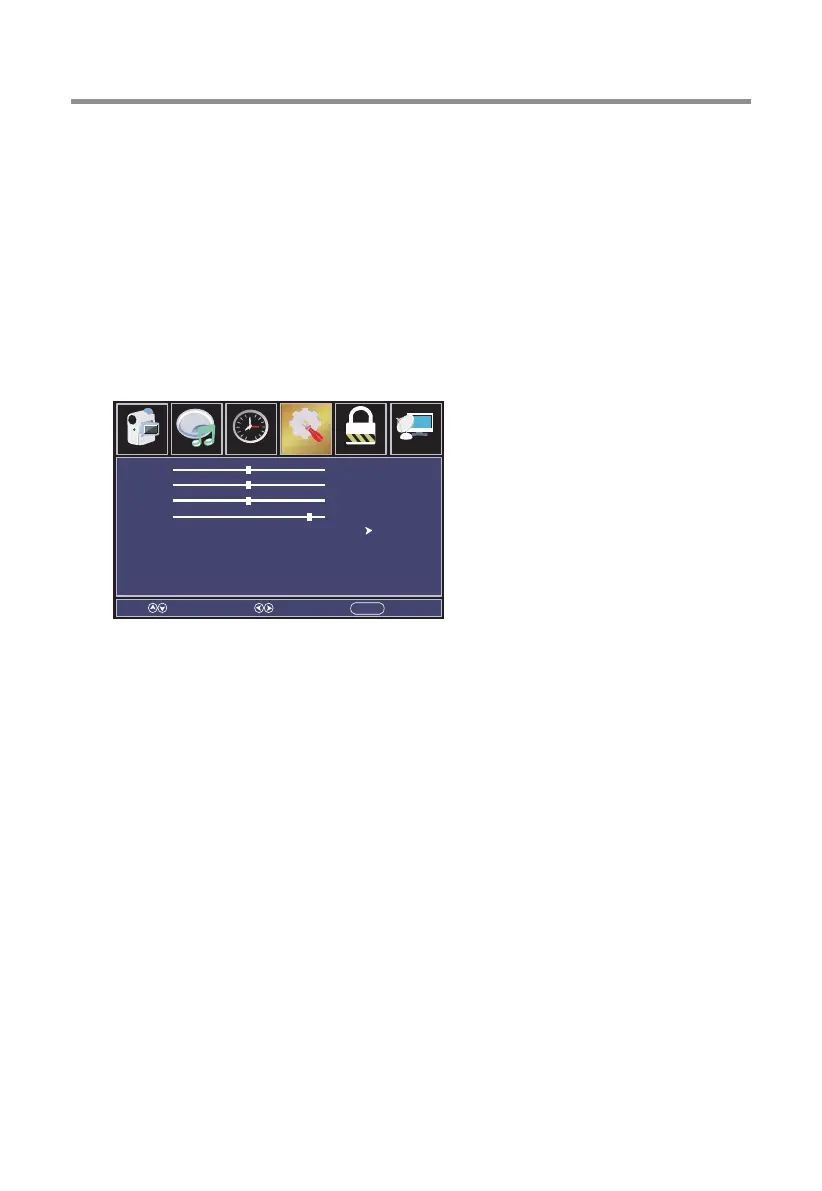
[H-Pos]
Adjust the horizontal position of the picture.
Press ◄ / ► button to adjust.
[V-Pos]
Adjust the vertical position of the picture.
Press ◄ / ► button to adjust.
[Clock]
Adjust the vertical position of the picture.
Press ◄ / ► button to adjust.
[Phase]
Adjust the horizontal interfering lines.
Press ◄ / ► button to adjust.
[Auto]
Allow the television to set the optimal picture position automatically based on
the signal being received.
Press ► button to enter.
TV Operation and System Setup
Over Scan
Press ◄/► button to select(On/Off).
Input Label
Create label for the devices connected to your TV.
Press OK / ► button to enter.
PC Settings (Only display in the VGA mode)
Adjust the position of images displayed on screen once you connect an input signal
from your PC.
Press OK / ► button to enter.
H-pos
V-pos
Clock
Phase
Auto
Select Move EXITMENU
50
50
50
95
Parental ChannelAudio
Picture
Time
12
6
Setup


 To Next Page