Model 2424www.rinnaiamerica.com 10
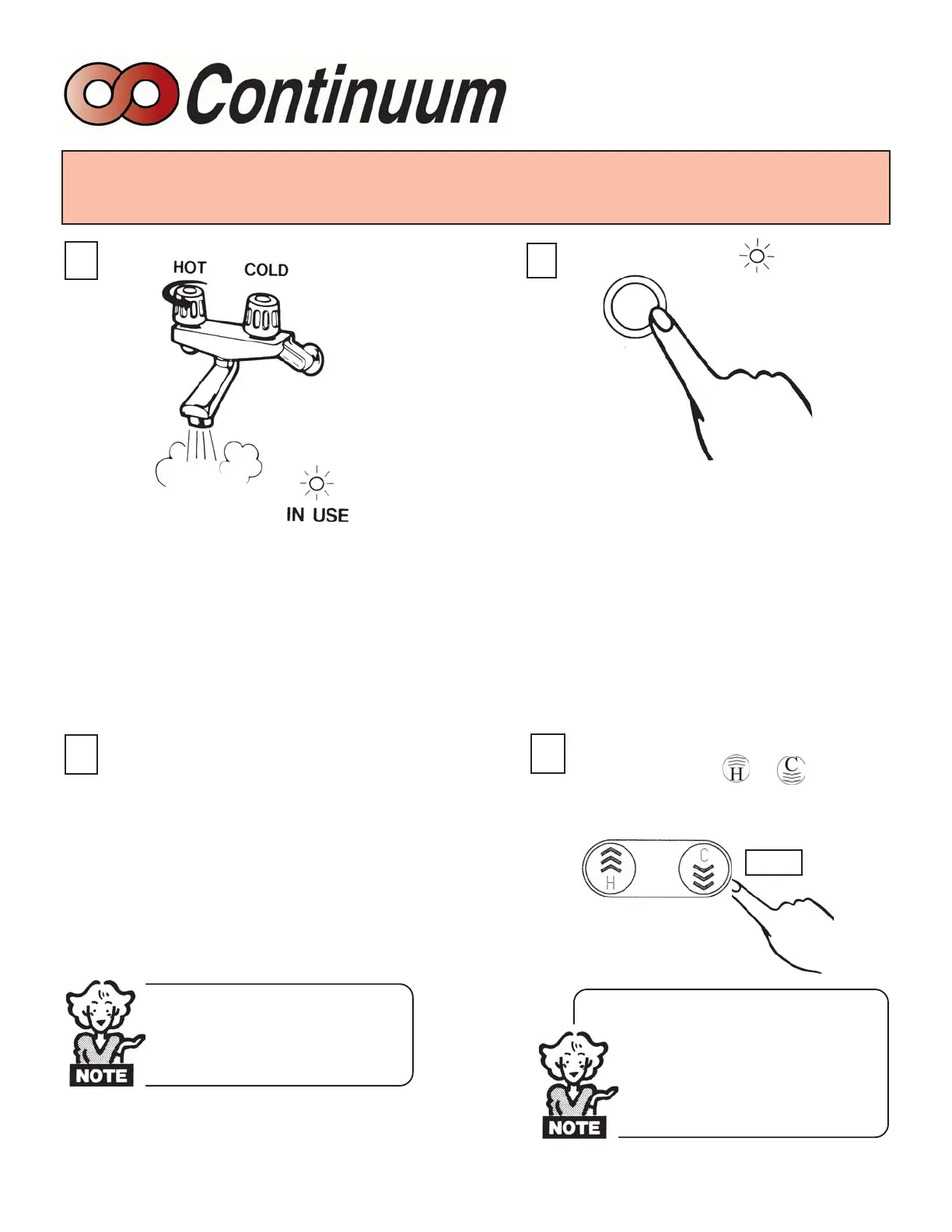
To operate the Continuum 2424 simply turn
any hot water tap on. This will automatically
light the burner providing hot water at the
preset temperature. If the optional remote
controls have been installed, the green IN USE
indicator will glow on all remote controls.
Adjusting Temperature
1
To take control of the Continuum 2424 all
hot water taps must be closed. Press the
“Priority button” on the control you want to
set the temperature with and the yellow
“Priority” indicator will glow on the Control
which you have pressed the “Priority
button” on. This indicates that the Con-
tinuum 2424 is ready to supply hot water
at the set temperature as soon as a tap is
opened.
The temperature can only be adjusted
on the Remote Control where the Priority
indicator is glowing, and the same tem-
perature will be displayed
on all Controls.
98F
110F
3
Simply press the or button
until the required temperature is dis-
played on the Digital Monitor.
4
110°F
2
TEMPERATURE CANNOT BE
ADJUSTED EXCEPT BE-
TWEEN 96°F AND 110°F
WHEN ANY HOT WATER
TAP IS OPEN.
CHECK WATER TEMPERA-
TURE BEFORE ENTERING
SHOWER OR BATH.
Always test the water temperature
in bath before a child gets in.
This is best done by the parent
placing their elbow in the water.
BASIC OPERATION
Priority


 To Next Page