DOWNLOAD THE CONTIXO F28 APP
1. DOWNLOAD THE CONTIXO F28 APP
QR code of "Contixo F28" App
for App Store (for iOS)& Google Play Store ( for Android)
• To connect the drone, access "Settings" from the smartphone, open the "Wi-Fi
Settings" and find the "Contixo F28-XXXX". When the link has successfully
completed, please exit the "Settings app".
• Open "Contixo F28" App from your smartphone to access the control interface.
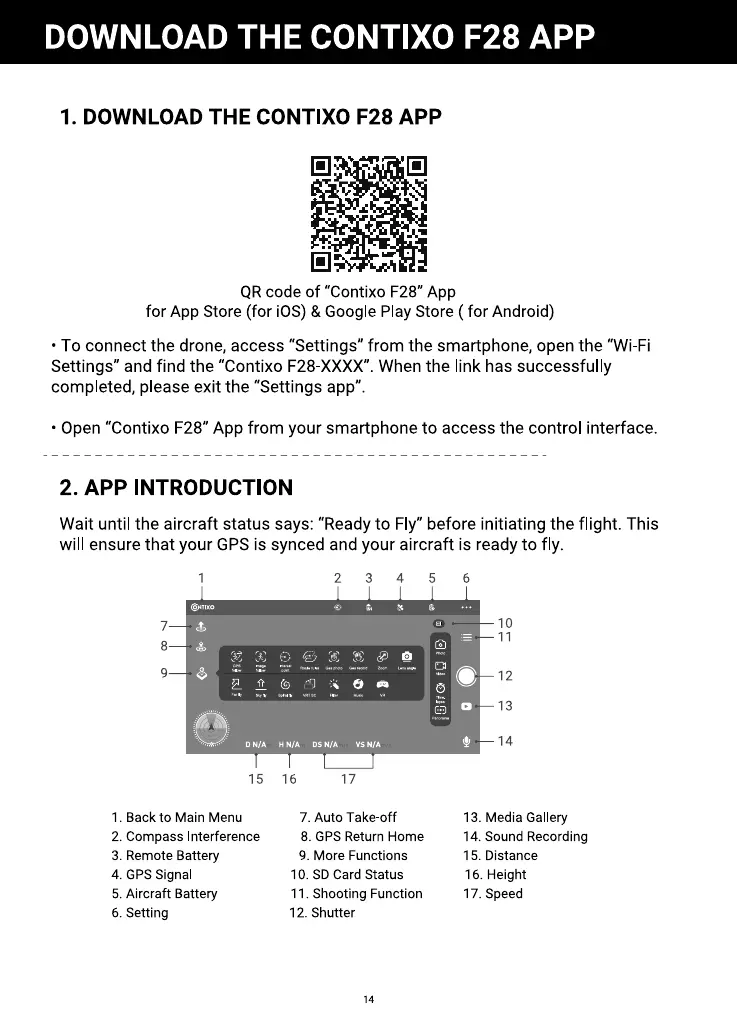
2. APP INTRODUCTION
Wait until the aircraft status says: "Ready to Fly" before initiating the flight. This
will ensure that your GPS is synced and your aircraft is ready to fly.
ONnxo
7
8
9
15
. Back to Main Menu
2. Compass Interference
3. Remote Battery
4. GPS Signal
5. Aircraft Battery
6. Setting
16
2
17
7. Auto Take-off
6
8. GPS Return Home
9. More Functions
10. SD Card Status
11. Shooting Function
12. Shutter
14
6
10
11
12
13
14
13. Media Gallery
14. Sound Recording
15. Distance
16. Height
17. Speed



 To Next Page