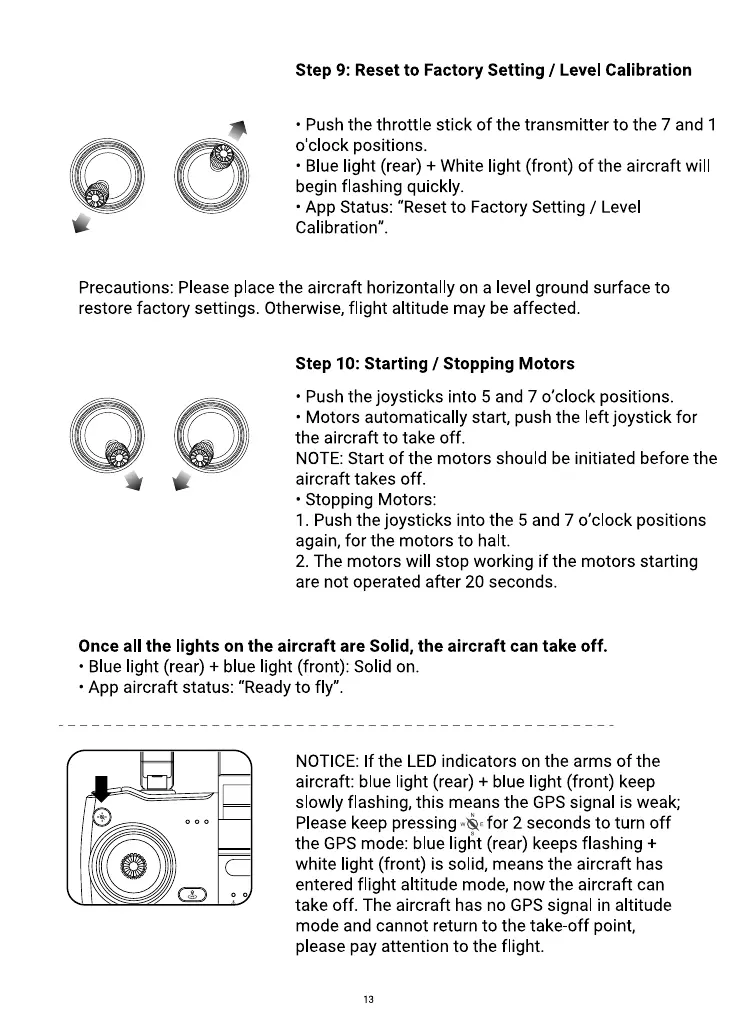
Step 9: Reset to Factory Setting / Level Calibration
• Push the throttle stick of the transmitter to the 7 and 1
o'clock positions.
• Blue light (rear) + White light (front) of the aircraft will
begin flashing quickly.
• App Status: "Reset to Factory Setting / Level
Calibration".
Precautions: Please place the aircraft horizontally on a level ground surface to
restore factory settings. Otherwise, flight altitude may be affected.
Step 10: Starting / Stopping Motors
• Push the joysticks into 5 and 7 0'clock positions.
• Motors automatically start, push the left joystick for
the aircraft to take off.
NOTE: Start of the motors should be initiated before the
aircraft takes off.
• Stopping Motors:
I. Push the joysticks into the 5 and 7 0'clock positions
again, for the motors to halt.
2. The motors will stop working if the motors starting
are not operated after 20 seconds.
Once all the lights on the aircraft are Solid, the aircraft can take off.
• Blue light (rear) + blue light (front): Solid on.
• App aircraft status: "Ready to fly".
NOTICE: If the LED indicators on the arms of the
aircraft: blue light (rear) + blue light (front) keep
slowly flashing, this means the GPS signal is weak;
Please keep pressing for 2 seconds to turn off
the GPSmode: blue light (rear) keeps flashing +
white light (front) is solid, means the aircraft has
entered flight altitude mode, now the aircraft can
take off. The aircraft has no GPS signal in altitude
mode and cannot return to the take-off point,
please pay attention to the flight.
13



 To Next Page