Front
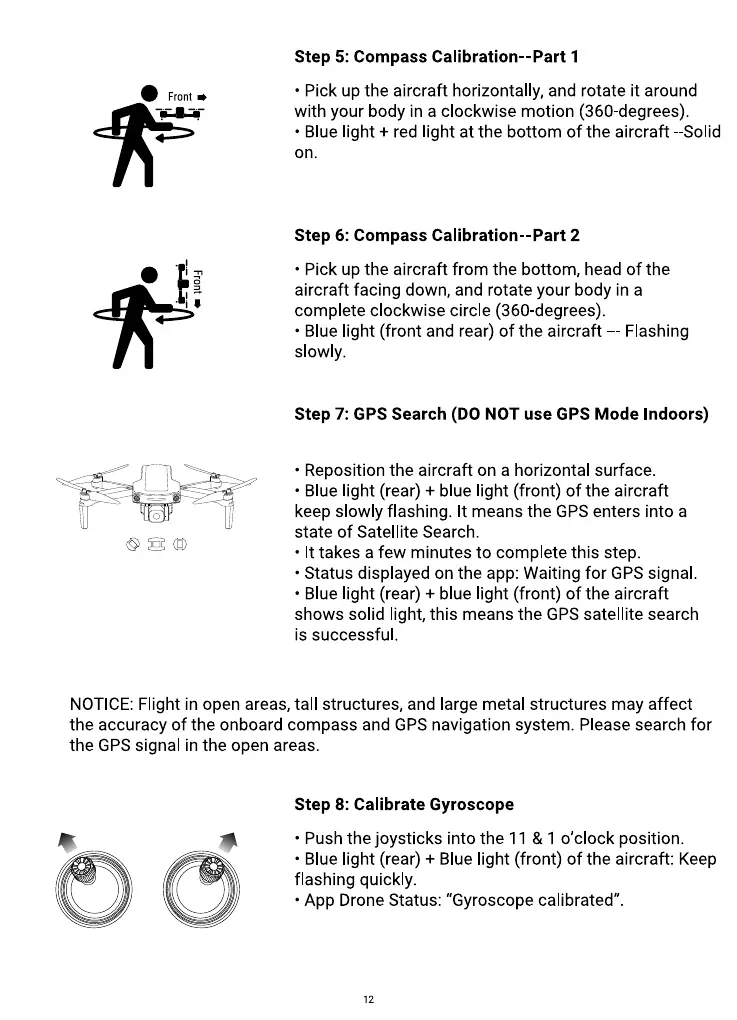
Step 5: Compass Calibration--Part 1
• Pick up the aircraft horizontally, and rotate it around
with your body in a clockwise motion (360-degrees).
• Blue light + red light at the bottom of the aircraft -Solid
on.
Step 6: Compass Calibration--Part 2
• Pick up the aircraft from the bottom, head of the
aircraft facing down, and rotate your body in a
complete clockwise circle (360-degrees).
• Blue light (front and rear) of the aircraft — Flashing
slowly.
Step 7: GPS Search (DO NOT use GPS Mode Indoors)
• Reposition the aircraft on a horizontal surface.
• Blue light (rear) + blue light (front) of the aircraft
keep slowly flashing. It means the GPS enters into a
state of Satellite Search.
• It takes a few minutes to complete this step.
• Status displayed on the app: Waiting for GPS signal.
• Blue light (rear) + blue light (front) of the aircraft
shows solid light, this means the GPS satellite search
is successful.
NOTICE: Flight in open areas, tall structures, and large metal structures may affect
the accuracy of the onboard compass and GPS navigation system. Please search for
the GPS signal in the open areas.
Step 8: Calibrate Gyroscope
• Push the joysticks into the 11 & 1 0'clock position.
• Blue light (rear) + Blue light (front) of the aircraft: Keep
flashing quickly.
• App Drone Status: "Gyroscope calibrated"
12



 To Next Page