Download the Contixo F36 App
Interface Description
When Using the App:
The Contixo F36 App supports Android Ver: 6.0 and
above, and iOS Ver: 10.0 and above. Scan the QR code
to the right to download the app.
For the best experience and all features, be sure to
connect your phone to the device through the app.
• Ensure your phone is fully charged before use.
• When operating the drone, be sure to focus on your flight without distractions.
• Do not answer calls, send or receive text messages or use other live phone functions
when in flight.
• The maps used by in-app must be downloaded from the internet, before using this
function. It is recommended you connect your mobile device to the internet to cache the
map files.
• The F36 drone will continually upgrade and occasionally add new features from time
to time, so the contents of this section may differ from the current app version.
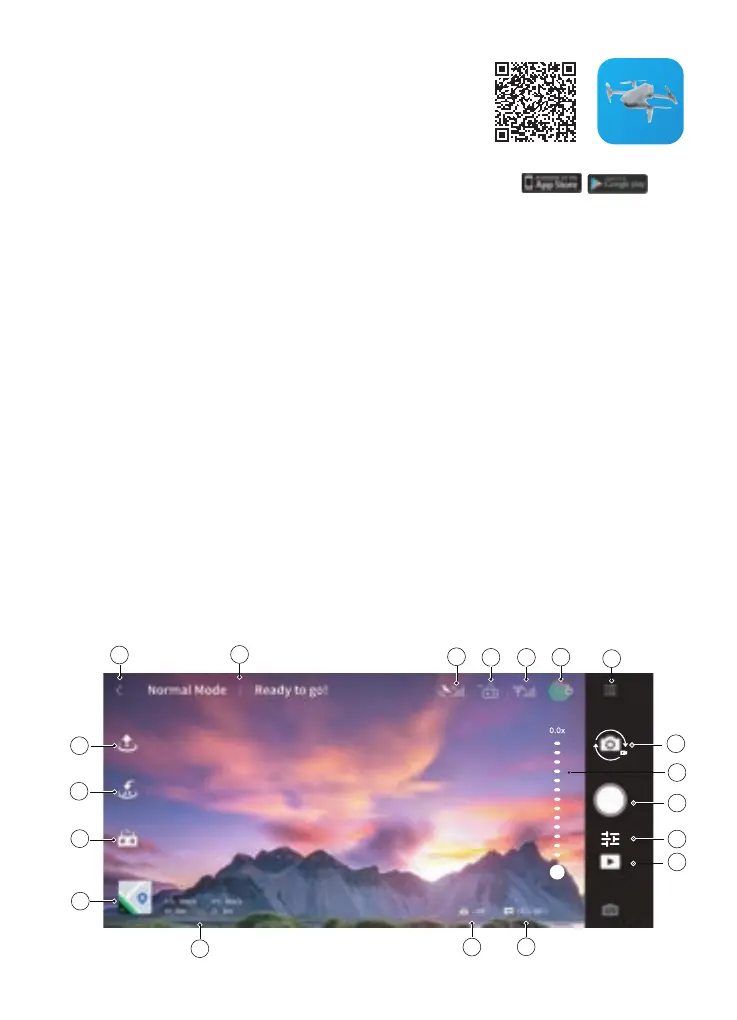
Through the Contixo F36 App, users can stream real-time video, view photos and video
recordings, as well as check the current status of the aircraft. Users can control the
aircraft, the camera, set flight parameters, and initiate various functions.
Power on the remote control, connect the controller to your phone, via the included data
cable. Open the app homepage, when the upper left-hand corner of the interface says:
“Connected device”, select: “Start Flight” to enter the control interface.
4
2
1
5
6
7
8
9
11
10
12
15
14
16
17
19
18
3
13
12
Contixo F36



 To Next Page