EasyManua.ls Logo

Contour rollermouse pro3 - User Manual

Contour rollermouse pro3
11 pages
Print Icon
To Next Page IconTo Next Page
Loading...
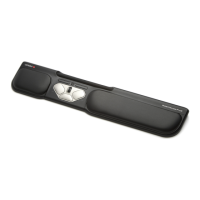
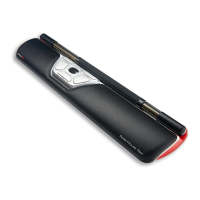
RollerMouse Pro3
User Guide
User Guide
Question and Answer IconNeed help?

Do you have a question about the Contour rollermouse pro3 and is the answer not in the manual?

Summary

RollerMouse Functions Overview

Rollerbar and Core Actions

Covers rollerbar use for cursor movement, left-click, and scroll wheel functionality.

Dedicated Buttons and Features

Explains the Copy, Paste, Double-Click, and Cursor Speed adjustment buttons.

Keyboard Positioning

Using Keyboard Risers for Height and Angle

Guide to using risers to achieve optimal keyboard height and angle for ergonomic positioning.

Understanding Tilt Adjustments

Explains the benefits and application of positive, neutral, and negative keyboard tilts.

Inserting Keyboard Risers

Connecting to a Computer

Click Force Tension Adjustment

Using the Rollerbar

Changing Cursor Speed

User Settings and Modes

Different Mode Settings Explained

Changing Double Click Button Function

Product Warranty Information

Summary

RollerMouse Functions Overview

Rollerbar and Core Actions

Covers rollerbar use for cursor movement, left-click, and scroll wheel functionality.

Dedicated Buttons and Features

Explains the Copy, Paste, Double-Click, and Cursor Speed adjustment buttons.

Keyboard Positioning

Using Keyboard Risers for Height and Angle

Guide to using risers to achieve optimal keyboard height and angle for ergonomic positioning.

Understanding Tilt Adjustments

Explains the benefits and application of positive, neutral, and negative keyboard tilts.

Inserting Keyboard Risers

Connecting to a Computer

Click Force Tension Adjustment

Using the Rollerbar

Changing Cursor Speed

User Settings and Modes

Different Mode Settings Explained

Changing Double Click Button Function

Product Warranty Information

Contour rollermouse pro3 Specifications

General IconGeneral
TypeRollerMouse
Product NameContour RollerMouse Pro3
CategoryMouse
ConnectionWired
Connectivity TechnologyUSB
Buttons Qty8
Pointing Device TechnologyOptical
Scroll WheelYes
Ergonomic DesignYes
Cable Length6 ft
CompatibilityWindows, Mac
FeaturesAdjustable

Related product manuals