EasyManua.ls Logo

Contrel CTT4 - User Manual

Contrel CTT4
8 pages
Print Icon
To Next Page IconTo Next Page
Loading...
CTT4 instruction manual IM301-U v2.1 pag. 1 / 8
INSTRUCTION MANUAL
IM301-U v2.1
CTT4 TEMPERATURE MONITOR DEVICE
GENERALITY
The device of control temperatures CTT4 is used in the control of
electric machine, transformer, motor, etc. where it’s possible to control
the temperature level signalling the critical temperature condition or to
disable the machine under control. For example for the control the
temperature of supplying transformer, where it’s possible to control the
temperatures of three coils of phase and the nucleus, using the tripped
output (TRIP) to cut off the load and eventually the functions of
ventilation control.
Another important function is the presence of one port of serial
communication RS485, that allows the connection to system of
acquisition (PC, PLC, scada, etc.) of the measure data, control and
programming of the device.
The MODBUS-RTU is the protocol used, it’s documented in a specific
manual.
A software for Windows environment is available for a management of
the devices with complete function of control, storing data, recording
alarm, etc.
It’s available a analogue output settable 0-20 or 4-20 mA with end-scale 200°C to join to one of channel or to the higher
of the 4 temperature channels.
INTRODUCTION
The device type CTT4 allows the control and the visualization of temperature read with probe type RTD PT100 ().
For each channel of measure are available two levels of alarm (alarm-tripped) that active the commutation of the relative
output relay for signalling at distance or to disable the machine under control. On front of the instrument on a double
display at 3 digit, it’s possible the visualization of the temperatures, the visualization of the status of the alarm of the
measure channels and 5 button for the programming. The instrument is completed by the functions of ventilation control,
storing maximum values and storing of the tripped.
ACCESSORIES AND OPTION
accessories
: transparent cover of frontal protection
options
: serial output RS485
analogical output 0-20mA (4-20mA)
INSTALLATION
Foreward.
Read carefully the present manual before to install and use the device.
The device described in this manual must be installed and used by personal opportunely learned.
Security.
Before to proceed at the installation it’s necessary verify if the device is intact and it haven’t damages caused by transport. The power
supply must be compatible with the tool range. The instrument installation must be done in total absence of voltage and observing the
security norm in force. All operation of maintenance and reparation executed by not authorized person are forbidden. If during of
functioning the device loose the security, it’s necessary to put it out of service and to be sure that this device will not use unintentionally.
The use can be considered insecure when the instrument: - don’t function regularly / - have damage clearly visible / - have
damage caused of transport / - is stored in bad condition
CONNECTION OF THE THERMOMETER SENSORS
For the connection of the thermometer sensor RTD Pt100 it’s necessary to follow the indication of the wiring diagram of
this manual: pay attention not to invert the position between the conductors with red insulator and the conductor with
white insulator. The probes type PT100 with 3 wires use a third wire to compensate the resistance of the conductors. If
the sensor has 2 wires (normally white and red) it’s necessary to short-circuit the terminals with the red wires (1-2, 4-5, 7-
8, 10-11).
To reduce the external noises it’s necessary to use the following indication for the wires of measure of the Pt100:
to use probes with shielded wire connected at earth and wires twisted
to separate the wires of the probes from wires of power
to use wires with section higher than 0,5 mm
2
to use wires with conductor with tin or silver-plated
Question and Answer IconNeed help?

Do you have a question about the Contrel CTT4 and is the answer not in the manual?

Summary

GENERALITY

INTRODUCTION

Device CTT4 controls and visualizes temperatures from RTD PT100 probes.

ACCESSORIES AND OPTIONS

Lists available accessories and optional features for the device.

INSTALLATION

Instructions for safe and proper installation of the device.

Security

Critical safety precautions for installation and device usage.

THERMOMETER SENSOR CONNECTION

Guidance on correctly wiring RTD Pt100 thermometer sensors.

OUTPUT RELAYS

WIRING CONNECTION GUIDE

Diagram and explanation for connecting probes and auxiliary power.

FRONT PANEL OPERATOR DESCRIPTION

FRONT PANEL LEGEND

Explains the meaning of LEDs, displays, and buttons on the front panel.

DEVICE PROGRAMMING GUIDE

HOLD FUNCTION SETTINGS

How to enable/disable the Hold function for alarm rearming.

ACTIVE INPUTS SELECTION

Setting whether 3 or 4 inputs are active for measurement.

VENTILATION CONTROL CONFIGURATION

Configuration options for the device's ventilation control function.

VENTILATION THRESHOLD SETTINGS

Setting temperature thresholds for ventilation switch-on and switch-off.

DISABLE VENTILATION THRESHOLD

Setting the temperature value to disable ventilation.

ENABLE VENTILATION THRESHOLD

Setting the temperature value to enable ventilation.

ALARM AND TRIP THRESHOLD CONFIGURATION

Configuring alarm and trip temperature thresholds for measurement channels.

MODBUS-RTU COMMUNICATION CONFIGURATION

BAUD RATE SELECTION

Setting the communication speed for the serial port.

DATA BIT, PARITY, STOP BIT SETTINGS

Configuring data bits, parity, and stop bits for serial communication.

ANALOG OUTPUT CHANNEL LINKING

Linking the analog output signal to a specific temperature channel.

OUTPUT SIGNAL TYPE CONFIGURATION

Setting the analog output signal type: 0-20mA or 4-20mA.

DIAGNOSTIC PROBE CONFIGURATION

Enabling/disabling probe variation control and setting related parameters.

TRIPPING AND RESTORE MODALITIES

ALARM SILENCING PROCEDURE

Procedure for silencing an alarm when the Hold function is disabled.

DEVICE DIAGNOSTIC FUNCTIONS

Explains probe diagnostics and fault signaling mechanisms.

RELAY STATUS OVERVIEW

Summarizes the status of device relays in different operational modes.

MAXIMUM TEMPERATURE VISUALIZATION

How to view and reset the maximum recorded temperature values.

HIGHEST TEMPERATURE CHANNEL DISPLAY

Displays channels with the highest temperatures among pairs.

INDICATOR LIGHTING TEST

Procedure to test all indicator lights on the device.

MEASURED TEMPERATURE DISPLAY

How to view current measured temperatures on the device display.

UNUSED PROBE INPUT HANDLING

Method to disable unused probe inputs by connecting a resistor.

TECHNICAL SPECIFICATIONS

DEVICE DIMENSIONS AND MOUNTING

Provides physical dimensions and mounting information for the device.

Overview

The CTT4 is a temperature monitor device designed for controlling electric machines, transformers, and motors. It monitors temperature levels and signals critical conditions or disables the controlled machine. For instance, it can monitor the temperatures of three-phase coils and the nucleus of a transformer, using a tripped output (TRIP) to cut off the load and control ventilation functions.

Function Description:

The device provides two alarm levels (alarm-tripped) for each measurement channel, activating corresponding output relays for remote signaling or machine shutdown. The front panel features a double 3-digit display for visualizing temperatures and alarm statuses, along with five buttons for programming. It also includes functions for ventilation control, storing maximum values, and recording tripped events.

A key feature is the RS485 serial communication port, enabling connection to acquisition systems (PC, PLC, SCADA, etc.) for data measurement, control, and device programming. The MODBUS-RTU protocol is used for communication, detailed in a separate manual. A Windows-based software is available for comprehensive device management, including control, data storage, alarm recording, and more. An analog output, settable to 0-20mA or 4-20mA with a 200°C end-scale, can be linked to one of the channels or the highest of the four temperature channels.

Important Technical Specifications:

  • Auxiliary Power Supply: 20-250Vca/cc ±15% or 115-230-400 Vca 50-60Hz
  • Maximum Consumption: 4 VA
  • Measure Inputs: 3-4 inputs by RTD Pt100
  • Interval of Measure: 0°C to +220°C / precision ± 2°C
  • Tripped Delay - Hysteresis: 5 seconds – 2°C
  • Measure Visualization: 2 displays with 7-segment LEDs, 3 digits
  • Outputs: 4 relay NO-C-NC, 8A resistive load
  • Output Functions: Alarm, Trip, Fan, Auto-diagnostic
  • Programmable Functions: ALARM, TRIP, HOLD, FAN, T.MAX, HOT
  • Connection: Extractible terminal with screws, max 2.5 mm² wire section
  • Insulation: 2500 Vrms 50Hz per 60 sec (U aux - input Pt100 / U aux - relay outputs / inputs Pt100 - relay outputs)
  • Protection Degree: IP52 front panel (IP65 with optional protection cover), IP20 rear panel, as CEI-EN 60529
  • Dimensions – Enclosure: Flash mounting DIN 96x96mm, depth 120mm / Enclosure thermoplastic self-extinguishing as UL94 V0
  • Working Temperature: -10°C to +55°C, humidity max 90%
  • Storing Temperature: -25°C to +80°C
  • Standards: Electromagnetic compatibility CEI-EN 50081-2 CEI-EN50082-2, security CEI 41.1, CEI-EN 60255-

Usage Features:

The CTT4 uses RTD Pt100 probes for temperature measurement. Each channel has two alarm levels: ALARM and TRIP. The ALARM and TRIP relays activate when their respective thresholds are exceeded. The FAULT relay is normally energized and de-energizes in the presence of an anomaly with the Pt100 probe or the device itself. The FAN relay controls a cooler's fan based on set switch-on and switch-off thresholds.

Front Panel Operators:

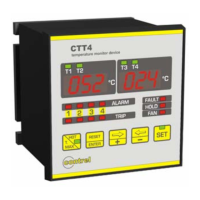
  • LEDs T1-T2-T3-T4: Indicate the displayed measure channel.
  • Displays: Show temperature values and settings.
  • LEDs ALARM: Indicate the alarm status of measure channels.
  • LEDs TRIP: Indicate the trip status (second level of alarm) of measure channels.
  • LED FAULT: Indicates device or thermometric probe failure.
  • LED HOLD: Indicates activated manual reset function.
  • LED FAN: Indicates ventilation output activation.
  • Push-button HOT / T. MAX: Selects visualization of the measure channel with the highest temperature (with LED indication activated) and displays maximum achieved temperatures.
  • Push-button ENTER / RESET: Confirms programming settings and manually resets alarm interventions.
  • Push-buttons ⇒+ / ⇐-: Selects the displayed channel and changes programming parameters.
  • Push-button SET: With LED status, accesses instrument setting programming.

Programming:

Upon power-on, the device displays internal software index, then measured temperatures. Pressing SET for a few seconds enters programming mode. Settings are displayed sequentially. To exit without saving, press SET without confirming with ENTER. To modify values, use the ⇐- and ⇒+ keys, then ENTER to store. ENTER also moves to the next function.

HOLD Function: This is the first programming function. When enabled, alarms can only be manually reset with the RESET button when the temperature is below the threshold. If disabled, alarms can be reset even if the temperature is above the threshold, but will automatically clear once the temperature drops below the threshold.

Number of Active Inputs: Selects between 3 or 4 active inputs. If 3 inputs are chosen, the T4 display remains off.

Ventilation Control: After input selection, the FAN LED illuminates. Settings include inhibited ventilation control or active control on 3 or 4 inputs (or only on the fourth input for 4-input mode). Thresholds for enabling and disabling ventilation are programmable.

Alarm and Tripped Thresholds: Programming starts with channel 1. The ALARM LED indicates alarm threshold programming, and the TRIP LED indicates tripping threshold programming. Values are set using ⇐- and ⇒+ keys within specified temperature ranges. This process is repeated for all measure channels.

Serial Port (MODBUS-RTU) Communication:

  • Network Identification Address: Sets the device's address (1-247) for RS485 communication.
  • Baud Rate: Selectable values include 2.4, 4.8, 9.6, and 19.2 kbps.
  • Data Bit, Parity, and Stop Bit: Configures parity (No, Even, Odd) and data/stop bit settings (8-1, 8-2).

Analogical Output:

  • Linked Channel: Selects which channel's measurement (CH1, CH2, CH3, CH4, or the highest temperature) is linked to the analog output.
  • Output Signal Configuration: Programs the output signal as 0-20mA or 4-20mA. Maximum load for analog output is 400Ω.

Diagnostic Probes Configuration:

This function enables/disables control on probes and monitors temperature variation over time. If the variation exceeds a set value, it indicates a problem.

  • FDC Modality: Enable or disable the FDC function.
  • Temperature Configuration FDC: Sets minimum (5°C) and maximum (30°C) variation temperatures.
  • Period Configuration FDC: Sets the time period (10-90 seconds) for control.

Exit Programming: Press SET or wait 8 seconds without pressing any key.

Modality of Tripping and Restore:

  • Alarm: Activates after 5 seconds when temperature exceeds the threshold by 1°C. The ALARM relay energizes, and the LED turns on. Restores when temperature drops 2°C below the threshold.
  • Trip: Similar to alarm, but for the TRIP relay and LED.
  • Silence Alarm: If the HOLD function is disabled, pressing RESET can silence an active alarm. The relay de-energizes, and the LED flashes. If temperature rises to TRIP minus 1°C, the relay and LED re-enable. If temperature drops below the threshold after reset, the flashing LED automatically clears.

Diagnostic Function:

The device includes diagnostic functions for thermic probes:

  • O P E: Probe Pt100 interrupted.
  • S H r: Probe in short circuit.
  • FDC: Probe out of order for wrong temperature reading. The FAULT relay energizes upon device power-on or failure and remains energized until a fault is detected. The FAULT LED also illuminates. Probe anomalies (OPE, SHR, FDC) cause the corresponding channel LED to flash. OPE and SHR alarms reset automatically, while FDC alarms require pressing ENTER for 5 seconds.

Relay Contact Status:

The manual provides a table detailing the contact status (CLOSED/OPEN) for ALARM, TRIP, FAN, and FAULT relays in DISABLE, ENABLE, and UNPOWERED states.

Visualization of Maximum Measured Temperature:

Pressing T.MAX displays the maximum measured temperature (flashing). Use ⇐- and ⇒+ keys to navigate between T1-T3 and T2-T4. After 8 seconds of inactivity, the device returns to current temperature display. To reset maximum values, press T.MAX and ⇐- simultaneously.

Visualization of Channels with Higher Temperature:

Press HOT for a few seconds to activate the HOT LED. The left display shows the hotter temperature between inputs 1 and 2, and the right display shows the hotter temperature between inputs 3 and 4. Press HOT again to return to standard display.

Test of Light Signalling:

Press ⇐- and ⇒+ keys simultaneously to make all LEDs flash for a few seconds.

Visualization of Measured Temperature:

The left display shows T1 and T2 temperatures (0°C to +220°C). The right display shows T3 and T4 temperatures (0°C to +220°C). Use ⇐- and ⇒+ keys to change displayed channels.

Exclusion of Unused Probe Inputs:

If an input is not used, a resistance of 100-120 ohms, 0.25W must be connected across terminals 1-2 (for Ch1), 4-5 (for Ch2), 7-8 (for Ch3), or 10-11 (for Ch4).

Maintenance Features:

  • Read the manual carefully before installation and use.
  • Installation and use should be performed by trained personnel.
  • Verify device integrity upon receipt; check for transport damage.
  • Ensure power supply compatibility with the device's range.
  • Installation must be done with power off, observing safety norms.
  • Unauthorized maintenance or repairs are forbidden.
  • If the device loses security during operation, remove it from service to prevent unintentional use.
  • A device is considered insecure if it malfunctions, has visible damage, transport damage, or is stored in poor condition.

Connection of Thermometer Sensors:

Follow the wiring diagram. Do not invert red and white insulated conductors. For 3-wire Pt100 probes, the third wire compensates for conductor resistance. For 2-wire probes (normally white and red), short-circuit terminals 1-2, 4-5, 7-8, or 10-11 with the red wires. To reduce external noise:

  • Use shielded wires connected to earth and twisted wires.
  • Separate probe wires from power wires.
  • Use wires with a cross-section greater than 0.5 mm².
  • Use wires with tin or silver-plated conductors.

Contrel CTT4 Specifications

General IconGeneral
BrandContrel
ModelCTT4
CategoryMeasuring Instruments
LanguageEnglish

Related product manuals