5
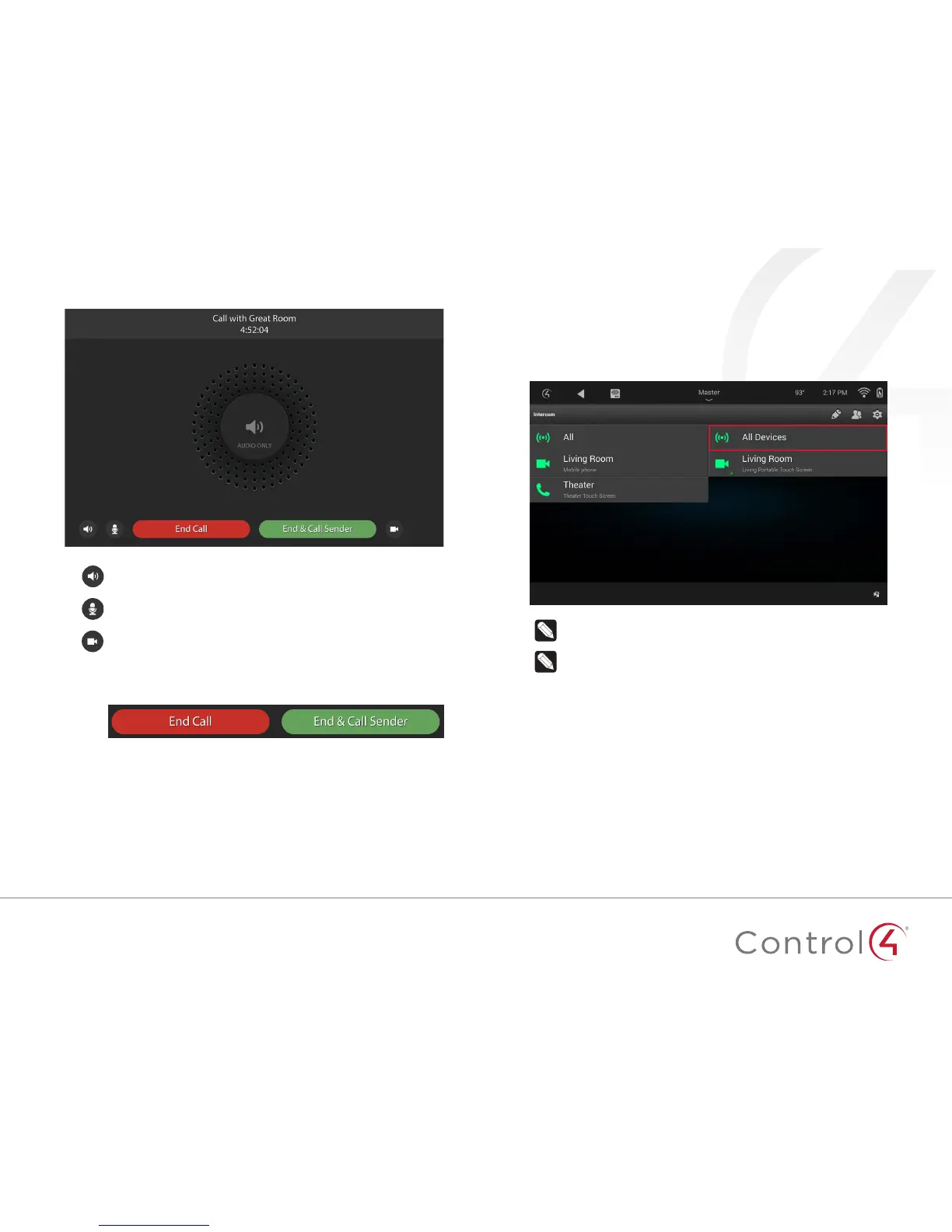
In-call menu and options
During a call these buttons appear (buttons may vary by touchscreen):
Volume—Tap to adjust the speaker volume on the touch screen.
Mic volume—Tap to adjust the microphone level on the touch screen.
Video—Tap to enable or disable video while in the call.
Call control buttons—Use to answer a call, reject a call, end a call, or
end a call and call back the sender. The buttons may vary by device
and type of Intercom call.
Making a group call
With a group call, you can tell your whole family to come to dinner from the
Intercom menu with only a single tap.
1 Choose the group of Intercom devices you want to include in the call, then
tap the name of the group.
Note: If a room’s Intercom properties are set to "Do Not Disturb,"
the Intercom device in that room will not receive the group call.
Note: A group call between dierent types of touch screens may
not behave the same as between touch screens of the same type.
Ask your dealer for more details.


 To Next Page