
 Need help?
Do you have a question about the Controls MVP-101 and is the answer not in the manual?
Explains J1939 CAN Bus network communication for engine ECU and required source address settings.
Describes how ECU actions like de-rate or shut down occur due to engine parameters outside normal ranges.
Explains how the panel displays alarm/trouble codes broadcast by the engine ECU.
Details procedures for entering, navigating, exiting the menu system, and changing settings.
Lists menu options for viewing engine information, identification, and module details.
Lists menu options for controller setup and configuration, requiring a password.
Configuration options for engine manufacturer, speed settings, and performance display.
Settings for selecting and configuring engine parameters like speed, temperature, and oil pressure.
Configuration for analog and digital inputs, including channels and custom messages.
Settings for pre-alarms, number of starts, and engine speed criteria.
Options for setting pressure/temperature units and performance display settings.
Settings for CAN bus communication, including engine manufacturer, addresses, and data transmission.
Settings for service messages, maintenance schedule selection, and interval warnings.
Settings for MOD bus communication mode, baud rate, parity, and timeouts.
This document describes the MVP-101 controller, a device designed for monitoring and controlling J1939-compliant engines. It serves as a display for engine parameters and alarm codes, and allows for configuration of various operational settings.
The MVP-101 controller communicates with the engine's Electronic Control Unit (ECU) via a J1939 CAN Bus network. This three-wire connection enables the controller to receive and display engine information and alarm codes broadcast from the ECU. A key function of the MVP-101 is to act as a trouble code reader. When the engine ECU broadcasts an SPN.FMI trouble code, the panel illuminates the appropriate LED indicator lamp (Yellow for Alarm, Red for Engine Shut Down), displays the trouble code, provides a code description on the LCD screen, and shows the occurrence count of the code. The panel also provides the ability to check both active and stored engine ECU codes through dedicated menus.
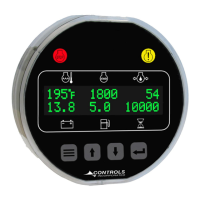
The controller features a display that shows real-time engine parameters such as temperature (e.g., 195°F), RPM (e.g., 1800 n/min), and other values (e.g., 54, 13.8, 5.0, 10000). It includes navigation buttons (up, down, menu, enter) for interacting with the menu system and a "STOP" button, likely for emergency shutdown or engine stop functionality.
The MVP-101 also incorporates analog and digital inputs to monitor additional components, senders, or signals. These inputs can be configured for various purposes, including alarms and shutdowns, expanding the monitoring capabilities beyond standard J1939 parameters.
The menu system is divided into "Viewing Menus" and "Configuration Menus." Access to configuration menus requires a password.
The Maintenance Configuration menu allows for setting up service messages and maintenance schedules. Users can define schedule intervals, warnings, and trip points, as well as reset schedules. This helps in proactive maintenance planning and ensures timely servicing of the engine and associated components. The "Services Messages (Yes/No)" option suggests the ability to enable or disable maintenance-related notifications.
 General
| Brand | Controls |
|---|---|
| Model | MVP-101 |
| Category | Control Systems |
| Language | English |

 To Next Page
