9.
5 operating instructions
- To turn the heater ON
Press on the key on the control panel.
The screen turns on, the button turns green, your device is running.
- To shut off heater operation
Press on the key on the control panel.
The green light turns orange, the screen turns off, the heater is in standby
- To set the desired temperature
Using the + and – keys, you can raise or lower the desired temperature as you wish by
1°F (0.5°C) each time the key is pressed, between 45°F and 82°F (7°C and 28°C).
- To change display in °C or °F
Shut off the heater operation. Simultaneously press keys " " and "+" and hold for
3 seconds to switch display in °C (Celsius) or °F (Fahrenheit).
- The «Timer » function
This function allows an immediate and additional 750 W of heat during a time
determined period(from 5 to 90 minutes). So you are using your device in its full power
unregulated, ie: 1500 W .
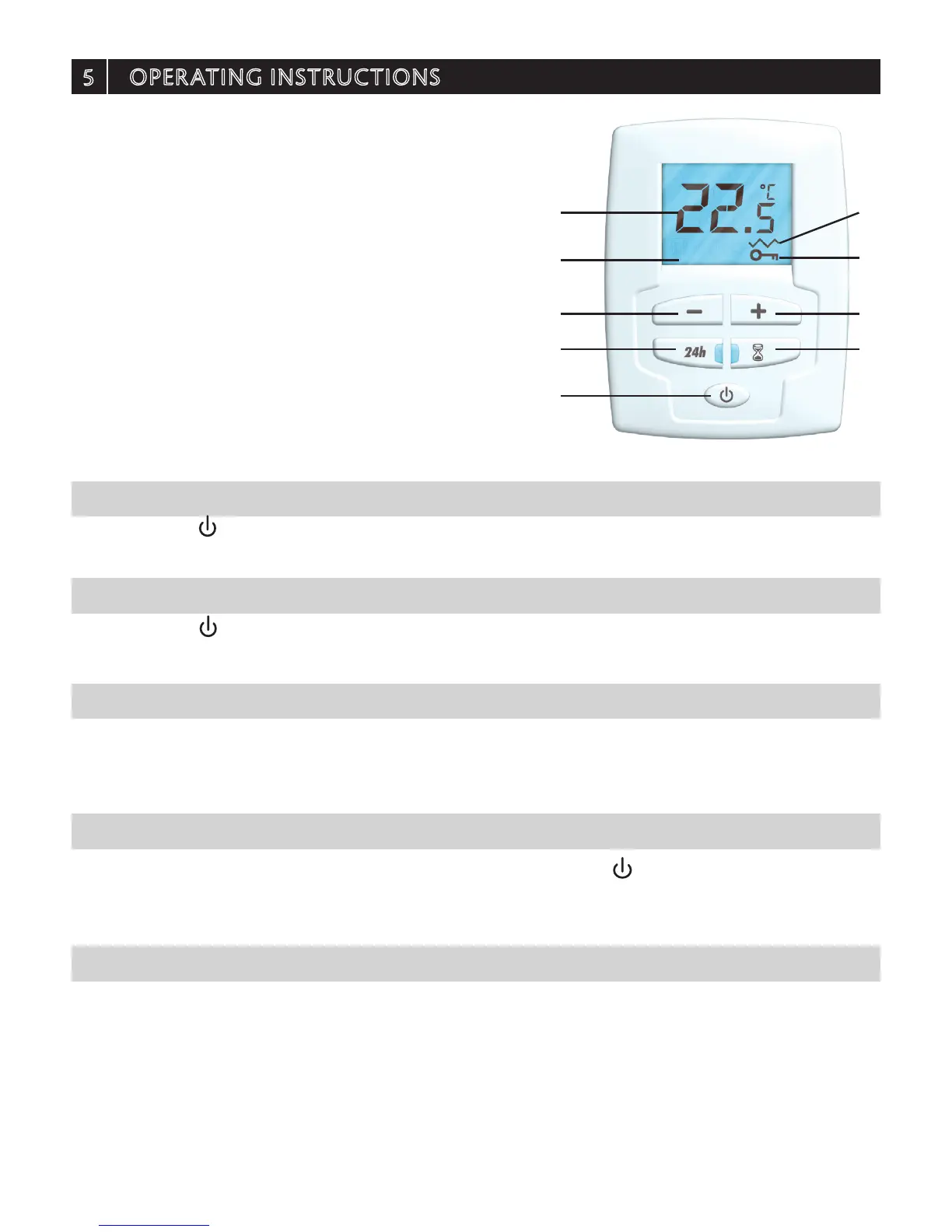
A- ON / Standby key
B- Temperature setting keys
C- Auto programming function 24H
D- Timer function
E- Backlit LCD screen
F- Temperature display
G- Locked controls indicator
H- Heating indicator symbol
B B
D
G
H
C
E
F
A


 To Next Page