9
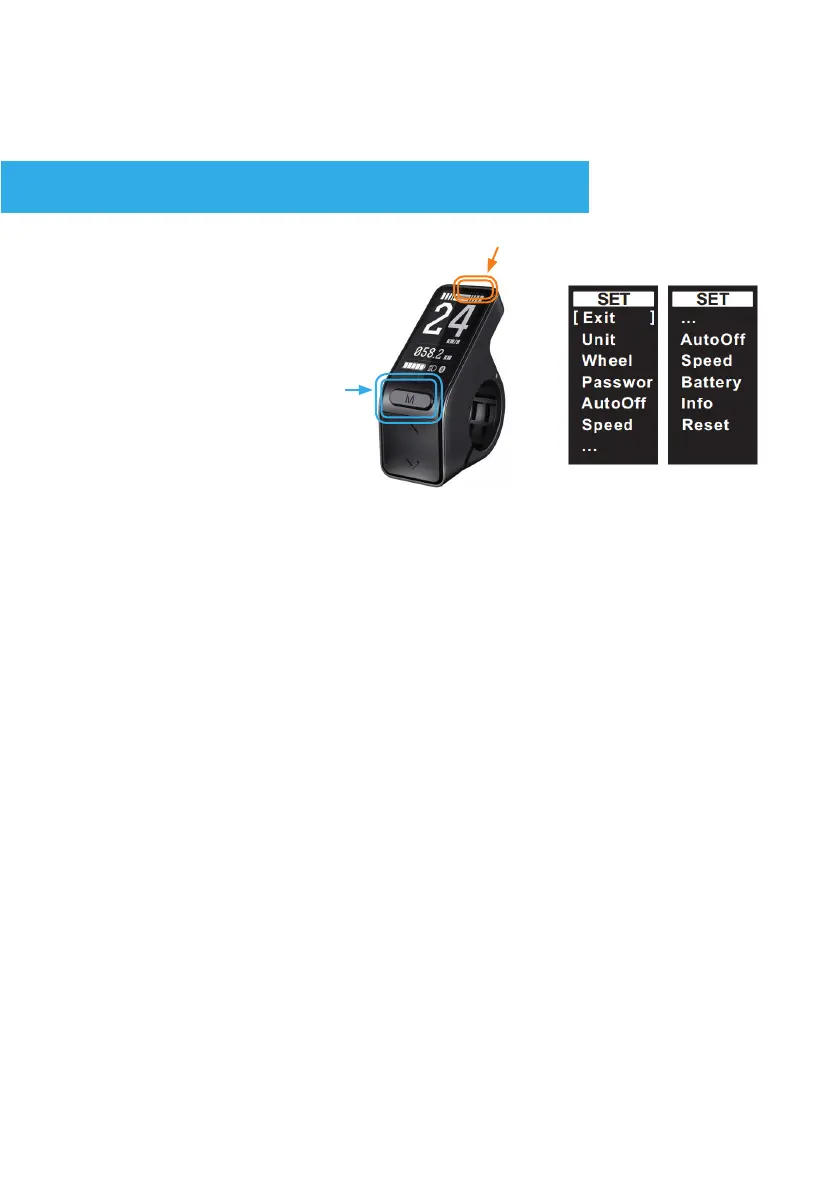
Turn the system on, within 10 Seconds press and hold Mode. The screen
will switch to the ‘setting’ menu.
Navigate the menu using short presses of the up/down keys. Select
adjustment sub-menus with a short press of the ‘M’ key.
Use the ‘M’ key and up/down to adjust the associated values(see below).
Press ‘Exit’ to accept a setting and return to the main setting menu.
To exit the settings menu, either select ‘Exit’ or wait 10 seconds for
the display to time-out and automatically revert back to the main user
mode.
UNITS
In the ‘Wheel’ menu, press ‘M’ to select the correct value to match the
wheel diameter. Selectable values include: 14, 16, 18, 20, 22, 24, 26,
27.5, 700C, 28, 29.
Select ‘Exit’ to accept a setting and return to the main setting menu.
In the ‘Unit’ setting menu, use the M button to toggle between KM/H
and MPH
Select ‘Exit’ to accept a setting and return to the main setting menu.
Enter and adjust within the settings menu.
SETTINGS
WHEEL (SIZE)
2. Press and hold
Immeditiately after startup
(before 10 seconds)
1.



 To Next Page