15
Ifusingbothpans,notethatthesamemode
mustbeselectedforbothsides.
Ifyouchoosetouseonlyoneside,bothrotating
axleswillturn,butonlythesideyouhavechosen
willheat(ifapplicable).
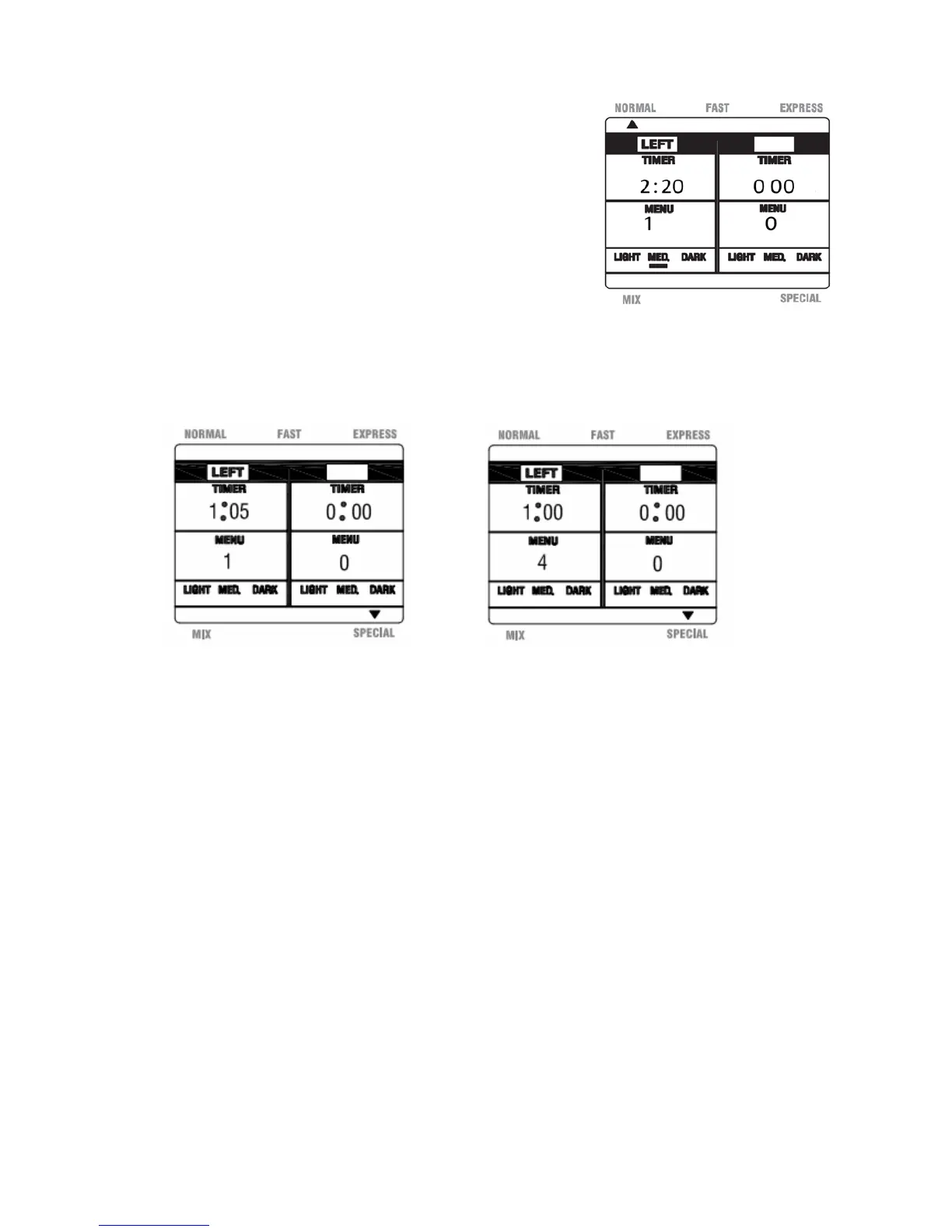
b. Press the ‘Mode Select’ button until the SPECIAL mode is displayed.This will be
indicatedbya smalltriangle onthe LCD.(SeeFigure26) Abeepwillsoundeachtime
thisbuttonispressed.
Fig.26Fig.27
c. Pressthe‘Menu’buttonuntilthedesiredmenuselectionisdisplayed,1Jam,2Quick,3
Cake or 4 Bake.The timer and menu information on the LCD will be update d
accordingly.(See Figure 27 for the Bake option, Menu 4)A beep will sound each
timethisbuttonispressed.
Notes:Ifusingbothpans,youmaychoosedifferentmenuselectionsforeachside.
Tocyclethroughtheoptionscontinuetopressthe‘Menu’buttonuntilyour
selectionsaredisplayed.
d.
Onceallselectionshavebeenmade,pressthe‘Start/Stop’buttonandholdfor2
secondstobeginthemixingprocess.Abeepwillsoundeachtimethisbuttonis
pressed.
Note: ThetimerwillcountdowneachpartoftheprocessasoutlinedintheProgram
SpecificationChartinthismanual.
Fig.25


 To Next Page