5
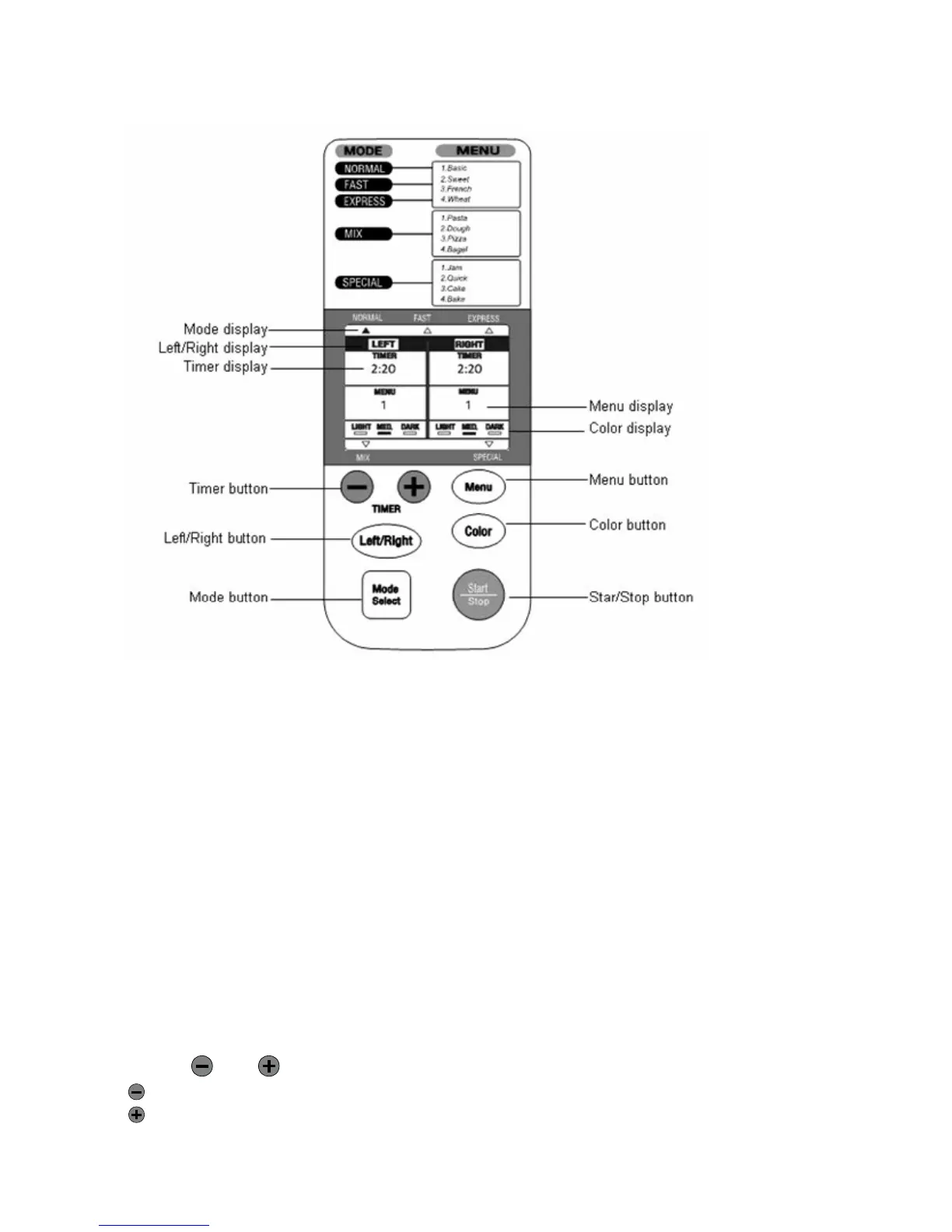
ButtonFunctionInformation
“ModeSelect”Button
Pressthe“ModeSelect”buttontochoosethemode.WhentheLeftandRightpansarebothinuse
atthesametime,thesamemodemustbeselected,butthecrustcolorselectionmaydiffer.
“Left/Right”Button
Thisbuttonallowsyoutoselectthepanyou
wouldliketoworkwith,leftorright.Ifyoudonot
selectaspecificpanside,thedefaultsettingisthatboththeleftandrightpanswillwork.
“Menu”Button
Pressthe“Menu”buttontochoosethemenuoption.Thechosenmenuoptionwillbeindicated
ontheLCDdisplay,I,2,3or4.
“TIMER”
and Buttons
Decreasesthetimein10minutesintervals.
Increasesthetimein10minutesintervals.
Fi


 To Next Page