4
CONTROLPANELSETTINGS
LCDDisplayInformation
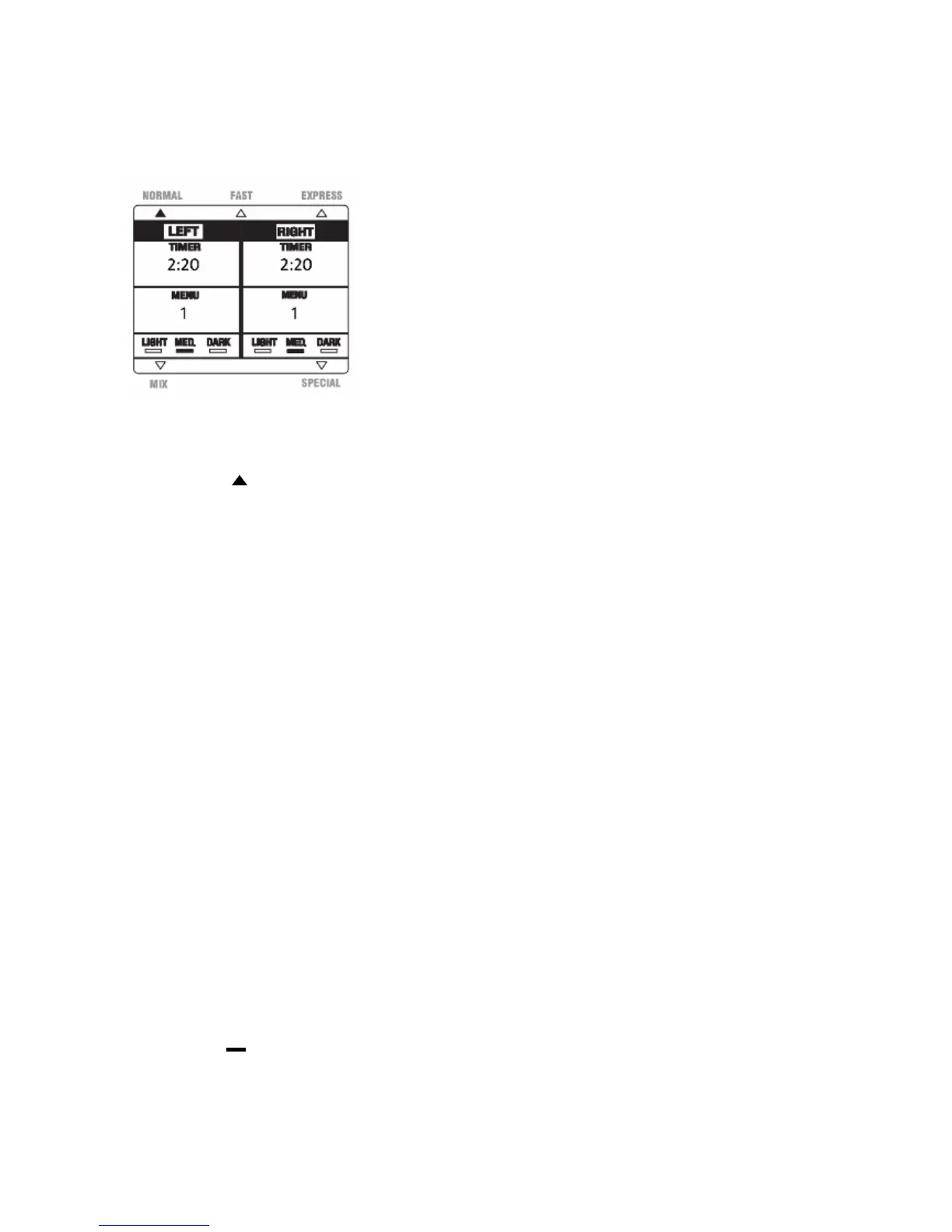
Fig.3
ModeDisplay“”
Thisunitoffersfiveworkingmodes:NORMAL、FAST、EXPRESS、MIXandSPECIAL.Thesmall
triangleintheLEDdisplaywillindicatethecurrentmodeselectedandilluminate.
“LEFT”and“RIGHT”Display
ThissectionoftheLCDwillindicatewhichside(s)oftheBreadMakeris(are)beingused.
“TIMER”Display
ThissectionoftheLCDindicatestheworkingtimeforthechosenmenuoption.
“MENU”Display
ThissectionoftheLCDindicatestheselectedmenuoptions,1,2,3or4undereachofthe5modes
available,aslistedbelow:
NORMAL、FAST、EXPRESSModes:
“1”—BASIC “3”—FRENCH
“2”—SWEET “4”—WHEAT
MIXMode:
“1”—PASTA “3”—PIZZA
“2”—DOUGH “4”—BAGEL
SPECIALMode:
“1”—JAM “3”—CAKE
“2”—QUICK “4”—BAKE
ColorDisplay““
Asmallbarunder“LIGHT ”,“MED.”or“DARK”intheLEDdisplaywillindicatethecolorselection.
Thecolorselectionoptionisavailableforthe
NORMALandFASTmodes.


 To Next Page