EasyManua.ls Logo

Cookshack FEC120 - User Manual

Cookshack FEC120
17 pages
Print Icon
To Next Page IconTo Next Page
Loading...
Cookshack, Inc.
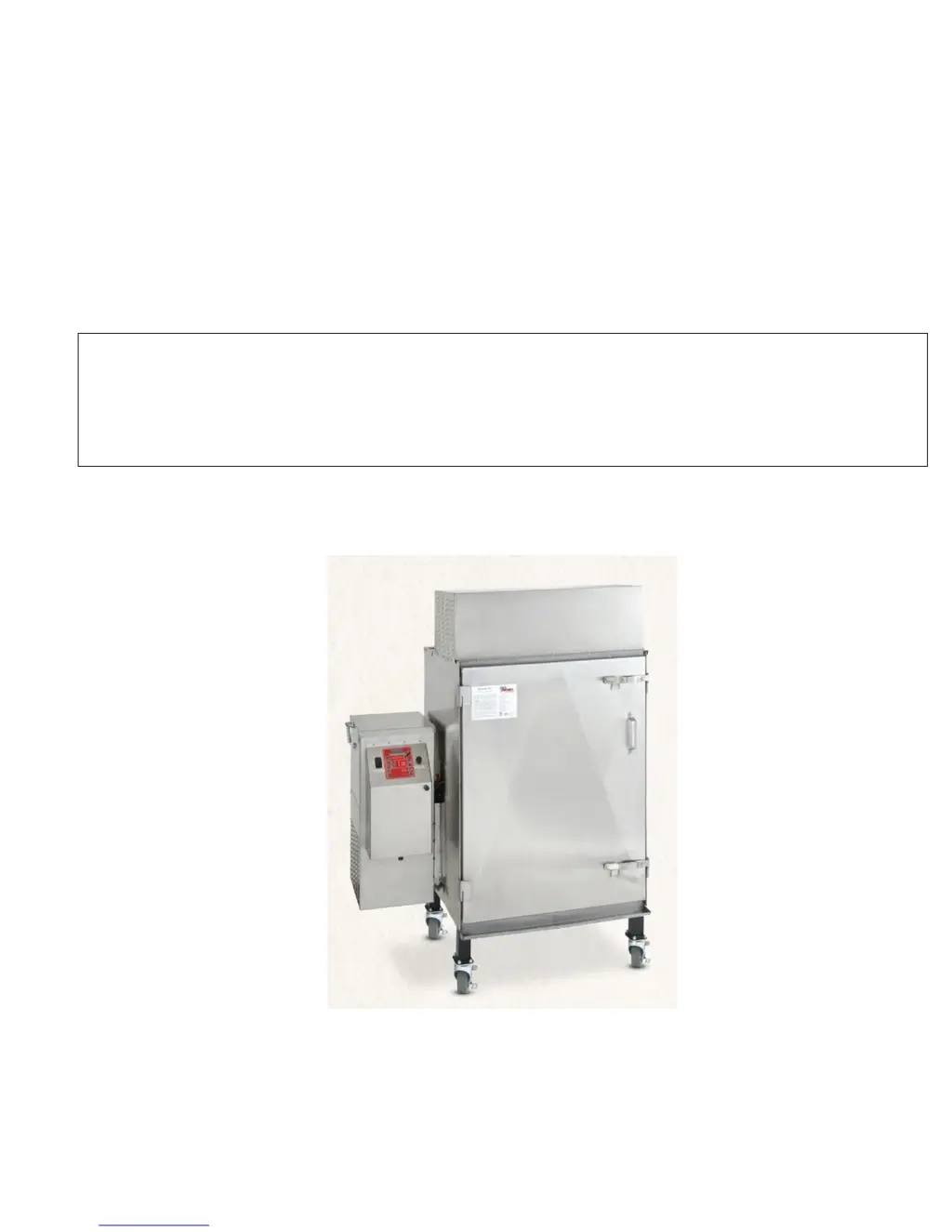
Model FEC120
Fast Eddy Oven
Operator’s Manual
Please read this entire manual installation and use of this pellet fired smoker oven. Failure to follow these
instructions could result in property damage, bodily injury or even death.
Contact local building or fire officials about restrictions and installation inspection requirements in your area.
SAVE THESE INSTRUCTIONS
Version 12.1
05/16/11

Questions and Answers

  • G
    gutierrezgeraldOct 31, 2025
    What to do if my Cookshack Oven control panel doesn't power up?
    • D
      daniel37Oct 31, 2025
      First, ensure the unit is plugged into a working 110VAC outlet, trying an alternate source if necessary. If that's not the issue, the high-temperature limit switch may have tripped; unplug the unit, remove the control panel access cover, and reset the limit switch by pushing the button. Also, check if the pellet hopper is empty, and if so, clean out any pellet dust and refill it with pellets. Another potential cause is the auger motor turning, but the auger not turning, in which case you should check the shear pin between the auger and motor and replace it if broken. Finally, ensure there's enough intake air; check the air intake fan, and if it's not turning, contact Customer Service. If the fan is turning, verify that the vent pipe is properly installed according to the installation instr...
  • M
    Matthew BerryNov 8, 2025
    Why does the fire go out during Cookshack Oven operation?
    • J
      Joseph WebbNov 8, 2025
      Several factors can cause the fire to go out during operation. Begin by checking if the unit is properly plugged into a working 110VAC outlet, and try an alternative outlet if needed. Another possible reason is a tripped high-temperature limit switch. To resolve this, unplug the unit, remove the control panel access cover, and reset the limit switch by pushing the button. Also, ensure that the pellet hopper isn't empty; inspect it, clean out any pellet dust, and fill it with pellets. If the auger motor is turning but the auger isn't, inspect the shear pin between them and replace it if broken. Insufficient intake air could also be the cause. Check the air intake fan; if it's not turning, call Customer Service. If the fan is working, verify the vent pipe is correctly installed according to ...
  • U
    uwigginsNov 15, 2025
    What to do if my Cookshack Oven fire does not light?
    • B
      Bryce BrewerNov 15, 2025
      Several factors can prevent the fire from lighting. One potential cause is excessive pellet feed. If the pellet auger is not cycling, contact Customer Service. Ensure the pellet hopper is not empty; inspect it, clean out any pellet dust, and fill it with pellets. Check that the switch on the pellet hopper is in contact with the lid; clear any pellets obstructing full closure or adjust the switch. A dirty combustion pot can also be the reason; open the firebox, clean the combustion pot, and try restarting the unit. If you suspect trouble with the igniter, open the pellet hopper lid (to stop pellet feed), push the start button, open the firebox, and feel over the pot. If it's hot, the igniter is okay; if it's cold, call Customer Service. Also, make sure there is enough intake air. Check the ...
  • T
    Tyler Williams Jr.Nov 22, 2025
    How to fix Cookshack Oven when the fire doesn't light?
    • B
      briana14Nov 22, 2025
      If the fire in your oven doesn't light, start by checking the pellet hopper to ensure it's filled with pellets and free of dust. If the hopper is full, make sure the switch on the pellet hopper lid is making contact; adjust it if necessary. A dirty combustion pot can also prevent ignition, so clean it out. If these steps don't work, the issue might be with the igniter. Open the pellet hopper lid (to stop pellet feed), push the start button, open the firebox, and feel over the pot. If it's hot, the igniter is okay; if it's cold, call Customer Service. Also, make sure there is enough intake air. Check the air intake fan; if it's not turning, call Customer Service. If the fan is turning, verify that the vent pipe is properly installed according to the installation instructions. If there's exc...

Summary

General Instructions

Installation Instructions

Exhaust System

Operating Instructions

Fuel Selection

100% hardwood food-grade pellets should be used. Pellets should be no larger than 1/4" in diameter and 3/4" long.

Control Panel Operation

Guide to using the Cookshack IQ4 control system for cooking and holding.

Loading Instructions

Shut Down Procedure

Safety Tips

Maintenance Procedures

Electrical Specifications

Troubleshooting Guide

Control Panel Power Issues

Addresses issues with the control panel not powering up, including outlet and limit switch checks.

Fire Goes Out During Operation

Troubleshooting for the fire going out, including pellet hopper status and auger motor issues.

Fire Does Not Light

Solutions for the fire failing to ignite, covering pellet feed, combustion pot, igniter, and intake air.

Limited Warranty Policy

National Service Policy

Return Merchandise Policy

Appendix C

Cookshack FEC120 Specifications

General IconGeneral
BrandCookshack
ModelFEC120
CategoryOven
LanguageEnglish

Related product manuals