CoolPlug CooLinkHUB HVAC Bridge Connecting CoolPlug LG (LG)
QIG Version 2.2 17 CoolPlug CooLinkHUB
10.
Connecting CoolPlug LG (LG)
1
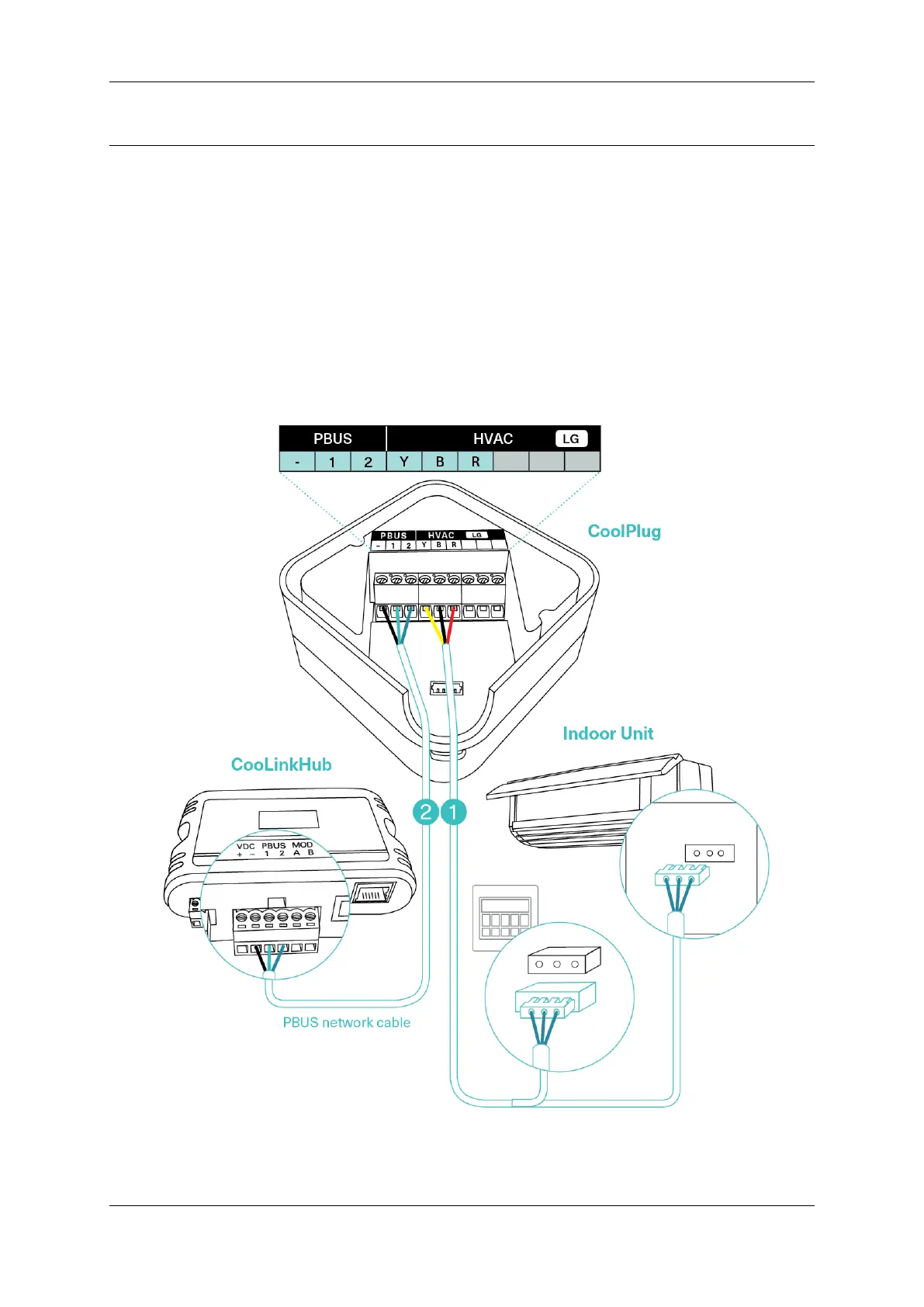
Connecting the CoolPlug to the Indoor unit
Connect the cable supplied with the CoolPlug, between the CoolPlug HVAC [Y], [B],
[R] terminals and the port on the indoor unit’s PCB. Consult the HVAC
manufacturer’s installation manual.
2
Connecting the CoolPlug to the CooLinkHUB
Connect the signal wires of the PBUS cable between CoolPlug terminals [-], [1] and [2],
and CooLinkHUB terminals [VDC-], [1] and [2], respectively.
3 Optional: Connect the Wired Remote Controller (W.R.C.) in parallel mode.


 To Next Page
 Loading...