Installation liuidl!
I
3C~i5i.a,Ej
'~€1
CNlS7rt!JRFV!
9
BY COOLER MASTER
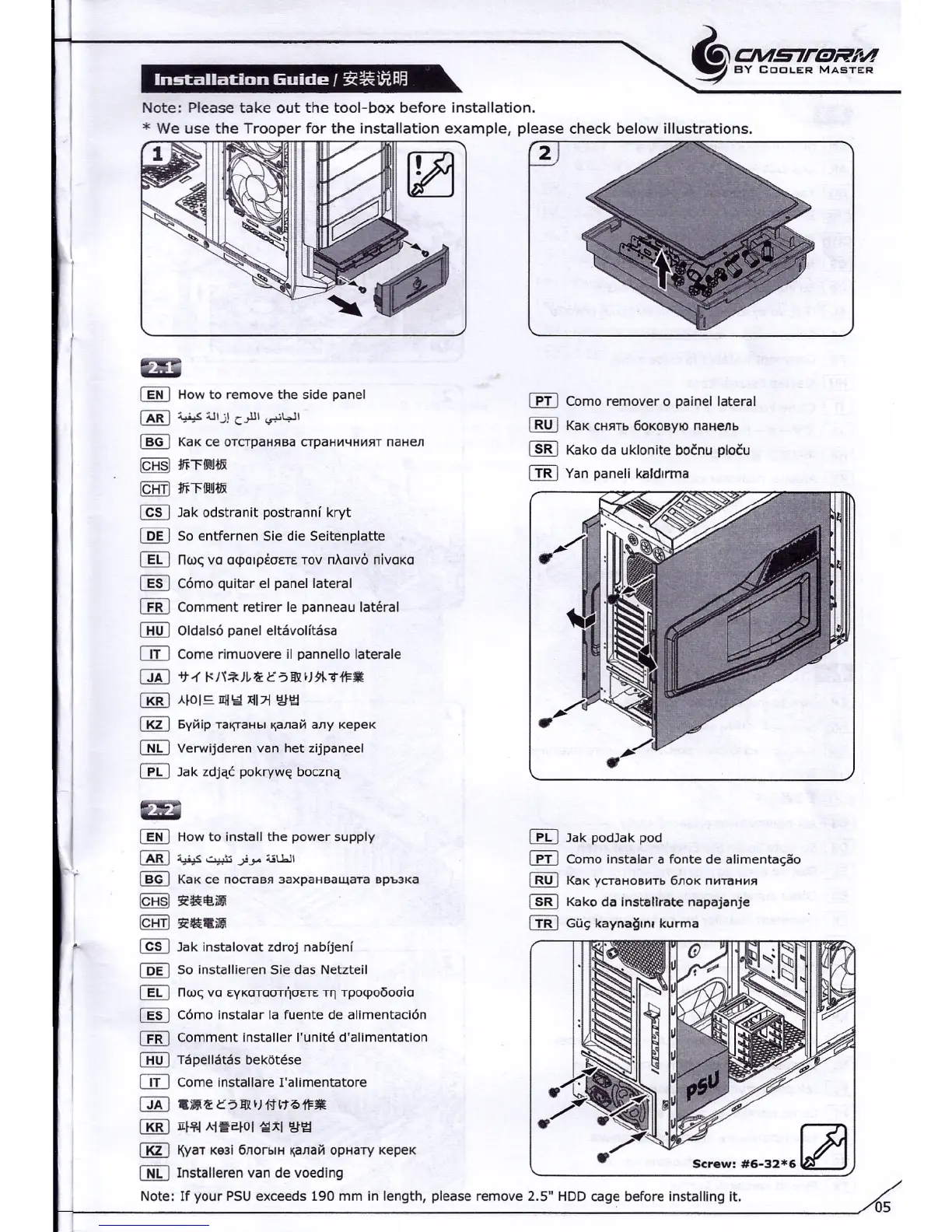
Note: Please take out the tool-box before installation,
(][I
How to remove the side panel
~ ~ Ulj! c.,lll<r'~1
(]§]
KaK ce oTCTpaHHBaCTpaH~4H~HTnaaen
[Qj§]
mnHIX
IQill
mHHIX
@§] Jak odstranit postranni kryt
[Q[) 50 entfernen 5ie die 5eitenplatte
(]g
nw~
va
mpOlpi:oETE TOV
nxorvo nlvoxo
[][J
Corno quitar el panel lateral
I£BJ
Comment retirer le panneau lateral
CHill
Oldalso
panel
eltavolltasa
OIJ
Come rimuovere il pannello laterale
QAJ
<74 t<H*JI,'.U:5m1fJ9I-"ti1=.
[RiD
AIDI=-
IIII\i1
xil71
~\1;j
[gJ
6V~ip Tal\TaHbl~alla~
any kepex
[]!J
Verwijderen van het zijpaneel
[EbJ
Jak zdjac pokrvwe boczna
(][I
How to install the power supply
~~~.)>,"'-iUJI
(]§]
KaK ce
nocraes aaxpauaaurara
Bpb3Ka
[Qj§]
3i'~EI!.ili1.
IQill
3i'~.imi
@§] Jak instalovat zdroj nabfjenf
[Q[) 50 installieren 5ie das Netzteil
(]g
nw~
vo
EVKOTOOT~OETE T~ rpotpoooolo
[][J
Corno instalar la fuente de ahrnentaclon
I£BJ
Comment installer l'unite d'alimentation
CHill
Tapellatas bekotese
OIJ
Come installare I'alimentatore
QAJ
.iIU,c5m1f)f'flt?>i1=ll
[RiD
1I1~4
Ai~~IDI {;;Ixl
~\1;j
[gJ
~yaT Ke3i 6llorblH ~alla~ opaarv xepex
[]!J
Installeren van de voeding
r.m
Como remover 0 painel lateral
IB[J
KaK CHHTb60KOBYlOnaHellb
~ Kako da uklonite bocnu plocu
ill]
Yan paneli katdrrma
[EbJ
Jak podJak pod
r.m
Como instalar a fonte de allmentacao
IB[J
KaK yCTaHoB~Tb6ll0K n~TaH~H
~ Kako da installrate napajanje
CIiD
Gu~
kaynagm. kurma
Screw:
#6-32*6121
Note: If your P5U exceeds
190
mm in length, please remove 2.5" HDD cage before installing it.
05


 To Next Page