,~€\
CNfS7reRfIA
9
BY COOLER MASTER
I]KJ
How to install the 5.25" and 3.5" devices
(AB]
l..;;"S ~
,,.,..,.'11 L>"~ 5.25"/3.5"
l........,
~ KaK ce ~Hcran~paT 5,25" ~ 3,5" vcrpoacrsaraa
~ 3i:l<i7tiIIHQ$.X~
I9:ill
3i:~7till!1Il1;m~ilI\lIl
cm
Jak nainstalovat zarfzeni 5.25" a 3.5"
[@
So installieren 5ie 5,25"- und 3,5"-Gerate
[ill
nw~
va €YKaTaOT~crET€TI~
xcprec
npocr8~K~~
[][) Corno instalar tarjetas adicionales
Im
Comment installer les cartes supplernentalres
I:Eill
5.25" es 3.5" eszk6z6k beszerelese
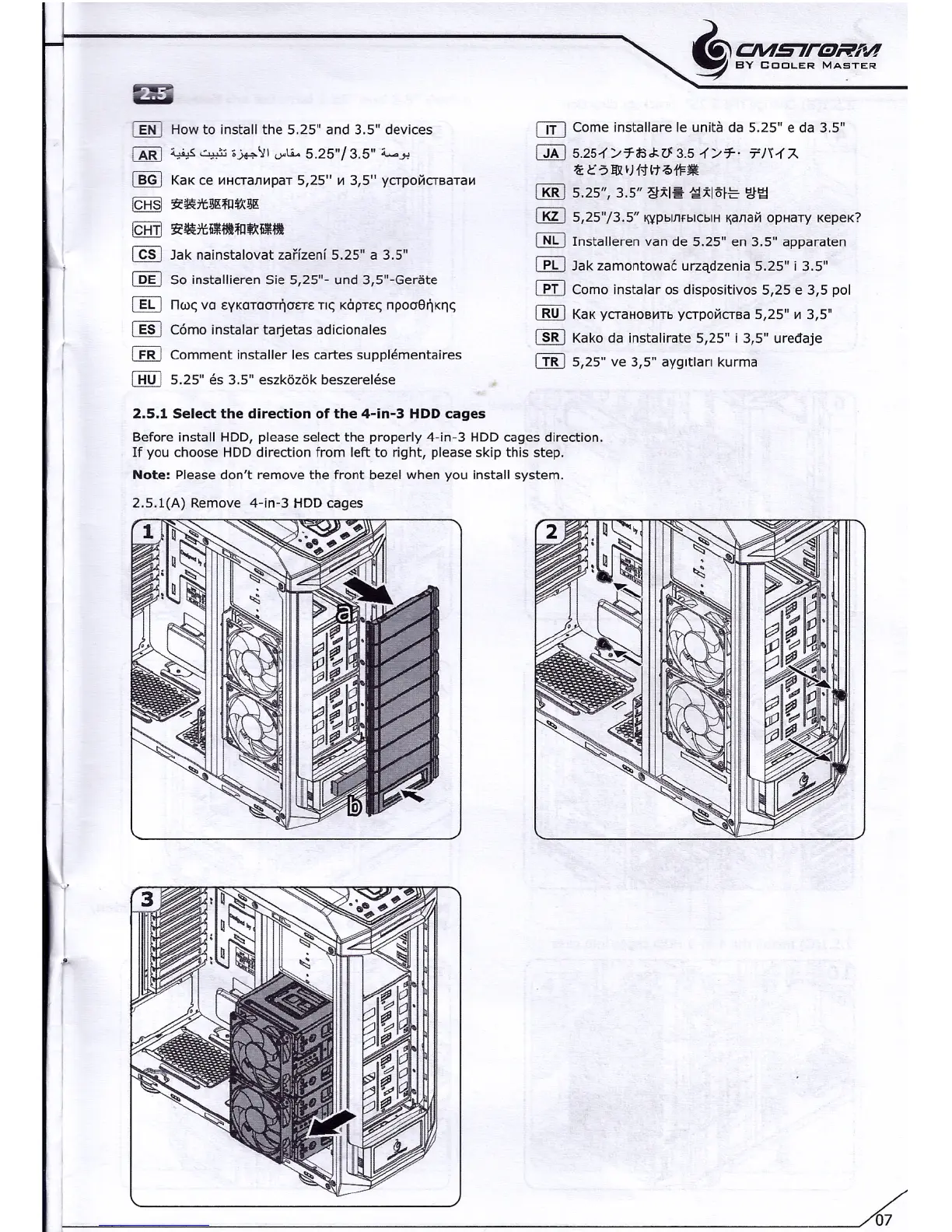
2.5.1 Select the direction of the 4-in-3 HDD
cages
Before install HDD, please select the properly 4-in-3 HDD cages direction.
If you choose HDD direction from left to right, please skip this step.
Note:
Please don't remove the front bezel when you install system.
CTIJ
Come installare le unlta da 5.25" e da 3.5"
cm
5.251'/7-ilSJ<V:3.51'/7-'
'TJH'A
-';:C?l&IHHt~t1=•.••
lliRl
5.25", 3.5" ~;tl~ 1;1;tI1'>fE
'2,t'gj
iMJ
5,25"/3.5" 'l¥pblnfblcblH~anaH
opaarv xepex?
[]g
Installeren van de 5.25" en 3.5" apparaten
~ Jak zarnontowec
urzadzenia
5.25" i 3.5"
~ Como instalar os dispositivos 5,25 e 3,5 pol
[][] KaKycrauoaars vcrpoacrsa 5,25" ~ 3,5"
cm
Kako da instalirate 5,25" i 3,5" uredaje
[I[J
5,25" ve 3,5"
ayqrtlar:
kurma
07


 To Next Page