4
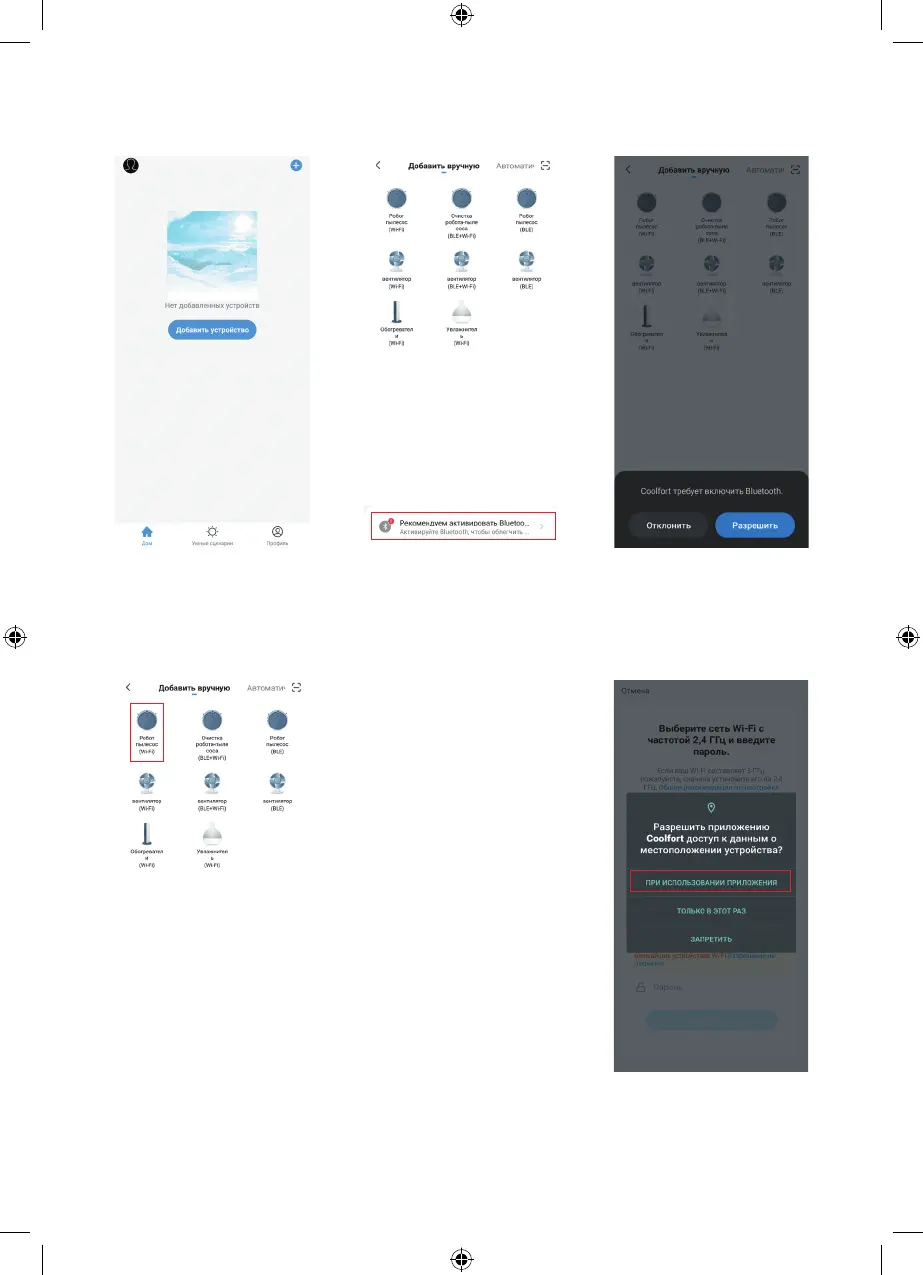
Step 12
Activate the Bluetooth function
on your device if it has not yet
been activated.
Click «Allow».
Step 10
Click «Add a device».
Step 11
Follow further recommendations.
Step 13
Click on the «Robot Vacuum
Cleaner (Wi-Fi)» icon.
Activating the Wi-Fi
connection mode
Make sure that your mobile
device has a stable Wi-Fi
connection.
If your router operates at 5 GHz,
then forcibly switch it to 2.4 GHz
before activating the connection
mode.
When activating the device for
the first time, the Bluetooth and
Geolocation services must be
enabled.
Note: During the first
activation the Wi-Fi settings
are transmitted through the
Bluetooth connection. After the
device has been successfully
activated the Bluetooth
connection is no longer
required.
Follow further instructions.
Step 14
Allow the «Coolfort» app
to access your device’s
location data.
Click on the highlighted icon.


 To Next Page