5
Step 16
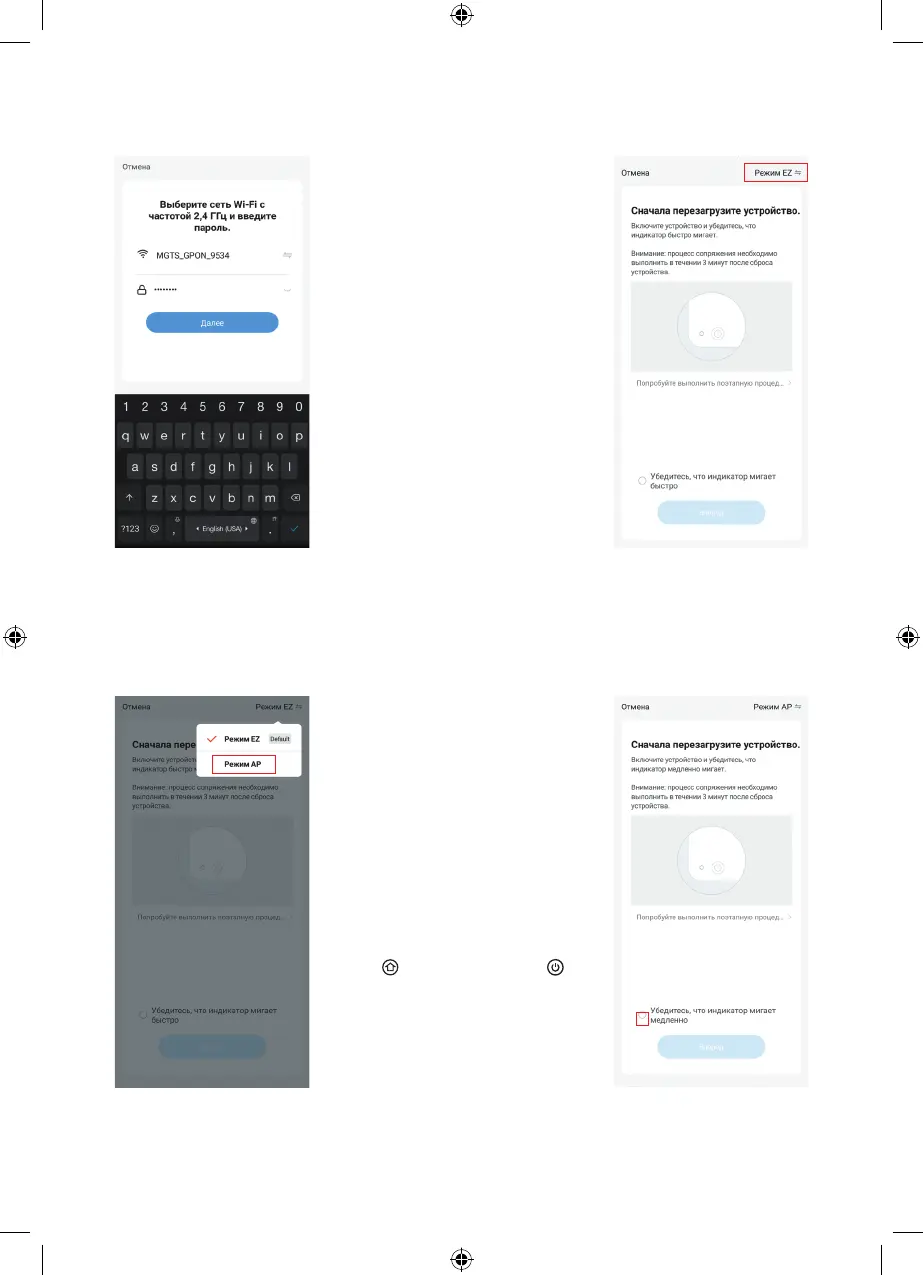
Select the desired connection
mode. Click on the «EZ Mode»
button and go to the next step.
Note:
– if your smartphone is already
connected to the Wi-Fi
network, the password can
be entered automatically.
Then click «Next». The
display of your mobile device
will show the next page.
– when connecting to the
application, if there is no
password for Wi-Fi (if the
network is easily available),
then there is no need to
enter any characters in
the Wi-Fi password bar,
just click «Next» and then
«Continue».
Connect your device to the Wi-Fi
hotspot of the vacuum cleaner.
To do this, follow the steps
below:
Step 15
Select the Wi-Fi network with a
frequency of 2.4 GHz and enter
the password to connect.
Click «Next».
Step 17
Select the Wi-Fi hotspot
connection mode
of the vacuum cleaner.
Turn the mode of connecting
the vacuum cleaner to a
Wi-Fi network on, to do this,
simultaneously press and hold
the « » button (1) and the « »
button (2) for 5 seconds. The
vacuum cleaner will go into the
Wi-Fi connection mode, and
the illumination of the buttons (1)
and (2) will start to flash slowly
in white. Go to Step 18.
Click «AP Mode», a confirmation
icon will appear on the display.
Go to the next step.
Step 18
Click the highlighted checkbox
to confirm the connection mode.


 To Next Page