OWNER’S MANUAL
|
5
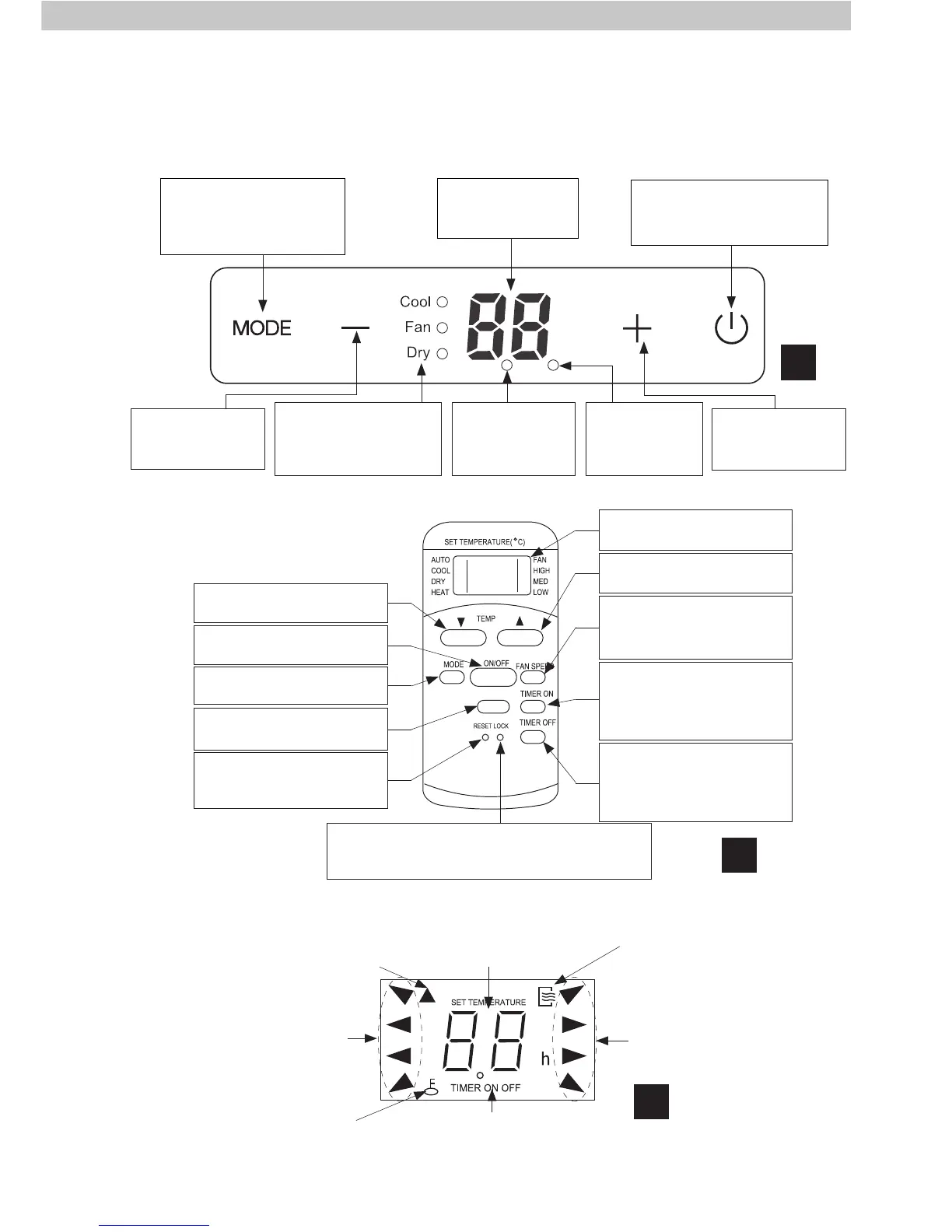
CONTROL AND DISPLAY
10
Display
See Figure 11.
MODE set button
See Figure 9.
UP button
See Figure 9.
POWER button
See Figure 9.
Air Conditioner Control Panel
Remote Controller
Remote Control Display
MODE select indicator
TIMER ON/OFF
indicators
FAN speed indicator
Temperature and timer
display
LOCK indicator
Indicates that the remote
lock is activated
ON / OFF indicator
Remote transmission
indicator
11
MODE select indicator
Displays the current
operating mode as Cool,
Fan or Dry.
POWER button
Press to turn the air
conditioner on and off.
LED Display
Set temperature and
time display.
MODE set button
Press to cycle between
Cool, Fan and Dry operating
modes.
DOWN button
Press to decrease
the set temperature.
UP button
Press to increase
the set temperature.
TIMER-ON button
Press to set the time when
before the air conditioner will
automatically startup.
LOCK button
Press to lock remote control from accepting any
button commands. Press again to unlock remote.
TIMER-OFF button
Press to set the time when
before the air conditioner will
automatically shutdown.
FAN speed select button
Press to cycle between Low
and High fan speeds.
9
POWER indicator
Becomes lit when
mains power is
connected.
TIMER indicator
Becomes lit when
an automatic
timer is set



 To Next Page